west flash on nrf9151dk failed

Hi,

I have an Ubuntu 22.04 LTS virtual machine where I installed the version v3.4.0 of all the needed
tools and libraries as explained in
nrfconnectdocs.nordicsemi.com/.../install_ncs.html.

I started a scratch project on a nRF9151DK board that I successfully built.
Specifically I executed the following steps:

  1. Cloning the version v3.4.0 of github.com/.../ncs-example-application project;
  2. Executed from the root project directory the command
    nrfutil sdk-manager toolchain launch --ncs-version=v3.4.0 --shell;
  3. In the root project directory created a directory scratch with the an empty
    prj,conf file and a CMakeLists.txt and a main.c file whose contents are

    - CMakeLists.txt
         cmake_minimum_required(VERSION 3.20.0)
         find_package(Zephyr REQUIRED HINTS $ENV{ZEPHYR_BASE})
         project(hello_work)
         target_sources(app PRIVATE src/main.c)Code


    - main.c
        #include <zephyr/kernel.h>
        #include  <zephyr/sys/printk.h>
    
        int main(void)
        {
            while (1) {
                printk("Hello World!\n);
                k_msleep(1000);
            }
            
            return 0;
        }


  4. In the root project directory successfully executed the command
    west build -b nrf9151dk_nrf9151 -p=always scratch
  5. I attaches the nrf9151dk board to an usb type-C port in the PC.
    Immediately a Windows Explorer popped up showing that an usb mass storage
    device was detected. In the VM in the root project directory I unsuccessfully
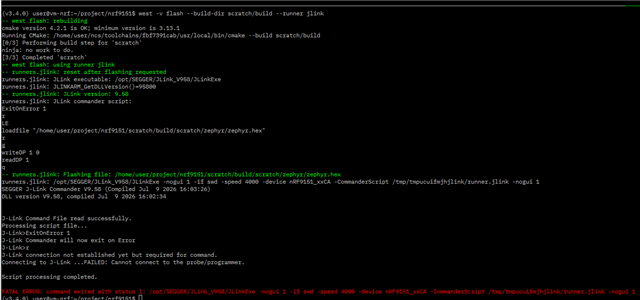
    executed west flash --build-dir scratch/build --runner jlink obtaining this
    error screen
When I set up the VM, I ran the sudo dpkg -i nrf-udev_1.0.1-all.deb to add udev rules
for the Ubuntu guest.

I also copied udev rules:
sudo cp ~/ncs/toolchains/fbf7391cab/usr/lib/udev/rules.d/60-dfu-util.rules /etc/udev/rules.d/
followed by sudo udevadm control --reload but with no success.
Also inspectioning those rules they seem suitable for STM32 microcontrollers/

Anyway, running nrfutil device list --traits seggerUsb inside the VM reported Supported devices found: 0

Are someone that already faced this kind of problems?
Thanks in advance for any help.

  • Hi Adam,

    the prodctod you refer was an typing error.. I meant to write productid.

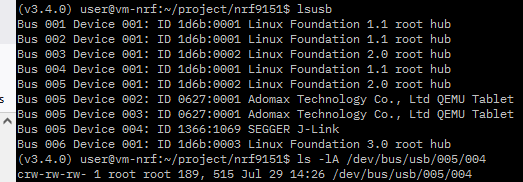
    Below I repost the output of lsusb:

    So it seems that the VM is able to grab the USB.
    Also here is the output from dmesg:

    It seems that the composite USB for the J-Link cannot be configurated.
    I googled around to see if there is information about that error, I found
    most configuration errors with value -71 but not -32.

    And here the output of usbipd list: 

    Ok, it seems that the USB device is neither shared nor attached..

  • Hi Adam,

    yes the /etc/udev/rules.d/99-jlink.rules is present.
    Here is the first part of that rules.

  • I believe BUSID 3-2 should be your board. Could you try running the following commands for me and see if your VM is able to detect the device now?

    usbipd bind --busid=3-2
    usbip attach --remote= (windows-host-ip) --busid=3-2 

  • I run in Powershell Admin shell the first command in the form:

    usbipd bind -b 3-2

    It return with no errors.

    I run Powershell Admin shell the second command in the form:

    usbipd -o win_host_ip -b 3-2

    This one complains about a missing --wsl option, but I don run my Ubuntu OS from inside
    wsl..

    Anyway, now the command:

    usbipd list

    now reports that the USB device is shared but not yet attached.

    Also tried to install in the Ubuntu guest the suggested qemu-guest-tool but it complains
    about a missing dependency when I run

    sudo systemctl start qemu-guest-agent

  • To launch in Windows10 via QEMU the Ubuntu guest VM I use a powershell script or
    a bash script where there are all the options that I have to pass to qemu-system-x86_64
    (the bash script is running in a bash enviroment present in a MSYS2 installation).

    Both of them show the same problem.


    Here the full  qemu-system-x86_64 options : 

    -name "XUBUNTU Linux 24.04.4 VM"
    -M q35 -accel whpx,kernel-irqchip=off
    -cpu qemu64 -smp 8 -m 4096 -rtc base=utc
    -device virtio-net-pci,netdev=net0 
    -boot order=c
    -drive file="xubuntu-24.04.4-minimal-amd64.qcow2",if=virtio,format=qcow2,media=disk,index=2
    -netdev tap,id=net0,ifname=tap0,script=no,downscript=no
    -usb -device qemu-xhci,id=xhci
    -device usb-host,bus=xhci.0,vendorid=0x1366,productid=0x1069
    -device usb-kbd -device usb-mouse 
    -device virtio-vga-gl,xres=1920,yres=1200 -display sdl,gl=on,full-screen=on

Related