Hi,
I have an Ubuntu 22.04 LTS virtual machine where I installed the version v3.4.0 of all the needed
tools and libraries as explained in
nrfconnectdocs.nordicsemi.com/.../install_ncs.html.
I started a scratch project on a nRF9151DK board that I successfully built.
Specifically I executed the following steps:
- Cloning the version v3.4.0 of github.com/.../ncs-example-application project;
- Executed from the root project directory the command
nrfutil sdk-manager toolchain launch --ncs-version=v3.4.0 --shell; - In the root project directory created a directory scratch with the an empty
prj,conf file and a CMakeLists.txt and a main.c file whose contents are
- CMakeLists.txtcmake_minimum_required(VERSION 3.20.0) find_package(Zephyr REQUIRED HINTS $ENV{ZEPHYR_BASE}) project(hello_work) target_sources(app PRIVATE src/main.c)Code
- main.c#include <zephyr/kernel.h> #include <zephyr/sys/printk.h> int main(void) { while (1) { printk("Hello World!\n); k_msleep(1000); } return 0; } - In the root project directory successfully executed the command
west build -b nrf9151dk_nrf9151 -p=always scratch - I attaches the nrf9151dk board to an usb type-C port in the PC.
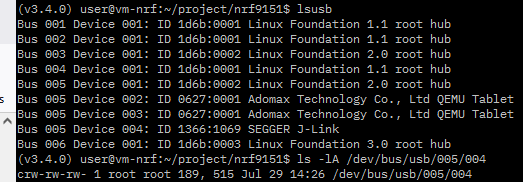
Immediately a Windows Explorer popped up showing that an usb mass storage
device was detected. In the VM in the root project directory I unsuccessfully
executed west flash --build-dir scratch/build --runner jlink obtaining this
error screen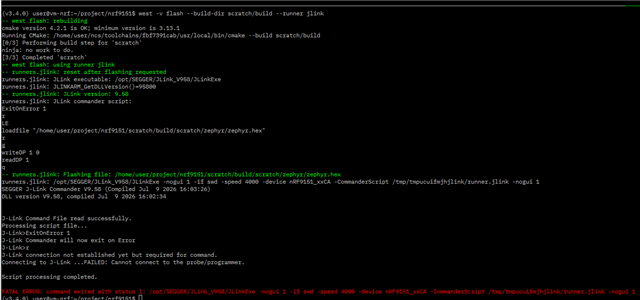
When I set up the VM, I ran the sudo dpkg -i nrf-udev_1.0.1-all.deb to add udev rules
for the Ubuntu guest.
I also copied udev rules:
sudo cp ~/ncs/toolchains/fbf7391cab/usr/lib/udev/rules.d/60-dfu-util.rules /etc/udev/rules.d/
followed by sudo udevadm control --reload but with no success.
Also inspectioning those rules they seem suitable for STM32 microcontrollers/
Anyway, running nrfutil device list --traits seggerUsb inside the VM reported Supported devices found: 0
Are someone that already faced this kind of problems?
Thanks in advance for any help.