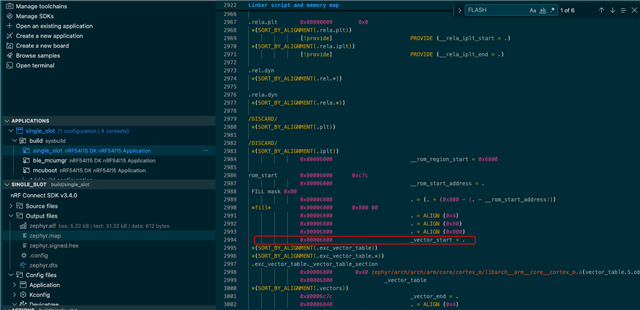
I am using ncs v3.3.0, and since Partition Manager will be deprecated, I followed the migration guide to use DTS board configuration. I am using mcuboot in firmware loader mode, so the overlay generation script produced overlapping partitions:
	slot1_partition: partition@133000 {
		label = "image-1";
		reg = <0x133000 0x40000>;
	};

	firmware_loader: partition@133800 {
		label = "firmware-loader";
		reg = <0x133800 0x3f800>;
	};
When removing the firmware loader partition, the application does not boot, and from comparing .elf files, DTS is starting the application at 0x6000 instead of 0x6800.
I am not sure how to move partition maanager to DTS configuraation, here is the full DTS node:
&cpuapp_rram {
    reg = <0x0 DT_SIZE_K(1524)>;

    /delete-node/ partitions;

    partitions {
        compatible = "fixed-partitions";
        #address-cells = <1>;
        #size-cells = <1>;

        boot_partition: partition@0 {
            label = "mcuboot";
            reg = <0x0 DT_SIZE_K(24)>;
        };

        slot0_partition: partition@6000 {
            label = "image-0";
            reg = <0x6000 DT_SIZE_K(1204)>;
        };

        slot1_partition: partition@133000 {
            label = "image-1";
            reg = <0x133000 DT_SIZE_K(256)>;
        };

        coredump_partition: partition@173000 {
            label = "coredump_partition";
            reg = <0x173000 DT_SIZE_K(4)>;
        };

        storage_partition: partition@174000 {
            label = "storage";
            reg = <0x174000 DT_SIZE_K(36)>;
        };
    };
};