How to Register a Device on nRF Cloud

Dear nordic team,

I’d like to ask two main questions about nRFCloud.

1,Please tell me how to register devices on nRFCloud.

First, I’d like to register the following two devices:
・nRF54L-DK
・Thingy 91X

nRF54L-DK

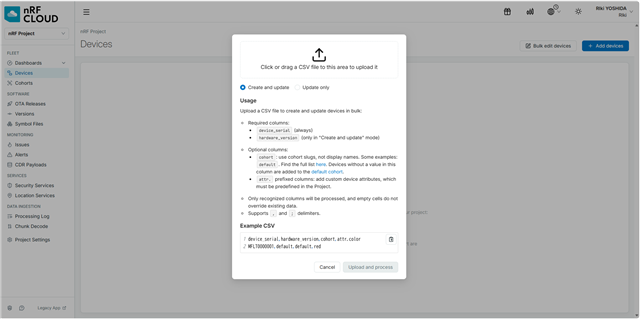
Is the procedure shown in the screenshot below correct?
Thingy 91X

→I entered “AT%ATTESTTOKEN” in the nRF Connect for Desktop serial terminal. However, I received an error message stating that “command not found”.

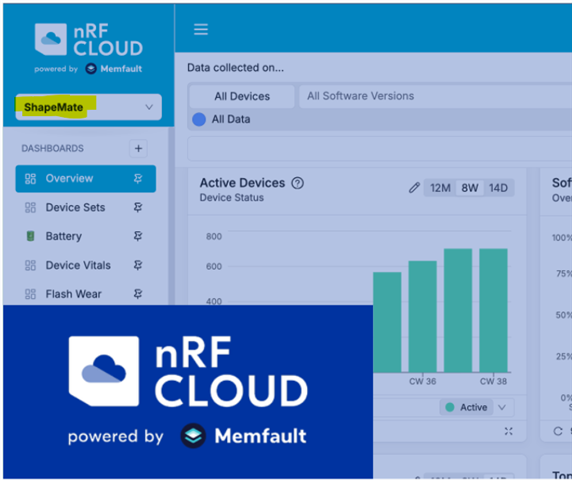
2,Also, what is “Shape Mate,” which is mentioned in the nRFCloud documentation?
Best Regards,

Riki Yoshida

  • Hello Riki Yoshida,

    Is the procedure shown in the screenshot below correct?

    For the nRF54L-dk, I think the CSV method you have mentioned is correct. I will confirm about this internally with our cloud team and see if there is a documentation for this process.  

    →I entered “AT%ATTESTTOKEN” in the nRF Connect for Desktop serial terminal. However, I received an error message stating that “command not found”.

    Can you please confirm whether your device was programmed with the modem_shell sample? Have you tried running: at AT%ATTESTTOKEN
    You have to make sure to have a firmware which has AT commands enabled. So, when you send "AT", the modem should respond with "OK". 
    If this is not the case, then you might not have the AT commands enabled on the serial port. You have to then flash for example the "Serial Modem application" or a different application supporting it. 

    2,Also, what is “Shape Mate,” which is mentioned in the nRFCloud documentation?

    If this image was given in the documentation, then I think it might be a name given to an example project they have used in the documentation. But just to confirm, which documentation was this given in?

    Please let us know if you have any further questions. 

    Best Regards,

    Samruddhi

  • Hello,

    Just an update on your first question from our team. For nRF54L, you can take a look at the following guide. The nRF54L device doesn't have to be pre-registered:
    Nordic Bluetooth Quickstart (nRF52/nRF53/nRF54 Series) | Memfault Docs

    An alternative is to flash a pre-built image:
    Release v1.0.1 · nrfconnect/quickstart-bluetooth · GitHub

    The project key can be configured before running the mobile app. See the following:
    GitHub - nrfconnect/quickstart-bluetooth: nRF Cloud Bluetooth Quick Start Sample · GitHub

    You can also take a look at:
    nRF Toolbox - nordicsemi.com
    nRF Toolbox is the mobile app which can be used to upload telemetry data to nRF Cloud. 

    Please let us know if you have any further questions.

    Best Regards,

    Samruddhi 

Related