nrf52832-DK sniffer issue

Dear Nordik, 

Made nrf52832-DK as a sniffer, using nrf sniffer for bluetooth le 4.1.1 and wireshark version 4.0.7. Now iwant to sniff NRF54L15 BLE device/Peripheral which is connected to central  using nrf connect app..

Now issues iare as
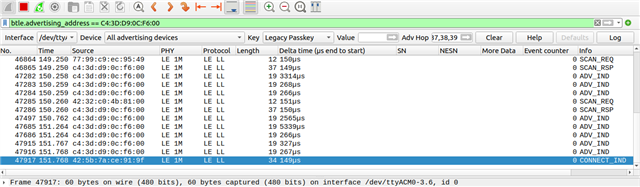
1. It detects advertisments successfully but sometimes it doesnot gives log entry of CONNECT_IND and remians in ADV_IND,SCAN_REQ and SCAN_RESP,despite device is connected with central

2. If it detects CONNECT_IND thenafter it doesnot log any communication event happening between device and central.

I want to sniff data packet transmitted over GATT profile and in another application packet transmitted using BTL2CAP. For above issue, my device is transmitting "Hello" as a data every secondand it works fine. In sthis simple app thereis no bonding/pairing mechanism used.

Even if any method to make NRF54L15 as a sniffer, please share the process of it.

Regards
Khodidas Domadiya

Parents
  • Hi Khodidas,

    In order to follow a connection you need to select the advertising device in the dropdown in Wirehark in the device list before the CONNECT_IND is sent. Do you do that? Note that even then the sniffer may loose the packet, and then you need to try again (disconnect and establish a new connection and see if the sniffer picks it up).

    If that is not the probelm, we need to look deeper. I have questions about the sofware versions. Are you using 4.1.1 of the sniffer PC side software, or is that just the version of he hex file? The PC side software has moved to nrfutil and is now installed via nrfutil and there has been several important undates there. See documentation. I would also suggest updating Wireshark as that is quite old. The last nrfutil based version is 0.21.0 (see changelog).

    If you stil see this issue with the latest versions, can you share a bit more detail about the configuration (type of advertisment, PHY used) as well as a description of how you test and logs?

    There is currently no support for using nRF54L15 as a sniffer, but that is a request that we are looking into. I cannot promise or povide a timeline for this, though.

    Regards,

    Einar

  • Hi, Einar

    I am using sniffer_nrf52dk_nrf52832_4.1.1.hex, which is proigrrammed if nrf52832-DK.
    Also tried with wireshark version 4.6.8. Facing same issues.


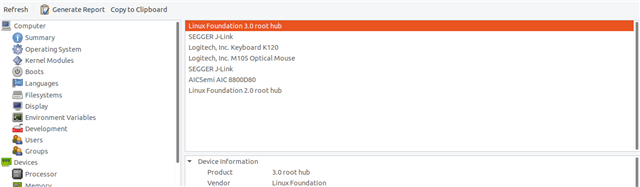
  • I see. I am not able to explain this, but the nRF52832 having no USB is a bit limited as it depends on UART and USB-CDC. In order to limit the potential proglems introduced by that, I suggest that you 1) Disable the mass storage device on the debugger (using the MSDDisable command as described here). It is also worth making sure that the J-Link firmware on the DK is up to date, which you can do with J-Link Configurator.

  • Hi,

    I am sorry I did not spot this before in your previous screenshot, but you are filtering on advertisign address using normal wirehark filtering. So you will not see this in a connection. You need to select the device from the Device list dropdown where you currently have selevted "All advertising devices". That is a requierment in order to follow and sniff a connection.

  • Hi,

    Thanks for Highlighting.

    It worked, It was observed that after changing firmware of segger Jlink. it helped.

    This helps to sniff sniff data packet transmitted over GATT profile. Now we need to sniff audio data transmitted on L2CAP. Also want to measure time between two transmission.

    Regards
    Khodidas

  • Hi Khodidas,

    I am glad to hear that workd. L2CAP is fine, but as you mention audio plese note that ISO is not supported, and conversly not LE Audio. If you need to sniff that you would need another sniffer such as for instance Ellisys.

    Regarding timing, note that you can use the delta time, but the absolute timestamp in the time field is not accurate as that is set on the PC side and affectec by the UART/USB transport between the sniffer HW and PC.

Reply
  • Hi Khodidas,

    I am glad to hear that workd. L2CAP is fine, but as you mention audio plese note that ISO is not supported, and conversly not LE Audio. If you need to sniff that you would need another sniffer such as for instance Ellisys.

    Regarding timing, note that you can use the delta time, but the absolute timestamp in the time field is not accurate as that is set on the PC side and affectec by the UART/USB transport between the sniffer HW and PC.

Children
Related