nRF9151DK Cellular IoT Fundamentals Lesson 7 Exercise 1 modem trace capture dropped traces

I'm working through the Cellular IoT Fundamentals course. In lesson 7 exercise 1 a modem trace must be captured. I'm following the instructions but the modem trace capture is mostly empty, it doesn't look anythink like the included "cellfund_less7_exer2.pcapng".

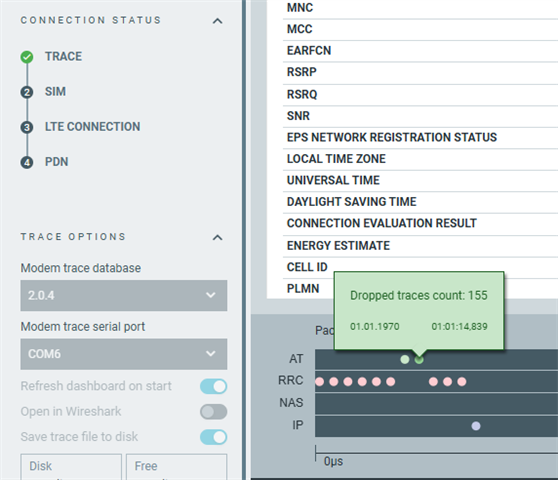
There are "dropped traces count" messages in the output, so I assume most of it was dropped. Is there a known limit on the nRF9151DK? Should the USB vitual com ports be able to handle the 1M baud throughput?

I did the same test with the Modem Shell application included with the nRF Connect for Desktop Quick Start. The result is the same, the capture is mostly empty and dropped traces.

The exercise says to use "Reset device on start" but there is no such option in the Cellular Monitor. Instead I start the capture then reset the board using several methods but with the same result: reset button on the nRF9151DK, reset through Connect Devices in VsCode, flashing again.

Versions used:

  • Windows 11 24H2
  • nRF Connect SDK 3.4.1
  • Modem version 2.0.4
  • Segger J-Link 9.82
    • The virtual com ports are using JLink CDC driver version 1.34.0.44950
  • Cellular Monitor 2.8.0

Build configuration for l7_e1:

Cellular Monitor dropped traces:
Wireshark

Trace file

trace-2026-10-13T08-38-53.537Z.mtrace

  • Hi, 

    I am checking with the team and will update the case once I have more information. 

    Regards,
    Amanda H.

  • Hi, 

    Can you share the Cellular Monitor application log? 

    The exercise says to use "Reset device on start" but there is no such option in the Cellular Monitor. Instead I start the capture then reset the board using several methods but with the same result: reset button on the nRF9151DK, reset through Connect Devices in VsCode, flashing again.

    Could you program DK in the Quick Start app, then open Cellular Monitor app and start tracing? No extra step by the user is required (reset is done under the hood when needed in Quick Start). If you program in Quick Start -> then reset with the button -> then goes into Cellular Monitor app that is OK, but not required. Resetting when tracing is not expected.

    -Amanda H.

  • I did a test with the Asset Tracker example from the Quick Start app, starting the Cellular Monitor after programming or a reset. I see more AT commands in the trace, and a few LTE-RRC events, but I think I'm still missing the attach to the network. I don't see the NAS-EPS events.

    If the Cellular Monitor is started after the device then wouldn't it miss the start of the modem trace? Maybe the DK USB interface isn't really suited for this, as the PC has to reconnect to the USB device after reset. Is a direct UART connection from the PC to the nRF9151 required to capture everything from the start?

    I think the lack of AT commands in the L7 Exercise 1 is because the AT host library is not included in that exercise. If I add it I also see AT commands with that exercise. I guess it's the Cellular Monitor executing these commands.

    I'm still not sure what to expect to see in the modem trace, but I'm not seeing what the exercise suggests.

    l7_e1_trace-2026-10-19T06-44-35.078Z.mtrace

    2026-10-19T06:44:30.690Z INFO Initialising the bundled nrfutil device
    2026-10-19T06:44:30.729Z DEBUG Application data folder: C:\Users\theo\AppData\Roaming\nrfconnect\pc-nrfconnect-cellularmonitor
    2026-10-19T06:44:30.750Z DEBUG App pc-nrfconnect-cellularmonitor v2.8.0 (official)
    2026-10-19T06:44:30.750Z DEBUG App path: C:\Users\theo\.nrfconnect-apps\node_modules\pc-nrfconnect-cellularmonitor
    2026-10-19T06:44:30.750Z DEBUG nRFConnect 5.4.0, required by the app is (>=5.2.0)
    2026-10-19T06:44:30.750Z DEBUG nRFConnect path: C:\Users\theo\AppData\Local\Programs\nrfconnect\resources\app.asar
    2026-10-19T06:44:30.750Z DEBUG HomeDir: C:\Users\theo
    2026-10-19T06:44:30.750Z DEBUG TmpDir: C:\Users\theo\AppData\Local\Temp
    2026-10-19T06:44:30.905Z INFO Using the bundled core version for nrfutil device: 8.1.1
    2026-10-19T06:44:30.945Z INFO Using nrfutil device version: 2.19.2
    2026-10-19T06:44:30.945Z INFO Using nrf-device-lib version: 0.22.20
    2026-10-19T06:44:30.945Z INFO Using nrf-probe version: 0.58.3
    2026-10-19T06:44:30.946Z INFO Using SEGGER J-Link version: JLink_V9.82
    2026-10-19T06:44:30.946Z INFO Your version of SEGGER J-Link (9.82) is newer than the one this app was tested with (9.24a). The tested version is not required, and your J-Link version will most likely work fine. If you get issues related to J-Link with your devices, use the tested version.
    2026-10-19T06:44:31.068Z INFO Getting serial port options from the persistent store for 001051226273.pc-nrfconnect-cellularmonitor
    2026-10-19T06:44:31.069Z INFO Device connected with the serial number null
    2026-10-19T06:44:31.069Z INFO Device connected with the serial number 001051226273
    2026-10-19T06:44:32.199Z INFO Selecting device with the serial number 001051226273
    2026-10-19T06:44:32.363Z DEBUG Trace database already downloaded: mfw_nrf9151-ntn_1.0.0_trace-db.json
    2026-10-19T06:44:32.363Z DEBUG Trace database already downloaded: mfw_nrf9151-ntn_1.0.0-FOTA-TEST_trace-db.json
    2026-10-19T06:44:32.364Z DEBUG Trace database already downloaded: mfw_nrf9151-ntn_1.0.1_trace-db.json
    2026-10-19T06:44:32.364Z DEBUG Trace database already downloaded: mfw_nrf9151-ntn_1.0.1-FOTA-TEST_trace-db.json
    2026-10-19T06:44:32.364Z DEBUG Trace database already downloaded: mfw_nrf91x1_2.0.0_trace-db.json
    2026-10-19T06:44:32.364Z DEBUG Trace database already downloaded: mfw_nrf91x1_2.0.0-FOTA-TEST_trace-db.json
    2026-10-19T06:44:32.364Z DEBUG Trace database already downloaded: mfw_nrf91x1_2.0.0_official_trace-db.json
    2026-10-19T06:44:32.364Z DEBUG Trace database already downloaded: mfw_nrf91x1_2.0.1_trace-db.json
    2026-10-19T06:44:32.364Z DEBUG Trace database already downloaded: mfw_nrf91x1_2.0.1-FOTA-TEST_trace-db.json
    2026-10-19T06:44:32.364Z DEBUG Trace database already downloaded: mfw_nrf91x1_2.0.2_trace-db.json
    2026-10-19T06:44:32.364Z DEBUG Trace database already downloaded: mfw_nrf91x1_2.0.2-FOTA-TEST_trace-db.json
    2026-10-19T06:44:32.364Z DEBUG Trace database already downloaded: mfw_nrf91x1_2.0.3_trace-db.json
    2026-10-19T06:44:32.364Z DEBUG Trace database already downloaded: mfw_nrf91x1_2.0.3-FOTA-TEST_trace-db.json
    2026-10-19T06:44:32.365Z DEBUG Trace database already downloaded: mfw_nrf91x1_2.0.4_trace-db.json
    2026-10-19T06:44:32.365Z DEBUG Trace database already downloaded: mfw_nrf91x1_2.0.4-FOTA-TEST_trace-db.json
    2026-10-19T06:44:32.614Z INFO Selected device with the serial number 001051226273
    2026-10-19T06:44:32.618Z DEBUG Terminal serial port: Will attempt to auto-connect to serial port COM9
    2026-10-19T06:44:32.625Z INFO Opened port with options: {"path":"COM9","baudRate":115200}
    2026-10-19T06:44:34.631Z DEBUG Terminal serial port: Could not detect AT Host library
    2026-10-19T06:44:35.082Z INFO Started tracefile
    2026-10-19T06:44:35.082Z INFO Refreshing dashboard in 5 seconds
    2026-10-19T06:46:30.732Z INFO Finished tracefile
    
    asset_tracker_trace-2026-10-19T06-49-18.415Z.mtrace
    2026-10-19T06:49:13.919Z INFO Initialising the bundled nrfutil device
    2026-10-19T06:49:13.958Z DEBUG Application data folder: C:\Users\theo\AppData\Roaming\nrfconnect\pc-nrfconnect-cellularmonitor
    2026-10-19T06:49:13.976Z DEBUG App pc-nrfconnect-cellularmonitor v2.8.0 (official)
    2026-10-19T06:49:13.976Z DEBUG App path: C:\Users\theo\.nrfconnect-apps\node_modules\pc-nrfconnect-cellularmonitor
    2026-10-19T06:49:13.977Z DEBUG nRFConnect 5.4.0, required by the app is (>=5.2.0)
    2026-10-19T06:49:13.977Z DEBUG nRFConnect path: C:\Users\theo\AppData\Local\Programs\nrfconnect\resources\app.asar
    2026-10-19T06:49:13.977Z DEBUG HomeDir: C:\Users\theo
    2026-10-19T06:49:13.977Z DEBUG TmpDir: C:\Users\theo\AppData\Local\Temp
    2026-10-19T06:49:14.133Z INFO Using the bundled core version for nrfutil device: 8.1.1
    2026-10-19T06:49:14.167Z INFO Using nrfutil device version: 2.19.2
    2026-10-19T06:49:14.167Z INFO Using nrf-device-lib version: 0.22.20
    2026-10-19T06:49:14.167Z INFO Using nrf-probe version: 0.58.3
    2026-10-19T06:49:14.167Z INFO Using SEGGER J-Link version: JLink_V9.82
    2026-10-19T06:49:14.168Z INFO Your version of SEGGER J-Link (9.82) is newer than the one this app was tested with (9.24a). The tested version is not required, and your J-Link version will most likely work fine. If you get issues related to J-Link with your devices, use the tested version.
    2026-10-19T06:49:14.289Z INFO Getting serial port options from the persistent store for 001051226273.pc-nrfconnect-cellularmonitor
    2026-10-19T06:49:14.290Z INFO Device connected with the serial number null
    2026-10-19T06:49:14.290Z INFO Device connected with the serial number 001051226273
    2026-10-19T06:49:15.550Z INFO Selecting device with the serial number 001051226273
    2026-10-19T06:49:15.688Z DEBUG Trace database already downloaded: mfw_nrf9151-ntn_1.0.0_trace-db.json
    2026-10-19T06:49:15.688Z DEBUG Trace database already downloaded: mfw_nrf9151-ntn_1.0.0-FOTA-TEST_trace-db.json
    2026-10-19T06:49:15.689Z DEBUG Trace database already downloaded: mfw_nrf9151-ntn_1.0.1_trace-db.json
    2026-10-19T06:49:15.689Z DEBUG Trace database already downloaded: mfw_nrf9151-ntn_1.0.1-FOTA-TEST_trace-db.json
    2026-10-19T06:49:15.689Z DEBUG Trace database already downloaded: mfw_nrf91x1_2.0.0_trace-db.json
    2026-10-19T06:49:15.689Z DEBUG Trace database already downloaded: mfw_nrf91x1_2.0.0-FOTA-TEST_trace-db.json
    2026-10-19T06:49:15.689Z DEBUG Trace database already downloaded: mfw_nrf91x1_2.0.0_official_trace-db.json
    2026-10-19T06:49:15.689Z DEBUG Trace database already downloaded: mfw_nrf91x1_2.0.1_trace-db.json
    2026-10-19T06:49:15.689Z DEBUG Trace database already downloaded: mfw_nrf91x1_2.0.1-FOTA-TEST_trace-db.json
    2026-10-19T06:49:15.689Z DEBUG Trace database already downloaded: mfw_nrf91x1_2.0.2_trace-db.json
    2026-10-19T06:49:15.689Z DEBUG Trace database already downloaded: mfw_nrf91x1_2.0.2-FOTA-TEST_trace-db.json
    2026-10-19T06:49:15.689Z DEBUG Trace database already downloaded: mfw_nrf91x1_2.0.3_trace-db.json
    2026-10-19T06:49:15.689Z DEBUG Trace database already downloaded: mfw_nrf91x1_2.0.3-FOTA-TEST_trace-db.json
    2026-10-19T06:49:15.690Z DEBUG Trace database already downloaded: mfw_nrf91x1_2.0.4_trace-db.json
    2026-10-19T06:49:15.690Z DEBUG Trace database already downloaded: mfw_nrf91x1_2.0.4-FOTA-TEST_trace-db.json
    2026-10-19T06:49:15.961Z INFO Selected device with the serial number 001051226273
    2026-10-19T06:49:15.964Z DEBUG Terminal serial port: Will attempt to auto-connect to serial port COM9
    2026-10-19T06:49:15.971Z INFO Opened port with options: {"path":"COM9","baudRate":115200}
    2026-10-19T06:49:15.976Z INFO Device is in shell mode.
    2026-10-19T06:49:15.977Z DEBUG Terminal serial port: Detected AT Host Library: Device is in shell mode
    2026-10-19T06:49:15.985Z DEBUG Shell Parser: loadToBuffer: Shell prompt has not been set
    2026-10-19T06:49:15.985Z DEBUG Shell Parser: loadToBuffer: Shell prompt has not been set
    2026-10-19T06:49:15.985Z DEBUG Shell Parser: loadToBuffer: Shell prompt has not been set
    2026-10-19T06:49:15.985Z DEBUG Shell Parser: loadToBuffer: Shell prompt has not been set
    2026-10-19T06:49:15.986Z DEBUG Shell Parser: loadToBuffer: Shell prompt has not been set
    2026-10-19T06:49:15.986Z DEBUG Shell Parser: loadToBuffer: Shell prompt has not been set
    2026-10-19T06:49:15.986Z DEBUG Shell Parser: loadToBuffer: Shell prompt has not been set
    2026-10-19T06:49:15.986Z DEBUG Shell Parser: loadToBuffer: Shell prompt has not been set
    2026-10-19T06:49:15.989Z DEBUG Shell Parser: loadToBuffer: Shell prompt has not been set
    2026-10-19T06:49:15.989Z DEBUG Shell Parser: loadToBuffer: Shell prompt has not been set
    2026-10-19T06:49:15.989Z DEBUG Shell Parser: loadToBuffer: Shell prompt has not been set
    2026-10-19T06:49:15.989Z DEBUG Shell Parser: loadToBuffer: Shell prompt has not been set
    2026-10-19T06:49:15.989Z DEBUG Shell Parser: loadToBuffer: Shell prompt has not been set
    2026-10-19T06:49:15.989Z DEBUG Shell Parser: loadToBuffer: Shell prompt has not been set
    2026-10-19T06:49:15.989Z DEBUG Shell Parser: loadToBuffer: Shell prompt has not been set
    2026-10-19T06:49:15.990Z DEBUG Shell Parser: loadToBuffer: Shell prompt has not been set
    2026-10-19T06:49:15.990Z DEBUG Shell Parser: loadToBuffer: Shell prompt has not been set
    2026-10-19T06:49:15.990Z DEBUG Shell Parser: loadToBuffer: Shell prompt has not been set
    2026-10-19T06:49:15.990Z DEBUG Shell Parser: loadToBuffer: Shell prompt has not been set
    2026-10-19T06:49:15.990Z DEBUG Shell Parser: loadToBuffer: Shell prompt has not been set
    2026-10-19T06:49:15.990Z DEBUG Shell Parser: loadToBuffer: Shell prompt has not been set
    2026-10-19T06:49:15.990Z DEBUG Shell Parser: found shell prompt: "uart:~$ "
    2026-10-19T06:49:18.419Z INFO Started tracefile
    2026-10-19T06:49:18.419Z INFO Refreshing dashboard in 5 seconds
    2026-10-19T06:50:53.158Z INFO Finished tracefile
    

  • Could you provide the device log for Lesson 7 Exercise 1? You can try l7_e1_sol. 

    Did you see it connect to the LTE network and the server while running Lesson 7 Exercise 1?

    Your mtraces look like you captured in a short time. Could you capture the modem trace until getting CoAP response as the following example?


    You can press the reset button on DK after starting the Cellular Monitor, and it would looks like this

  • So it is ok to reset the device after starting the Cellular Monitor?

    I repeated the test with a l7_e1_sol build. The device connects really fast (3-5 seconds), then starts the CoAP communication.

    On one of the attemps I did see a NAS-EPS event, but still the trace is mostly empty. E.g. it does not match with the number of CoAP messages sent. The trace file does keep increasing, like 1MB in this example, so it's strange so little is shown.

    The Cellular Monitor dashboard was not showing any data during a 3 minute test.

    > AT+CFUN=1
    *** Booting nRF Connect SDK v3.4.1-b20f8619ba9a ***
    *** Using Zephyr OS v4.4.2-33fa6a7aac6a ***
    [00:00:00.387,725] <inf> Lesson7_Exercise1: Initializing modem library
    [00:00:00.654,602] <inf> nrf_modem_lib_trace: Trace thread ready
    [00:00:00.662,689] <inf> nrf_modem_lib_trace: Trace level override: 2
    [00:00:01.560,821] <inf> Lesson7_Exercise1: Connecting to LTE network
    [00:00:02.707,275] <inf> Lesson7_Exercise1: RRC mode: Connected
    [00:00:03.707,550] <inf> Lesson7_Exercise1: Network registration status: Connected - roaming
    [00:00:03.707,580] <inf> Lesson7_Exercise1: PSM parameter update: Periodic TAU: 32400 s, Active time: 180 s
    [00:00:03.707,733] <inf> Lesson7_Exercise1: eDRX parameter update: eDRX: *float*, PTW: *float*
    [00:00:03.707,824] <inf> Lesson7_Exercise1: Connected to LTE network
    [00:00:04.092,102] <inf> Lesson7_Exercise1: IPv4 Address found 20.47.97.44
    [00:00:05.056,427] <inf> Lesson7_Exercise1: Successfully connected to server
    [00:00:11.567,108] <inf> Lesson7_Exercise1: CoAP GET request sent: Token 0x6f42
    [00:00:12.116,546] <inf> Lesson7_Exercise1: CoAP response: Code 0x45, Token 0x6f42, Payload: Hi from my PC!!!
    [00:00:18.626,922] <inf> Lesson7_Exercise1: CoAP GET request sent: Token 0x6f43
    [00:00:19.145,690] <inf> Lesson7_Exercise1: CoAP response: Code 0x45, Token 0x6f43, Payload: Hi from my PC!!!
    [00:00:25.647,674] <inf> Lesson7_Exercise1: CoAP GET request sent: Token 0x6f44
    [00:00:25.865,203] <inf> Lesson7_Exercise1: CoAP response: Code 0x45, Token 0x6f44, Payload: Hi from my PC!!!
    [00:00:32.367,004] <inf> Lesson7_Exercise1: CoAP GET request sent: Token 0x6f45
    [00:00:32.775,054] <inf> Lesson7_Exercise1: CoAP response: Code 0x45, Token 0x6f45, Payload: Hi from my PC!!!
    [00:00:39.277,069] <inf> Lesson7_Exercise1: CoAP GET request sent: Token 0x6f46
    [00:00:39.467,102] <inf> Lesson7_Exercise1: CoAP response: Code 0x45, Token 0x6f46, Payload: Hi from my PC!!!
    [00:00:45.969,146] <inf> Lesson7_Exercise1: CoAP GET request sent: Token 0x6f47
    [00:00:46.187,316] <inf> Lesson7_Exercise1: CoAP response: Code 0x45, Token 0x6f47, Payload: Hi from my PC!!!
    [00:00:52.689,392] <inf> Lesson7_Exercise1: CoAP GET request sent: Token 0x6f48
    [00:00:52.907,379] <inf> Lesson7_Exercise1: CoAP response: Code 0x45, Token 0x6f48, Payload: Hi from my PC!!!
    [00:00:59.409,393] <inf> Lesson7_Exercise1: CoAP GET request sent: Token 0x6f49
    [00:00:59.627,746] <inf> Lesson7_Exercise1: CoAP response: Code 0x45, Token 0x6f49, Payload: Hi from my PC!!!
    [00:01:06.129,791] <inf> Lesson7_Exercise1: CoAP GET request sent: Token 0x6f4a
    [00:01:06.348,022] <inf> Lesson7_Exercise1: CoAP response: Code 0x45, Token 0x6f4a, Payload: Hi from my PC!!!
    [00:01:12.850,036] <inf> Lesson7_Exercise1: CoAP GET request sent: Token 0x6f4b
    [00:01:13.068,054] <inf> Lesson7_Exercise1: CoAP response: Code 0x45, Token 0x6f4b, Payload: Hi from my PC!!!
    [00:01:19.570,098] <inf> Lesson7_Exercise1: CoAP GET request sent: Token 0x6f4c
    [00:01:19.788,299] <inf> Lesson7_Exercise1: CoAP response: Code 0x45, Token 0x6f4c, Payload: Hi from my PC!!!
    [00:01:26.290,008] <inf> Lesson7_Exercise1: CoAP GET request sent: Token 0x6f4d
    [00:01:26.508,697] <inf> Lesson7_Exercise1: CoAP response: Code 0x45, Token 0x6f4d, Payload: Hi from my PC!!!
    [00:01:33.010,711] <inf> Lesson7_Exercise1: CoAP GET request sent: Token 0x6f4e
    [00:01:33.228,820] <inf> Lesson7_Exercise1: CoAP response: Code 0x45, Token 0x6f4e, Payload: Hi from my PC!!!
    [00:01:39.730,834] <inf> Lesson7_Exercise1: CoAP GET request sent: Token 0x6f4f
    [00:01:39.947,692] <inf> Lesson7_Exercise1: CoAP response: Code 0x45, Token 0x6f4f, Payload: Hi from my PC!!!
    [00:01:46.449,554] <inf> Lesson7_Exercise1: CoAP GET request sent: Token 0x6f50
    [00:01:46.669,464] <inf> Lesson7_Exercise1: CoAP response: Code 0x45, Token 0x6f50, Payload: Hi from my PC!!!
    [00:01:53.171,478] <inf> Lesson7_Exercise1: CoAP GET request sent: Token 0x6f51
    [00:01:53.388,275] <inf> Lesson7_Exercise1: CoAP response: Code 0x45, Token 0x6f51, Payload: Hi from my PC!!!
    [00:01:59.890,106] <inf> Lesson7_Exercise1: CoAP GET request sent: Token 0x6f52
    [00:02:00.118,347] <inf> Lesson7_Exercise1: CoAP response: Code 0x45, Token 0x6f52, Payload: Hi from my PC!!!
    [00:02:06.620,330] <inf> Lesson7_Exercise1: CoAP GET request sent: Token 0x6f53
    [00:02:06.830,047] <inf> Lesson7_Exercise1: CoAP response: Code 0x45, Token 0x6f53, Payload: Hi from my PC!!!
    [00:02:13.332,153] <inf> Lesson7_Exercise1: CoAP GET request sent: Token 0x6f54
    [00:02:13.558,807] <inf> Lesson7_Exercise1: CoAP response: Code 0x45, Token 0x6f54, Payload: Hi from my PC!!!
    [00:02:20.060,791] <inf> Lesson7_Exercise1: CoAP GET request sent: Token 0x6f55
    [00:02:20.270,690] <inf> Lesson7_Exercise1: CoAP response: Code 0x45, Token 0x6f55, Payload: Hi from my PC!!!
    [00:02:26.772,827] <inf> Lesson7_Exercise1: CoAP GET request sent: Token 0x6f56
    [00:02:26.990,936] <inf> Lesson7_Exercise1: CoAP response: Code 0x45, Token 0x6f56, Payload: Hi from my PC!!!
    [00:02:33.493,072] <inf> Lesson7_Exercise1: CoAP GET request sent: Token 0x6f57
    [00:02:33.720,611] <inf> Lesson7_Exercise1: CoAP response: Code 0x45, Token 0x6f57, Payload: Hi from my PC!!!
    [00:02:40.222,564] <inf> Lesson7_Exercise1: CoAP GET request sent: Token 0x6f58
    [00:02:40.431,182] <inf> Lesson7_Exercise1: CoAP response: Code 0x45, Token 0x6f58, Payload: Hi from my PC!!!
    [00:02:46.933,288] <inf> Lesson7_Exercise1: CoAP GET request sent: Token 0x6f59
    [00:02:47.151,428] <inf> Lesson7_Exercise1: CoAP response: Code 0x45, Token 0x6f59, Payload: Hi from my PC!!!
    [00:02:53.653,564] <inf> Lesson7_Exercise1: CoAP GET request sent: Token 0x6f5a
    [00:02:53.871,826] <inf> Lesson7_Exercise1: CoAP response: Code 0x45, Token 0x6f5a, Payload: Hi from my PC!!!
    [00:03:00.373,931] <inf> Lesson7_Exercise1: CoAP GET request sent: Token 0x6f5b
    [00:03:00.592,102] <inf> Lesson7_Exercise1: CoAP response: Code 0x45, Token 0x6f5b, Payload: Hi from my PC!!!
    [00:03:07.094,238] <inf> Lesson7_Exercise1: CoAP GET request sent: Token 0x6f5c
    [00:03:07.312,347] <inf> Lesson7_Exercise1: CoAP response: Code 0x45, Token 0x6f5c, Payload: Hi from my PC!!!
    

    2026-10-20T06:25:13.791Z INFO Initialising the bundled nrfutil device
    2026-10-20T06:25:13.855Z DEBUG Application data folder: C:\Users\theo\AppData\Roaming\nrfconnect\pc-nrfconnect-cellularmonitor
    2026-10-20T06:25:13.880Z DEBUG App pc-nrfconnect-cellularmonitor v2.8.0 (official)
    2026-10-20T06:25:13.880Z DEBUG App path: C:\Users\theo\.nrfconnect-apps\node_modules\pc-nrfconnect-cellularmonitor
    2026-10-20T06:25:13.880Z DEBUG nRFConnect 5.4.0, required by the app is (>=5.2.0)
    2026-10-20T06:25:13.880Z DEBUG nRFConnect path: C:\Users\theo\AppData\Local\Programs\nrfconnect\resources\app.asar
    2026-10-20T06:25:13.880Z DEBUG HomeDir: C:\Users\theo
    2026-10-20T06:25:13.880Z DEBUG TmpDir: C:\Users\theo\AppData\Local\Temp
    2026-10-20T06:25:14.101Z INFO Using the bundled core version for nrfutil device: 8.1.1
    2026-10-20T06:25:14.167Z INFO Using nrfutil device version: 2.19.2
    2026-10-20T06:25:14.168Z INFO Using nrf-device-lib version: 0.22.20
    2026-10-20T06:25:14.168Z INFO Using nrf-probe version: 0.58.3
    2026-10-20T06:25:14.168Z INFO Using SEGGER J-Link version: JLink_V9.82
    2026-10-20T06:25:14.169Z INFO Your version of SEGGER J-Link (9.82) is newer than the one this app was tested with (9.24a). The tested version is not required, and your J-Link version will most likely work fine. If you get issues related to J-Link with your devices, use the tested version.
    2026-10-20T06:25:14.310Z INFO Getting serial port options from the persistent store for 001051217785.pc-nrfconnect-cellularmonitor
    2026-10-20T06:25:14.311Z INFO Device connected with the serial number null
    2026-10-20T06:25:14.312Z INFO Device connected with the serial number 001051217785
    2026-10-20T06:25:17.938Z INFO Started converting C:\Users\theo\AppData\Roaming\nrfconnect\pc-nrfconnect-cellularmonitor\trace-2026-10-20T06-23-59.511Z.mtrace to pcap.
    2026-10-20T06:25:22.899Z INFO Successfully converted C:\Users\theo\AppData\Roaming\nrfconnect\pc-nrfconnect-cellularmonitor\trace-2026-10-20T06-23-59.511Z.mtrace to pcap
    2026-10-20T06:27:15.575Z INFO Selecting device with the serial number 001051217785
    2026-10-20T06:27:16.063Z INFO Selected device with the serial number 001051217785
    2026-10-20T06:27:16.070Z DEBUG Terminal serial port: Will attempt to auto-connect to serial port COM5
    2026-10-20T06:27:16.082Z INFO Opened port with options: {"path":"COM5","baudRate":115200}
    2026-10-20T06:27:16.637Z DEBUG Trace database already downloaded: mfw_nrf9151-ntn_1.0.0_trace-db.json
    2026-10-20T06:27:16.638Z DEBUG Trace database already downloaded: mfw_nrf9151-ntn_1.0.0-FOTA-TEST_trace-db.json
    2026-10-20T06:27:16.638Z DEBUG Trace database already downloaded: mfw_nrf9151-ntn_1.0.1_trace-db.json
    2026-10-20T06:27:16.638Z DEBUG Trace database already downloaded: mfw_nrf9151-ntn_1.0.1-FOTA-TEST_trace-db.json
    2026-10-20T06:27:16.638Z DEBUG Trace database already downloaded: mfw_nrf91x1_2.0.0_trace-db.json
    2026-10-20T06:27:16.638Z DEBUG Trace database already downloaded: mfw_nrf91x1_2.0.0-FOTA-TEST_trace-db.json
    2026-10-20T06:27:16.638Z DEBUG Trace database already downloaded: mfw_nrf91x1_2.0.0_official_trace-db.json
    2026-10-20T06:27:16.639Z DEBUG Trace database already downloaded: mfw_nrf91x1_2.0.1_trace-db.json
    2026-10-20T06:27:16.639Z DEBUG Trace database already downloaded: mfw_nrf91x1_2.0.1-FOTA-TEST_trace-db.json
    2026-10-20T06:27:16.639Z DEBUG Trace database already downloaded: mfw_nrf91x1_2.0.2_trace-db.json
    2026-10-20T06:27:16.639Z DEBUG Trace database already downloaded: mfw_nrf91x1_2.0.2-FOTA-TEST_trace-db.json
    2026-10-20T06:27:16.639Z DEBUG Trace database already downloaded: mfw_nrf91x1_2.0.3_trace-db.json
    2026-10-20T06:27:16.639Z DEBUG Trace database already downloaded: mfw_nrf91x1_2.0.3-FOTA-TEST_trace-db.json
    2026-10-20T06:27:16.640Z DEBUG Trace database already downloaded: mfw_nrf91x1_2.0.4_trace-db.json
    2026-10-20T06:27:16.640Z DEBUG Trace database already downloaded: mfw_nrf91x1_2.0.4-FOTA-TEST_trace-db.json
    2026-10-20T06:27:18.090Z DEBUG Terminal serial port: Could not detect AT Host library
    2026-10-20T06:27:27.180Z INFO Started tracefile
    2026-10-20T06:27:27.181Z INFO Refreshing dashboard in 5 seconds
    2026-10-20T06:30:38.785Z INFO Finished tracefile
    

    trace-2026-10-20T06-27-27.175Z.mtrace

Related