This post is older than 2 years and might not be relevant anymore
More Info: Consider searching for newer posts

Eclipse with SDK5.2 nan-29

Hello,

I'm trying to get the SDK examples working in Eclipse. I have followed all steps(except debugging part) in the nan-29, but i can only import the s110/ble_hrs example with missing headers(see attachment)? Is there any information about how to import for example the ble_template project and set all header/source files correctly? All help will be appreciated!

Regards, Pascal
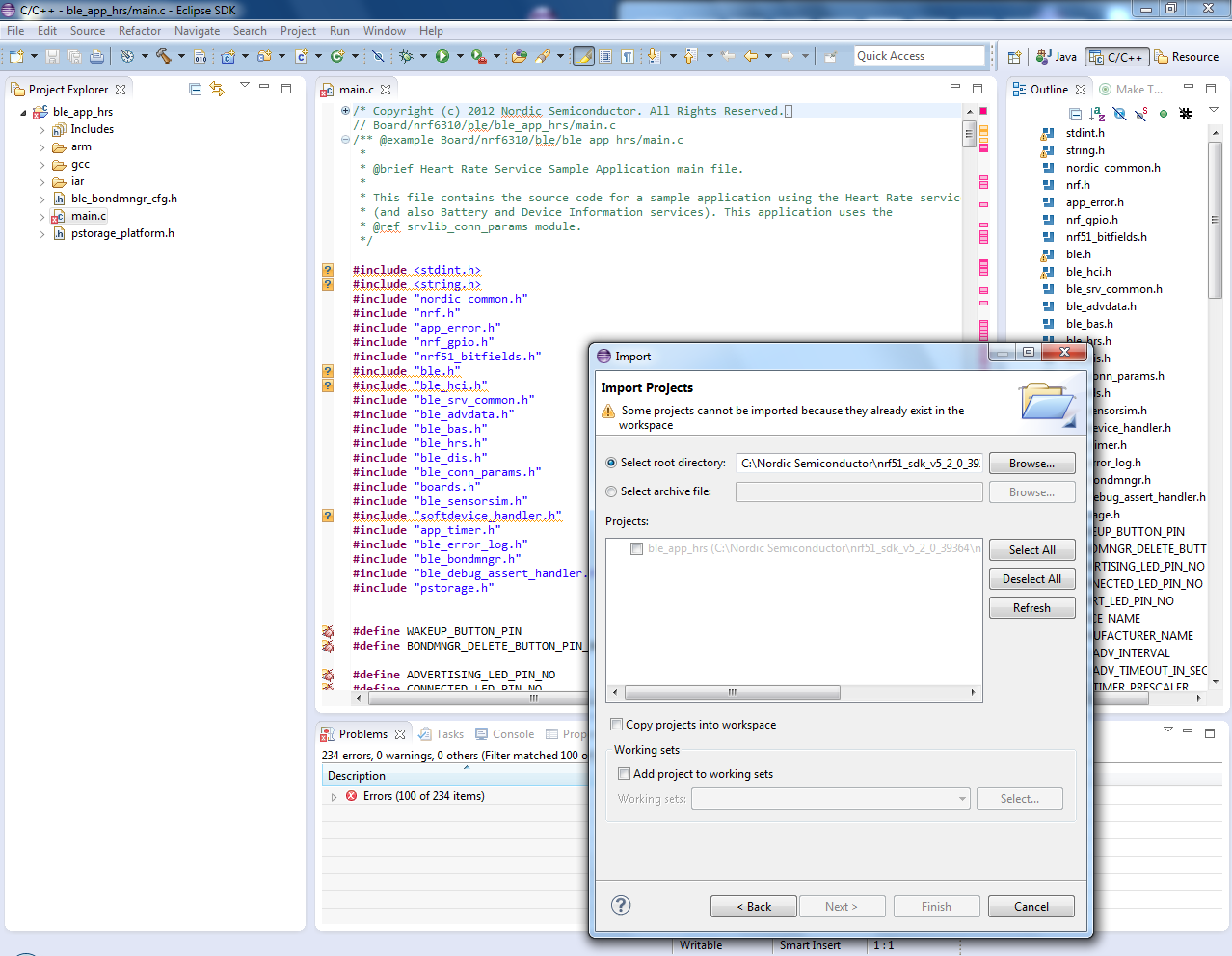
GCC_import.png

Parents
  • my thread goes too long, I can't find your reply in the thread, so I post it on your thread Thanks for help out first!

    my current issue is able to start debugger, but can't stop at breakpoint, below is log: www.dropbox.com/.../Screenshot 2014-04-11 17.19.53.png

    Connecting to J-Link... J-Link is connected. Firmware: J-Link OB-SAM3U128 V1 compiled Dec 11 2013 20:20:11 Hardware: V1.00 S/N: 480205216 Checking target voltage... Target voltage: 3.30 V Listening on TCP/IP port 2331 Connecting to target...Connected to target Waiting for GDB connection...Connected to 127.0.0.1 Reading all registers Read 4 bytes @ address 0x00000000 (Data = 0x20001C48) Target interface speed set to 30 kHz Resetting target Halting target CPU... ...Target halted (PC = 0x00012B98) R0 = FFFFFFFF, R1 = FFFFFFFF, R2 = FFFFFFFF, R3 = FFFFFFFF R4 = FFFFFFFF, R5 = FFFFFFFF, R6 = FFFFFFFF, R7 = FFFFFFFF R8 = FFFFFFFF, R9 = FFFFFFFF, R10= FFFFFFFF, R11= FFFFFFFF R12= FFFFFFFF, R13= 20001C48, MSP= 20001C48, PSP= FFFFFFFC R14(LR) = FFFFFFFF, R15(PC) = 00012B98 XPSR C1000000, APSR C0000000, EPSR 01000000, IPSR 00000000 CFBP 00000000, CONTROL 00, FAULTMASK 00, BASEPRI 00, PRIMASK 00 Reading all registers Select auto target interface speed (2000 kHz) Flash breakpoints enabled Semi-hosting enabled (VectorAddr = 0x08) Semihosting I/O set to TELNET Client Failed to disable SWO. ERROR: Could not detect CPU clock speed. Verification of test code downloaded into RAM failed.

    Failed to enable SWO. Could not measure target CPU frequency. Read 4 bytes @ address 0x00012B98 (Data = 0x681B4B15) Downloading 16192 bytes @ address 0x00014000 - Verify failed Downloading 15968 bytes @ address 0x00017F40 - Verify failed Downloading 16160 bytes @ address 0x0001BDA0 - Verify failed Downloading 16096 bytes @ address 0x0001FCC0 - Verify failed Downloading 16080 bytes @ address 0x00023BA0 - Verify failed Downloading 16176 bytes @ address 0x00027A70 - Verify failed Downloading 12208 bytes @ address 0x0002B9A0 - Verify failed Downloading 68 bytes @ address 0x0002E950 - Verify failed Downloading 8 bytes @ address 0x0002E994 - Verify failed Downloading 2396 bytes @ address 0x0002E99C - Verify failed Writing register (PC = 0x0002e951) Read 4 bytes @ address 0x0002E950 (Data = 0xFFFFFFFF) Read 4 bytes @ address 0xFFFFFFFF (Data = 0x001C4800) Read 4 bytes @ address 0xFFFFFFFF (Data = 0x001C4800) Resetting target Halting target CPU... ...Target halted (PC = 0x00012B98) R0 = FFFFFFFF, R1 = FFFFFFFF, R2 = FFFFFFFF, R3 = FFFFFFFF R4 = FFFFFFFF, R5 = FFFFFFFF, R6 = FFFFFFFF, R7 = FFFFFFFF R8 = FFFFFFFF, R9 = FFFFFFFF, R10= FFFFFFFF, R11= FFFFFFFF R12= FFFFFFFF, R13= 20001C48, MSP= 20001C48, PSP= FFFFFFFC R14(LR) = FFFFFFFF, R15(PC) = 00012B98 XPSR C1000000, APSR C0000000, EPSR 01000000, IPSR 00000000 CFBP 00000000, CONTROL 00, FAULTMASK 00, BASEPRI 00, PRIMASK 00 Reading all registers Read 4 bytes @ address 0x00012B98 (Data = 0x681B4B15) Starting target CPU...

    if I suspend it www.dropbox.com/.../Screenshot 2014-04-11 17.21.12.png

    do you have any hint on this?

  • I use Nordic dev kit, and able to flash in keil without problem

Reply Children
No Data
Related