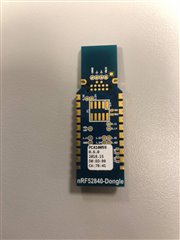
I just received my nRF52840 dongles and am trying to get nRF Connect going (macOS El Capitan).
Installed the J-Link package per instructions, and the nRF Connect 2.6.0 app. So far I've tried the Bluetooth Low Energy and Programmer apps.
When I click 'Select device' in the main window, it shows the ID 'C850B87ED8D6', which I presume is the dongle's MAC address? It is plugged into a USB port on the Mac keyboard (which works fine with, e.g., Arduino devices).
When I click on that device, it displays a small window with some information too quickly for me to read it (I think it may say 'Generic Access' and 'Generic Attribute'), and then opens a large, completely empty window titled 'nRF Connect v2.6.0 - Bluetooth Low Energy'.
If I select 'View | Reload' I get back to the main window. Here I select 'Launch other app' and select 'Programmer'. The log says 'Using nrfjprog library 9.8.1, pc-nrfjprog-js 1.4.1'
If I now select the dongle device, the Device Memory Layout just shows crawling diagonal bars. The pop-down menu shows device information, but Communication Type says 'unknown'.
That's the extent of what I've been able to do.