This post is older than 2 years and might not be relevant anymore
More Info: Consider searching for newer posts

nrf52840 Board Detection problem after click the recover button in nRFGO studio

Hi, I am a beginner for NRF52840. I started with PCA10056 Board and installed SDK Version 13.0. I am using IAR embedded workbench. I started with blinky example and worked fine. After that to program softdevices I downloaded NRFgo studio and it detetcs my board with nRF52 Development dongles in device manager. when I click on the Nrf52 development dongles, Its shows a message like this.
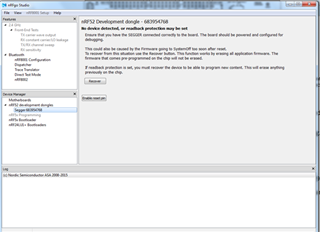
NO DEVICE DETECTED, OR READBACK PROTECTION MAY BE SET

Ensure that you have segger connected correctly to the board. The board should be powered and configured for debugging.
This could be caused by the firmware going to systemoff to soon after reset
To recover from this situation use the Recover Button.This function will works by erasing all application firmware. The firmware that comes pre-programmed on the chip will not be erased.
if feedback protection is set, you must recover the device to program a new content. This will erase anything previously on the chip.

I accidently clicked on Recover button which erase all application firmware. Now my led 1 is not blinking and the nrf52840 device is not detecting in the IAR while debugging THE BLINKY example. How to solve this problem?

Parents
  • Hi,


    When you erase the UICR (as when recovering) you also erase the voltage setting of the REG0 output voltage to 1.8V, which is used as GPIO and SWD high voltage. This is outside the PCA10056 Segger OB range.


    See this tutorial for instructions on how to retrieve the original behaviour: devzone.nordicsemi.com/.../nrf52840-dongle-programming-tutorial


    Best regards,

    Andreas

  • Hi  Andreas

    Thanks for your quick response.

    I read the tutorial how to Recover after an accidental UICR erase.

    I think i choose the 1st method by connecting the debug probe and program the firmware by changing REGOUT0 TO 1.8V.

    Could you please help me how to program the firmware. In which file i need to change?

  • Hi Andreas,

    I dont have the nrf52840 dongle and open USB Bootloader for programming. I only have the nrf52840 development kit. so i try to use segger J-link debug cable to connect to the debug out of nrf52840. I installed NRF5 command line tools.The file folder has nrfjprog.exe. But it crashes when i open the nrfprog.exe. Could you please explain little bit briefly how to program the firmware using segger j-link Debug probe inorder to retrieve the original behaviour.

    Regards

    Divya

  • Hi,


    OK so the dongle you mentioned is a dongle that you have made yourself? Can you describe how have you powered the board or show the relevant portions of your board schematic?


    In any case, once you installed nRF Command Line Tools, the commands are to be run from a command line window. Navigate to the folder with the respective .hex file you want to program, and write cmd in the navigation bar (and hit enter). Opening the cmd window from the navigation bar automatically gets you the correct path to the folder of the hex file you want to program. You should see a similar window open:

    Then write nrfjprog --program <name of your hex file>, e.g. nrfjprog --program myapplication.hex and hit enter.


    Best regards,

    Andreas

  • Hi Andreas

    The Dongle i mentioned above is the Nrf52840 development board (pca10056). It appears like nrf52 development dongles in the nRFgo studio. 

    Does it automatically program the firmware and changes the Regout to 3volt  if I loaded the .hex file  using command line tools?

    I tried to program the blinky hex file using J-link PLUS debugger port connected to the debug out (p20) of NRF52840 DK  using cmd window. But it shows error of low voltage. 


    C:\NRF52840\nRF5_SDK_13.0.0-1.alpha_055eef3\examples\peripheral\blinky>nrfjprog --program blinky_pca10056.hex
    ERROR: Low voltage detected at the target. Please make sure the device is
    ERROR: properly supplied.

    Regards

    Divya

  • Hi Andreas

    I connected to the wrong Debug out port.

    Could you please send me the schematic of nrf52840 development kit? I need the pinout of the p18 debug input port.

    Regards

    Divya

  • Hi,


    See here. (the site says outdated, but it is still valid)


    Best regards,

    Andreas

Reply Children
No Data
Related