This post is older than 2 years and might not be relevant anymore
More Info: Consider searching for newer posts

Adapting BLE Eddystone Beacon Example

Good day,

I wish to adapt the Eddystone Beacon example for nRF51822 with S130 in e.g.:

..\nRF5_SDK_12.3.0\examples\ble_peripheral\ble_app_beacon\pca10028\s130\armgcc

as follows:

1)  Configure slot 1 as TLM in the application code (retain slot 0 as default URL);

2)  Disable 'connectability' in the code (as per step 1 above, this will no longer be required);

3)  Increase period between transmissions

all in order to reduce power consumption.

Please provide information as to how/where to implement the above changes.

Thank you.

Regards

Jacques

  • Thank you Bjørn

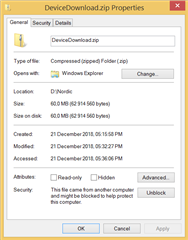
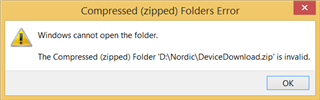
    I downloaded the ZIP for 12.2.0 called DeviceDownload.zip, but Windows 8.1 fails to open it.


    I will retry download in the new year.

    All the best!

    Regards

    Jacques

  • Good day,

    Using Android app "nRF Beacon for Eddystone" I was able to reconfigure slot 0 from URL to TLM, so all good with that.  I was also able to set the Advertising Interval to 20 seconds.  What is the longest interval I can configure?  Also please confirm that during the quiet time in-between TLM adverts the SoC goes into deep sleep to conserve battery power?

    However, it seems to reject setting Tx Power to a lower value than 0dBm - I tried -12dBm, -16dBm and -20dBm but all of those cause Error 133 in the Android app.

    When I set slot 0 as URL and slot 1 as TLM, I can set -30dBm on slot 0.  This power is indicated in slot 0 (URL) but slot 1 (TLM) still shows 0dBm?  Does that mean slot 1 is transmitting at 0dBm and not -30dBm? EDIT: nRF Connect confirms URL is transmitted at -30dBm but TLM is transmitted at 0dBm.

    EDIT: I discovered that when I set only slot 0 to TLM (nothing in slot 1), with Adv. Interval set to 16384ms, the TLM transmissions was at 0dBm every 10-odd seconds.  For better battery life, I found it better to set slot 0 to URL (Adv. Interval=16384 and Radio Tx. Power=-30dBm) and slot 1 to TLM (Radio Tx. Power=0dBm).  As stated above, it would be more ideal to be able to also set TLM's Radio Tx. Power to -30dBm.

    Thank you
    Regards
    Jacques

  • I programmed my nRF52-DK with the BLE Eddystone example hex file:

    ..\nRF5_SDK_15.2.0_9412b96\examples\ble_peripheral\ble_app_eddystone\hex\ble_app_eddystone_pca10040_s132.hex

    I then used nRF Connect Android application to change slot 0 from URL to TLM, and to set Radio Tx Power to 0dBm (i.e. set it to the default value). An error was thrown, the below nRF Logger file might assist to troubleshoot?

    Thank you
    Regards
    Jacques

    nRF Connect, 2019-01-03
    No name (DB:A7:7C:5F:05:A6)
    V	19:18:17.537	Connecting to DB:A7:7C:5F:05:A6...
    D	19:18:17.537	gatt = device.connectGatt(autoConnect = false)
    D	19:18:21.364	[Callback] Connection state changed with status: 0 and new state: CONNECTED (2)
    I	19:18:21.364	Connected to DB:A7:7C:5F:05:A6
    V	19:18:21.416	Discovering services...
    D	19:18:21.416	gatt.discoverServices()
    D	19:18:21.793	[Callback] Services discovered with status: 0
    I	19:18:21.794	Services discovered
    V	19:18:21.865	Generic Access (0x1800)
    - Device Name [R W] (0x2A00)
    - Appearance [R] (0x2A01)
    - Peripheral Preferred Connection Parameters [R] (0x2A04)
    - Central Address Resolution [R] (0x2AA6)
    Generic Attribute (0x1801)
    - Service Changed [I] (0x2A05)
    Client Characteristic Configuration (0x2902)
    Eddystone Configuration Service (a3c87500-8ed3-4bdf-8a39-a01bebede295)
    - Capabilities [R] (a3c87501-8ed3-4bdf-8a39-a01bebede295)
    - Active Slot [R W] (a3c87502-8ed3-4bdf-8a39-a01bebede295)
    - Advertising Interval [R W] (a3c87503-8ed3-4bdf-8a39-a01bebede295)
    - Radio Tx Power [R W] (a3c87504-8ed3-4bdf-8a39-a01bebede295)
    - (Advanced) Advertised Tx Power [R W] (a3c87505-8ed3-4bdf-8a39-a01bebede295)
    - Lock State [R W] (a3c87506-8ed3-4bdf-8a39-a01bebede295)
    - Unlock [R W] (a3c87507-8ed3-4bdf-8a39-a01bebede295)
    - Public ECDH Key [R] (a3c87508-8ed3-4bdf-8a39-a01bebede295)
    - EID Identity Key [R] (a3c87509-8ed3-4bdf-8a39-a01bebede295)
    - ADV Slot Data [R W] (a3c8750a-8ed3-4bdf-8a39-a01bebede295)
    - (Advanced) Factory Reset [W] (a3c8750b-8ed3-4bdf-8a39-a01bebede295)
    - (Advanced) Remain Connectable [R W] (a3c8750c-8ed3-4bdf-8a39-a01bebede295)
    D	19:18:21.866	gatt.setCharacteristicNotification(00002a05-0000-1000-8000-00805f9b34fb, true)
    V	19:18:38.065	Reading characteristic a3c87502-8ed3-4bdf-8a39-a01bebede295
    D	19:18:38.065	gatt.readCharacteristic(a3c87502-8ed3-4bdf-8a39-a01bebede295)
    E	19:18:38.294	Error 2 (0x2): GATT READ NOT PERMIT
    V	19:18:44.124	Reading characteristic a3c87507-8ed3-4bdf-8a39-a01bebede295
    D	19:18:44.125	gatt.readCharacteristic(a3c87507-8ed3-4bdf-8a39-a01bebede295)
    I	19:18:44.240	Read Response received from a3c87507-8ed3-4bdf-8a39-a01bebede295, value: (0x) 6C-E6-B0-D8-AD-EA-57-12-BF-C6-BD-EB-28-4A-16-55
    A	19:18:44.240	"(0x) 6C-E6-B0-D8-AD-EA-57-12-BF-C6-BD-EB-28-4A-16-55" received
    V	19:18:52.055	Writing request to characteristic a3c87507-8ed3-4bdf-8a39-a01bebede295
    D	19:18:52.055	gatt.writeCharacteristic(a3c87507-8ed3-4bdf-8a39-a01bebede295, value=0x920713C8A1D65E56002FD53D6FC3F712)
    I	19:18:52.155	Data written to a3c87507-8ed3-4bdf-8a39-a01bebede295, value: (0x) 92-07-13-C8-A1-D6-5E-56-00-2F-D5-3D-6F-C3-F7-12
    A	19:18:52.155	"(0x) 92-07-13-C8-A1-D6-5E-56-00-2F-D5-3D-6F-C3-F7-12" sent
    V	19:18:59.896	Reading characteristic a3c87502-8ed3-4bdf-8a39-a01bebede295
    D	19:18:59.896	gatt.readCharacteristic(a3c87502-8ed3-4bdf-8a39-a01bebede295)
    I	19:19:00.075	Read Response received from a3c87502-8ed3-4bdf-8a39-a01bebede295, value: (0x) 00
    A	19:19:00.075	"0" received
    V	19:19:06.696	Reading characteristic a3c8750a-8ed3-4bdf-8a39-a01bebede295
    D	19:19:06.696	gatt.readCharacteristic(a3c8750a-8ed3-4bdf-8a39-a01bebede295)
    I	19:19:06.829	Read Response received from a3c8750a-8ed3-4bdf-8a39-a01bebede295, value: (0x) 10-00-01-6E-6F-72-64-69-63-73-65-6D-69-00
    A	19:19:06.829	"Frame type: URL <0x10>
    Tx power at 0m: 0 dBm
    URL: https://www.nordicsemi.com/" received
    V	19:19:18.461	Writing request to characteristic a3c8750a-8ed3-4bdf-8a39-a01bebede295
    D	19:19:18.461	gatt.writeCharacteristic(a3c8750a-8ed3-4bdf-8a39-a01bebede295, value=0x20)
    I	19:19:18.615	Data written to a3c8750a-8ed3-4bdf-8a39-a01bebede295, value: (0x) 20, " "
    A	19:19:18.615	"Frame type: TLM <0x20>" sent
    V	19:19:31.504	Writing request to characteristic a3c87504-8ed3-4bdf-8a39-a01bebede295
    D	19:19:31.504	gatt.writeCharacteristic(a3c87504-8ed3-4bdf-8a39-a01bebede295, value=0x00)
    E	19:19:35.496	Error 133 (0x85): GATT ERROR
    D	19:19:35.537	[Callback] Connection state changed with status: 0 and new state: DISCONNECTED (0)
    I	19:19:35.537	Disconnected
    D	19:19:35.538	gatt.refresh() (hidden)

  • I sincerly aplogize for the late reply. 

    The longest advertisment interval allowed in BLE is 10.24s. 

    Yes, the firmware is configured to goes to System On: Low Power in between advertisement events. 

    DId you still have issues with setting the Slot 1 TX power to values lower than 0dBm?

  • Thank you Bjorn, no problem. HNY!

    Using nRF Beacon for Eddystone Android app (Huawei Mediapad T1 8.0 + Android 4.3) with nRF52-DK and OOB hex file:

    ..\nRF5_SDK_15.2.0_9412b96\examples\ble_peripheral\ble_app_eddystone\hex\ble_app_eddystone_pca10040_s132.hex

    1)  When I set Adv. Interval to 20000ms, it is rejected and replaced with 16384ms. However nRF Connect Android app seems to confirm the actual interval is 10.24ms, as per your post above.  (Interestingly this 20s change seems to be accepted on the nRF51822, and actual interval seems to be 20s...I will recheck that);

    EDIT: I checked the nRF51822: the Android app allows up to 20000ms for Adv. Interval, but actual interval on-air is also 10.24s.  With Slot 0 on URL, Slot 1 on TLM and Radio Tx. Power on URL set to -30dBm, I notice about 9 URL transmissions at -30dBm, and the 10th TLM transmission at 0dBm, as expected?  The ideal is only slot 0 set to TLM and -30dBm - is that possible (or allowed in the Eddystone spec)?

    2)  When I change Slot 0 from URL to TLM (i.e. nothing in any of the other slots) I struggle to reconnect, mostly getting Error 133. When I do reconnect and try to set Radio Tx. Power to -20dBm, it is rejected and reverts to 0dBm, and app shows Error 133. On some occasions after making the power change, the code on the DK seems to stop running, despite reboot or power off/on, so I need to reprogram the DK.  When I keep slot 0 as URL in default hexfile, and set slot 1 on TLM, still unable to set Radio Tx. Power to -20dBm.

    Thank you
    Regards
    Jacques

Related