This post is older than 2 years and might not be relevant anymore
More Info: Consider searching for newer posts

app_timer will be high consumption when repeated mode and config WDT with pause at CPU sleep

hello , everyone 

platform :  NRF52832, SDK13.0 , project:\examples\ble_peripheral\ble_app_template

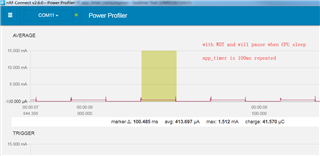
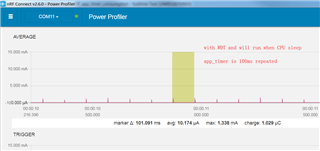
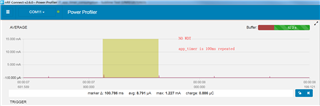
I meet such a problem, config app_timer in APP_TIMER_MODE_REPEATED and 100ms period , and do nothing at app_timer_handler , use PPK measured consumption is 8uA.

Then , i wanna add WDT, with NRF_WDT_BEHAVIOUR_PAUSE_SLEEP_HALT , it's consumption became 200uA(one cycle is 8uA,and the other cycle is 400uA).

Then, i change WDT config  with  NRF_WDT_BEHAVIOUR_RUN_SLEEP, consumption became normal 8uA.

I dont known why WDT will cause a big current ?

By the way , i tested WDT config with NRF_WDT_BEHAVIOUR_PAUSE_SLEEP_HALT , and set a delay 1ms at app_timer_handler , the consumption will be OK
github:github.com/.../nrf52832-occur-high-consumption

ble_app_template.zip

Parents
  • Hello,

    thanks a kind friend remind me ,this is a nrf52832 own bug,this mentioned in nRF52832 Rev 2 Errata ---at anomalies[88].

    refer to the workaround :Do not enter System ON IDLE within 125 µs after reloading the watchdog, modify my code like this:

    	nrf_drv_wdt_channel_feed(m_wdt_channel_id);
            
        nrf_delay_us(128);
    

    It fixed bug , but the consumption is 15uA more than 8uA( fixed by: config WDT with NRF_WDT_BEHAVIOUR_RUN_SLEEP ).

    I'm confused to choose which way.

    Could anybody let me know why the offical workaround is add a delay other than change the WDT mode?

  • Hi, when you add nrf_delay_us(128) the CPU is running for 128us. The CPU consumes current and it will add to the average idle current. If your application goes to sleep often I think it's better to use the RUN_SLEEP mode.

Reply Children
Related