This post is older than 2 years and might not be relevant anymore
More Info: Consider searching for newer posts

light switch examples using nrf5SDKforMeshv300src on PCA10040 board is not working. I am using 4 boards 2 configured as clients, 2 configured as server. I provisioned all the nodes in the mesh network using nrfMesh Android MobileApp. Provisioning was succ

I am unable to toggle LED's on server boards, using Push buttons on client boards.  flashed the light_switch client,server, provisioning images on nrf52832 boards  using nrf5SDKforMeshv300src SDK. I am able to provision the Clients & servers using both nrfMesh MobileApp  &  other board running ligh_switch provsioning example.

Parents
  • I tried running segger RTTClient on one of the boards running light switch client example.

    One board i am seeing error messages "Acknowledged transfer timeout.", Second board i am seeing "Publication not configured for client."

  • Have you taken a look at this youtube video? It seems like the configuration of the nodes might not have been successful. The procedure is very similar for the dev kits as with the Thingy:52s. This documentation may also be helpful.

    In addition, why are you using both the Android mobile app & the light switch provisioning example? Do you want two provisioners in your mesh network? I would recommend to flash one DK with the client example & then one or two with the server example. Then, follow the documentation carefully to provision & configure the system.

    You must remember to set the publish address on the client side, so that when you press a button the client, the client knows which address to publish the message to. The server(s) that are subscribed to this address will receive the message, consume it & handle it.

Reply
  • Have you taken a look at this youtube video? It seems like the configuration of the nodes might not have been successful. The procedure is very similar for the dev kits as with the Thingy:52s. This documentation may also be helpful.

    In addition, why are you using both the Android mobile app & the light switch provisioning example? Do you want two provisioners in your mesh network? I would recommend to flash one DK with the client example & then one or two with the server example. Then, follow the documentation carefully to provision & configure the system.

    You must remember to set the publish address on the client side, so that when you press a button the client, the client knows which address to publish the message to. The server(s) that are subscribed to this address will receive the message, consume it & handle it.

Children
  • Hi Bjorne,

    I tried to  provision the  devices using Android Mobile App  &  board with firmware build from light_switch provisioner example.   

    I  am using one board with light_switch client & Two boards with light_switch server exmples.

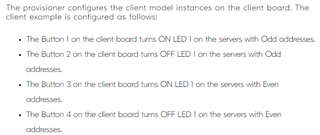
    In both scenarios I am able Togle LED's on only one Server.  As per documentation  I should  Toggle LED's  of all the Server  i.e Even & Odd servers.

    From The Segger RTT Logs  below on board with light switch client example program

    <t:   10953195>, main.c,  199, Button 2 pressed
    <t:   10953197>, main.c,  226, Sending msg: ONOFF SET 1
    <t:   13233054>, main.c,  199, Button 1 pressed
    <t:   13233056>, main.c,  226, Sending msg: ONOFF SET 0
    <t:   13233795>, main.c,  146, Acknowledged transfer success.
    <t:   13233797>, main.c,  172, OnOff server: 0x0103, Present OnOff: 1, Target OnOff: 0, Remaining Time: 100 ms
    <t:   13238484>, main.c,  177, OnOff server: 0x0103, Present OnOff: 0

    I am getting transfer Success for Button 1, which Togles LED on one server. For Button 2 i am not getting acknowledgement  and Led was not Glowing.

    Regards,

    Siva.

  • Hi Siva,

    If you take a look at the documentation, you see that button 3 turns on LED1 of the servers with the even addresses. You were turning LED1 on/off with the servers that had ODD addresses (i.e. when you provision via the provisioner example).

    Regards,

    Bjørn

  • From the Logs 

    i  am getting acknowledgement success when i pressed  Button 0, Button 1.  I am able to Toggle  LED 1 on  one server( i.e Odd server as mentioned in the documentation ).

    I should  get acknowledgement when i pressed  Button2,Button 3. I am unable to toggle the LED on other board(i.e Even Server)

    Here is the Total log

    ###RTT Client: -----------------------------------------------
    ###RTT Client: Connecting to J-Link RTT Server via localhost:19021  Connected.
    SEGGER J-Link V6.35f (beta) - Real time terminal output
    J-Link OB-SAM3U128-V2-NordicSemi compiled Jul 12 2018 11:44:41 V1.0, SN=682556034
    Process: JLinkExe
    <t:          0>, main.c,  321, ----- BLE Mesh Light Switch Client Demo -----
    <t:      16897>, main.c,  288, Initializing and adding models
    <t:      21360>, main.c,  361, Device UUID : 0059CCAA00000000B1E5A0034C100E11
    <t:     880714>, main.c,  111, Successfully provisioned
    <t:     880719>, main.c,  122, Node Address: 0x0100
    <t:     883007>, config_server.c,  601, dsm_appkey_add(appkey_handle:0 appkey_index:0)
    <t:     886209>, config_server.c, 2426, Access  Info:
            element_index=0        model_id = 2-FFFF        model_handle=1
    <t:     891041>, config_server.c, 2426, Access  Info:
            element_index=1        model_id = 1001-FFFF        model_handle=2
    <t:     891955>, config_server.c, 2426, Access  Info:
            element_index=2        model_id = 1001-FFFF        model_handle=3
    <t:   10108682>, main.c,  199, Button 0 pressed
    <t:   10108685>, main.c,  226, Sending msg: ONOFF SET 1
    <t:   10111227>, main.c,  146, Acknowledged transfer success.
    <t:   10111229>, main.c,  172, OnOff server: 0x0103, Present OnOff: 1, Target OnOff: 1, Remaining Time: 100 ms
    <t:   10114404>, main.c,  177, OnOff server: 0x0103, Present OnOff: 1
    <t:   10953195>, main.c,  199, Button 2 pressed
    <t:   10953197>, main.c,  226, Sending msg: ONOFF SET 1
    <t:   13233054>, main.c,  199, Button 1 pressed
    <t:   13233056>, main.c,  226, Sending msg: ONOFF SET 0
    <t:   13233795>, main.c,  146, Acknowledged transfer success.
    <t:   13233797>, main.c,  172, OnOff server: 0x0103, Present OnOff: 1, Target OnOff: 0, Remaining Time: 100 ms
    <t:   13238484>, main.c,  177, OnOff server: 0x0103, Present OnOff: 0

  • Are you sure that the even server has been provisioned & configured correctly? Could you please upload the log from the provisioner board & the two server boards too please? It is easiest to read if you insert them as code (i.e. Insert -> Code):

  • I already posted as code above. I will try tomorow and let you know.

Related