This post is older than 2 years and might not be relevant anymore
More Info: Consider searching for newer posts

Failed to do DFU

Hi, All,

We developed our device with KEIL 5, SDK15.2 and SoftDevice 6.1.1. Android App was developed on Android Nordic DFU 1.8.1 library.

When we try to upgrage the firmware of our device,
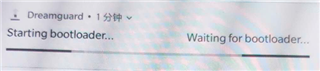
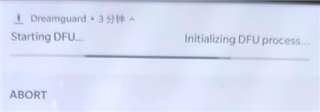
the App often halt with the error message "Starting DFU..." or "Starting bootloader..." on master control panel as the attached images.

Do you have any ideas about this problem?

Thanks and regards!
Parents Reply Children
  • Dear Einar,

    In Andriod App, when app excuted NRF_DFU_OP_OBJECT_EXECUTE(Execute selected object) command, NRF_DFU_RES_CODE_INVALID_OBJECT() returned.
    Do you have any idea of the reasons which caused this error?

    Thanks,

    Richard

  • Hi Richard,

    The NRF_DFU_RES_CODE_INVALID_OBJECT error is documented here:

    Data object does not match the firmware and hardware requirements, the signature is wrong, or parsing the command failed.

    This typically means that the bootloader checked the init packet and found something wrong (could be wrong version of application, bootloader, SoftDevice, hardware or similar or that the signature is invalid).

  • Dear Einar,

    Thank you for your patience!

    We had a stranger phenonmenon of our device DFU:

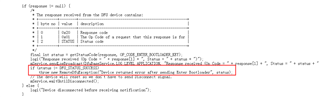
    For a particular device we used nRF connect or our App to do DFU for many times successfully, but when failed by using nRF connect or App by accident, then we never get success to do DFU no matter using nFR connect or App. The device was always stayed the stage of 'Start bootloader...'.  On this case, we debug mobile App into DFU library,  got the error information:  

    Response received (Op Code = 1, Status = 4)
    Device returned error after sending Enter Bootloader

    Best regards,

    Richard

  • Hi Richard,

    What state is the nRF in during this test? Is the nRF still in the application, or did it reset into the bootloader? Can you add logging in the application and use the debug version of the bootloader with RTT logging, and upload here?

  • Dear Einar,

    We saved the the DFU library internal logs into file. I attached 2 log files: 'Failed.txt' is the log file for a failed DFU and 'Succeed.txt' is the log file of a succeeded DFU. For the most of our failure of DFU, android app threw a error at line 137 in the ButtonlessDfuImpl.java of DFU library, as the attched the picture: ExceptionPlace.png. 

     Could you please have a analysis based on these information at first and the further information will be provided as soon as we get.

    Best Regards,
    Richard

    ************* Log Head ****************
    Date of Log        : 2019-01-17
    Device Manufacturer: motorola
    Device Model       : XT1662
    Android Version    : 6.0
    Android SDK        : 23
    App VersionName    : 0.8.9+5
    App VersionCode    : 5
    ************* Log Head ****************
    
    13:29:02.256 D/DfuServiceInitiator [main, no.nordicsemi.android.dfu.DfuServiceInitiator.initLog(DfuServiceInitiator.java:768)]: 
    switch: true
    console: false
    tag: null
    head: true
    file: true
    dir: /storage/emulated/0/Android/data/com.jabil.dozecare_app_android_formal/cache/log/
    filePrefix: dfu
    border: false
    singleTag: true
    consoleFilter: V
    fileFilter: D
    stackDeep: 1
    stackOffset: 0
    saveDays: 10
    formatter: {class java.util.ArrayList=no.nordicsemi.android.dfu.DfuServiceInitiator$1@5d6cd6}
    13:29:02.257 I/DfuServiceInitiator [main, no.nordicsemi.android.dfu.DfuServiceInitiator.start(DfuServiceInitiator.java:687)]: args[0] = DfuServiceController
    args[1] = Starting upgrade device: Wearable-TEST-0016: FD:BB:62:F4:47:8F
    
    13:29:02.264 I/DfuBaseService [main, no.nordicsemi.android.dfu.DfuBaseService.logi(DfuBaseService.java:1846)]: args[0] = DfuBaseService
    args[1] = DFU service created. Version: 1.8.1
    
    13:29:02.290 I/DfuBaseService [IntentService[DfuBaseService], no.nordicsemi.android.dfu.DfuBaseService.logi(DfuBaseService.java:1846)]: args[0] = DfuBaseService
    args[1] = Connecting to the device...
    
    13:29:02.298 I/DfuBaseService [Binder_2, no.nordicsemi.android.dfu.DfuBaseService.logi(DfuBaseService.java:1846)]: args[0] = DfuBaseService
    args[1] = Connected to GATT server
    
    13:29:02.300 I/DfuBaseService [Binder_2, no.nordicsemi.android.dfu.DfuBaseService.logi(DfuBaseService.java:1846)]: args[0] = DfuBaseService
    args[1] = Waiting 1600 ms for a possible Service Changed indication...
    
    13:29:03.904 I/DfuBaseService [Binder_2, no.nordicsemi.android.dfu.DfuBaseService.logi(DfuBaseService.java:1846)]: args[0] = DfuBaseService
    args[1] = Attempting to start service discovery... succeed
    
    13:29:03.978 I/DfuBaseService [Binder_4, no.nordicsemi.android.dfu.DfuBaseService.logi(DfuBaseService.java:1846)]: args[0] = DfuBaseService
    args[1] = Services discovered
    
    13:29:03.981 I/BaseDfuImpl [IntentService[DfuBaseService], no.nordicsemi.android.dfu.BaseDfuImpl.logi(BaseDfuImpl.java:785)]: args[0] = DfuImpl
    args[1] = Reading Service Changed CCCD value...
    
    13:29:04.100 I/BaseDfuImpl [IntentService[DfuBaseService], no.nordicsemi.android.dfu.BaseDfuImpl.logi(BaseDfuImpl.java:785)]: args[0] = DfuImpl
    args[1] = Buttonless service with bond sharing found -> SDK 14 or newer
    
    13:29:05.152 I/BaseDfuImpl [IntentService[DfuBaseService], no.nordicsemi.android.dfu.BaseDfuImpl.logi(BaseDfuImpl.java:785)]: args[0] = DfuImpl
    args[1] = Enabling indications...
    
    13:29:06.334 I/BaseDfuImpl [IntentService[DfuBaseService], no.nordicsemi.android.dfu.BaseDfuImpl.logi(BaseDfuImpl.java:785)]: args[0] = DfuImpl
    args[1] = Sending Enter Bootloader (Op Code = 1)
    
    13:29:06.425 I/BaseDfuImpl [IntentService[DfuBaseService], no.nordicsemi.android.dfu.BaseDfuImpl.logi(BaseDfuImpl.java:785)]: args[0] = DfuImpl
    args[1] = Response received (Op Code = 1, Status = 1)
    
    
    Succeed.txt

Related