This post is older than 2 years and might not be relevant anymore
More Info: Consider searching for newer posts

nRF9160 DK SMT issue (GPS antenna fell off)

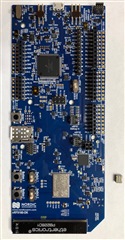
The GPS antenna just fell off the board. Seems like the part has a cold solder joint. This led me thinking that the LTE antenna might also have the same problem. I had no success connecting it to the LTE network no matter what SIM card I use (iBasic, AT&T, Rogers, etc.). Attached picture. 

Wonder how can I return it for a new board?
  • Hi Steve,

    That is unfortunate. (I will come back to you regarding the GPS antenna)

    The LTE antenna should not have this problem.

    Regarding the issue with connecting to the LTE-M network, this is most likely unrelated to the HW.

    I would recommend you to run the "at_client" sample on the DK with the LTE Link Monitor (in nrf Connect for Desktop) to see additional information from the modem.

    This is also covered in the nRF91 Getting Started tutorial.

    //Cheers

  • I've tested both at_client and asset_tracking. I moved my board to another location and finally got connection this morning. The place I initially tested my board is in the center of a large city in Canada. I am not sure why it didn't get any reception. Could it be RF performance issue? Do I need to tune the antenna to the band i am currently using? I saw some matching placeholders at the back of the board not populated.

  • Hi Steve,

    It depends which SIM provider and which carrier you use. Do you know if your given carrier has good LTE-M coverage at your location.

    Many Operators usually have a coverage map on their site which can beneficial to check that you actually can get a LTE link with the basestation in your area.

    I still recommend you to flash the at_client as stated last post, this can provide you with a lot of information regarding the connection.

    There should not be a RF issue, or necessary to tune the antenna. You can lock the modem to only connect to a specific band if you want, but the modem automatically goes through the supported bands and connects to the correct one anyway.

    So,

    1. Check out the LTE-M coverage in your area
    2. Test the at_client with LTE Link Monitor
Related