

Good day,
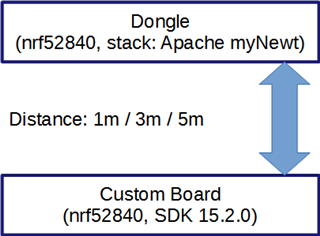
When testing our own board with a module (BT840) for communication range, we obtained the following results:
1. removal for a distance of 1m: 55-70 kB / s
2. removal for a distance of 3m: 15-30 kB / s
3. distance removal 5m: 5-12 kB / s
the experiment is as follows:
Settings:
mtu = 247;
Gap Event Length = 251;
Connection Inerval = 100 ms; (tried and 50, but did not notice the difference);
Power Level: +8 dbm
At the same time, your demo example (ble_app_att_mtu_throughput) shows a stable result at a distance of up to 10m (about 45 - 50 kB / s).
The code that performs the sending of notifications was taken from the example and adapted to our project. But the essence remains the same: adding data to the internal queue before receiving an error (NRF_ERROR_RESOURCES). After receiving an error, waiting for an event: data was sent (BLE_GATTS_EVT_HVN_TX_COMPLETE).
This means that the problem is either in our board or in the dongle. To check our board, I would like to use it in your demo example instead of one of the DCs.
in this connection questions:
- how to adapt the sample code so that it can run in the correct configuration on the user board. (that is, without additional button presses)?
- maybe there is another way to check the quality of communication on the user fee?
thanks, Max
