This post is older than 2 years and might not be relevant anymore
More Info: Consider searching for newer posts

External target NRF51422 with BLE problems

Hello everyone,

I know that there are many similiar questions on the DevZone but i am not able to get it work and i dont uderstand it yet. 

For example: https://devzone.nordicsemi.com/f/nordic-q-a/24922/ble-example-not-working-on-external-target

I have similiar problem -  with BLE example on the NRF51422 processor (custom board). Namely, after uploading SoftDevice (s130 / s110), and uploading the program to launch Bluetooth (eg ble_app_template), I can not make a connection.

I would like to add that as a programmer I use nrf52 DK which contains the processor NRF52832 on which after uploading s132 and the above program, the connection was established without difficulty.

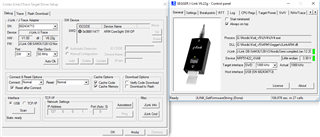
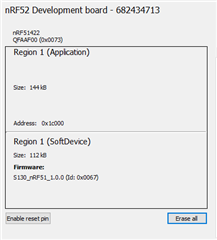
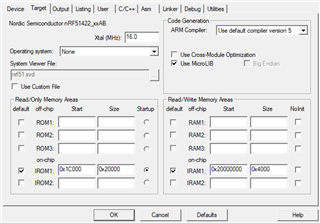
Below I put in a few screenshots showing the settings in Keil.

What can be the issue ?
Parents
  • Hi,

    • Which version of the Softdevice are you using?
    • Does it advertise if you upload the ble_app_blinky example from the SDK? (Note you have to remap the board file so that it corresponds to your board)
      I would like to add that as a programmer I use nrf52 DK which contains the processor NRF52832 on which after uploading s132 and the above program, the connection was established without difficulty.
       
    • I'm not sure i understand you correctly. Does this mean that you have programmed the application to an nRF52 and it worked? 

    Jared

  • Hi Jared,
    Thanks for the quick response. I will try to explain everything accurately

    • I first used the s130 version and then s110. None of them worked 

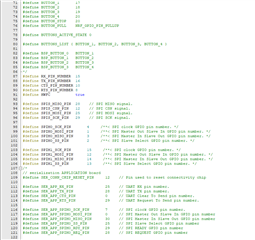
    • ble_app_blinky don't work too, but I see that the problem is probably with the board file mapping. Could you help me with this? I have edited the pca10028.h file, changed the LED's pins, commented on the buttons and the "serialization APPLICATION board" and "serialization CONNECTIVITY board" and "Arduino board mappings".

    Additionally, under "Low frequency clock source to be used by the SoftDevice" I have defined S130.
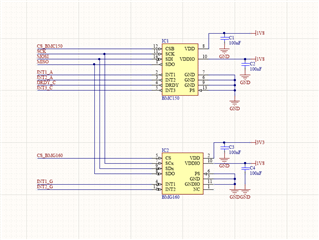
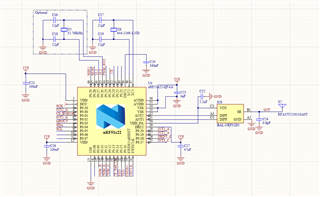
    I have a problem with this fragment (see figure 1). I have 2 sensors that communicate using the SPI protocol (see figure 2). What should this pin layout look like in this case? And where is the place to define the antenna pins? 
    https://pastebin.com/YeimxH38

    • Exactly. At the beginning I programmed my nrf52 DK, uploading S132 and ble_app_template. On the phone, I launched nrf Connect and there I could connect to the processor (it was called Nordic_Template).
    Then I used nrf52 DK as a programmer (see here) and uploaded to my custom board first S130 + program, and then when it did not work, S110 + program. In both cases in nrf Connect I could not find my board.

                                    Fig.1                                                                                Fig.2

  • Hi,

    • When I mentioned the remapping the code, I meant remapping code that is already built for the nRF51. I suggest that you start with the ble_app_blinky project for the nRF51 then remap the pins so that it fits your board. Regarding custom board.
    • It's OK to share the MISO and MOSI pins with slaves as long as they have separate CS pins. 
    • The pins for the radio is not configurable and is automatic assigned once the appropriate chip is chosen. 
  • Okey Jared,

    I launched ble_app_blinky and SoftDevice S130 from the SDK11 packages.
    I used "board_custom" with following LFCLKSRC:

    #define NRF_CLOCK_LFCLKSRC      {.source       = NRF_CLOCK_LF_SRC_XTAL,            \
    							    .rc_ctiv       = 0,                                \
    							    .rc_temp_ctiv  = 0,                                \
    							    .xtal_accuracy = NRF_CLOCK_LF_XTAL_ACCURACY_20_PPM}

    I chose the NRF51422_XXAB board in Keil, I set ROM1 (screen under the first post) and XTAL to 32 Mhz (For lower values, it does not turn on BLE).

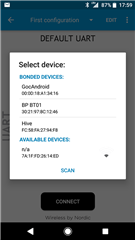
    After uploading the program, in nrfConnect i found the board as "n/a", and after clicking "Connect", it immediately breaks the connection.

    Is there a problem with clock settings ?

  • The softdevice is enabled by the function call sd_ble_enable() in the softdevice_enable() call that is done in ble_stack_init(). One of the parameters that is passed to sd_ble_enable() is a pointer to the address that sets the amount of memory the ble stack needs. Could you run the program in debug mode and see what value &app_ram_base is pointing to? Also, could you print the err_code that is returned from sd_ ble_enable()?

  • I hope I have read your instructions correctly.
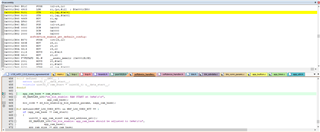
    app_ram_base(0x0001CB44 ) and err_code(0x0001CB46). (screen)

    In memory view (decimal):
    0x0001CB44 = 001
    0x0001CB46 = 000

  • Hi. Sorry for the late response. It doesn't seem that you have turned off optimizations while debugging. You should redo it with optimizations turned off. Check this post for more info regarding optimizations: You can also try to change the IRAM1 configuration to:

    START:0x20002080

    SIZE: 0x5F80

    Best regards

    Jared 

Reply Children
No Data
Related