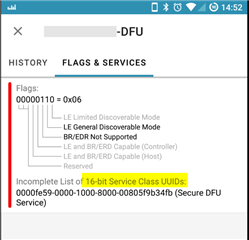
Hi,
We are developing a BLE peripheral that support DFU and accompanying Andriod & iOS apps.
When using the following tools, (buttonless) DFU concludes successfully:
- nRF connect for PC
- nRF connect on Android,
- nRF toolbox for Android
- nRF connect on iOS
- Android DFU library (is integrated in our Android app)
However, when using the following tools, entering DFU mode fails, the peripheral seem to hang and after being reset it runs its original firmware.
- nRF toolbox for iOS; or
- IOS-Pods-DFU-Library in our iOS app
The peripheral uses the 'standard' secure_dfu_ble project and, as mentioned above, successfully concludes dfu in many non-iOS scenarios.
Some more info:
- Both the app profile and the bootloader's profile have a 'Service changed' characteristic (though we didn't implement any code to deal with it)
- No pairing is used
- In order to clear iOS cache, BT setting on the iPhone was toggled on-off many times
- The bootloader advertised name is :"MyDevice-DFU" (the app's advertised name is "MyDevice" .fyi)
Attached is an iOS code snippet + error log
func startUpdateDFU(){
        guard let url = Defaults[.firmwareURL] else {
            print("No file found")
            return
        }

        let selectedFirmware = DFUFirmware(urlToZipFile: url)

        guard
            let firmware = selectedFirmware,
            let peripheral = BLEManager.shared.peripheralManager.peripheral else { return }

        let initiator = DFUServiceInitiator(queue: nil).with(firmware: firmware)
        initiator.logger = self
        initiator.delegate = self
        initiator.progressDelegate = self
        initiator.enableUnsafeExperimentalButtonlessServiceInSecureDfu = true;
        initiator.peripheralSelector = self

        dfuController = initiator.start(target: peripheral)
    }
Message: [Callback] Central Manager did update state to: Powered ON
Message: Connecting to SomyBand...
Message: centralManager.connect(peripheral, options: nil)
state:Connecting
Message: [Callback] Central Manager did connect peripheral
Message: Connected to SomyBand
Message: Discovering services...
Message: peripheral.discoverServices(nil)
Message: Services discovered
Message: Starting Secure DFU...
Message: Connected to SomyBand
Message: Services discovered
Message: Secure DFU Service found
Message: Discovering characteristics in DFU Service...
Message: peripheral.discoverCharacteristics(nil, for: FE59)
Message: DFU characteristics discovered
Message: Enabling indications for 8EC90003-F315-4F60-9FB8-838830DAEA50...
Message: peripheral.setNotifyValue(true, for: 8EC90003-F315-4F60-9FB8-838830DAEA50)
state:Starting
Message: Indications enabled for 8EC90003-F315-4F60-9FB8-838830DAEA50
Message: Buttonless DFU indications enabled
Message: Application with buttonless update found
Message: Trying setting bootloader name to Dfu37021
Message: Writing to characteristic 8EC90003-F315-4F60-9FB8-838830DAEA50...
Message: peripheral.writeValue(0x02084466753337303231, for: 8EC90003-F315-4F60-9FB8-838830DAEA50, type: .withResponse)
state:Enabling DFU Mode
Message: [Callback] Central Manager did disconnect peripheral
Message: Disconnected by the remote device
Message: Scanning for the DFU Bootloader...

Message: DFU Bootloader found
Message: Connecting to Unknown device...
Message: centralManager.connect(peripheral, options: nil)
Message: [Callback] Central Manager did connect peripheral
Message: Connected to Unknown device
Message: Discovering services...
Message: peripheral.discoverServices([FE59])
Message: Services discovered
Message: DFU Service not found
Message: No services found
Message: Did you connect to the correct target? It might be that the previous services were cached: toggle Bluetooth from iOS settings to clear cache. Also, ensure the device contains the Service Changed characteristic
Message: Disconnecting...
Message: centralManager.cancelPeripheralConnection(peripheral)
Message: [Callback] Central Manager did disconnect peripheral
Message: Disconnected
DFU Error: 302
Please note that some of this information was also posted in your github issues tab
Many thanks for any advice