This post is older than 2 years and might not be relevant anymore
More Info: Consider searching for newer posts

nRF52-DK with HRM application - expected average current?

Hello, DevZone,

I have programmed an nRF52-DK with the unmodified SDK's ble_app_hrs_pca10040_s132 (heart rate monitor) BLE peripheral application.  I also have a Power Profiling Kit to measure the current.  I have cut SB9 as directed so that the PPK can measure the current, and have the DUT, Power Select, and COM switches all set to "DK" position.

I ran nRF Connect for Desktop, and have installed the Power Profiler application.  The nRF52-DK is connected to my PC via USB cable, and I started the Power Profiler.

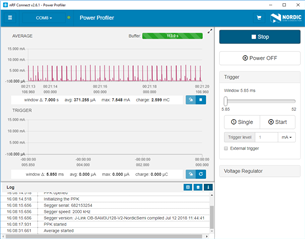
While the board is advertising (LED1 on nRF52-DK blinking), I'm seeing an average current of around 585 uA, which seems pretty high.  Is this expected/normal, or do I have something set up incorrectly?
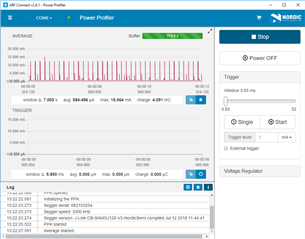
After connecting to nRF Toolkit's HRM app on my smartphone, I see the average current change to about 507 uA.  Again, this seems high, and I'd like to know if this is expected, or if I have something set up incorrectly on one of the boards or in the application.
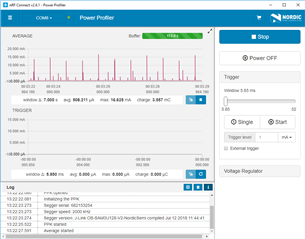
Can someone please confirm that these average currents are as expected for this application?  If so, can you suggest specific steps that might help reduce the average current?

If I consider a normal CR2032 as the power source with a capacity of 220 mAh, this seems to mean that this application would be able to run for:

220 mAh * 1000 uA/mA / 507 uA = 433.9 hours, or about 18.1 days. 

Is this correct?  For reference, we would eventually like to get to an ECG monitor that can run for 30 days from a battery.  I know this application has much less data than a full ECG (even single-lead), but thought that it would be a good place to start to see if this is even feasible.

Any pointers on how this application or test setup can be configured to reduce current consumption would be greatly appreciated.  I'm still very new to the nRF52 family, and there is much that I don't know yet!

Many thanks for your help and insights!

Scott

Parents Reply Children
  • Thanks for the pointer, Kenneth.  I do not understand what could be wrong with my configuration.  I am trying to use the "stock" ble_app_hrs_pca10040_s132 heart rate monitor peripheral.  I am using nRF5_SDK_15.2.0_9412b96.  I have selected the Release configuration in Segger Embedded Studio, done a rebuild, and have then selected Build and Run

    Perhaps there are peripherals turned on that I'm not aware of, or do not fully understand the purpose of.  One example is in sdk_config.  NRF_LOG_ENABLED is defined to 1.  Could that be generating unexpected UART traffic that is driving the current up?

    I have attached my sdk_config.h.  Would it be possible for you to run this example with the PPK to see if you get similar current measurements to what I am seeing?

    0523.sdk_config.h

    Thank you for your help.

    Scott

  • Kenneth, I did a quick search through sdk_config.h to see what logs are enabled.  I found the following:

    C:/Nordic_Semi/nRF5_SDK_15.2.0/examples/ble_peripheral/ble_app_hrs/pca10040/s132/config/sdk_config.h:#define NRF_LOG_ENABLED 1
    C:/Nordic_Semi/nRF5_SDK_15.2.0/examples/ble_peripheral/ble_app_hrs/pca10040/s132/config/sdk_config.h:#define NRF_SDH_BLE_LOG_ENABLED 1
    C:/Nordic_Semi/nRF5_SDK_15.2.0/examples/ble_peripheral/ble_app_hrs/pca10040/s132/config/sdk_config.h:#define NRF_SDH_LOG_ENABLED 1
    C:/Nordic_Semi/nRF5_SDK_15.2.0/examples/ble_peripheral/ble_app_hrs/pca10040/s132/config/sdk_config.h:#define NRF_SDH_SOC_LOG_ENABLED 1
    C:/Nordic_Semi/nRF5_SDK_15.2.0/examples/ble_peripheral/ble_app_hrs/pca10040/s132/config/sdk_config.h:#define PM_LOG_ENABLED 1

    Could these have an impact on the average current?  I am new to the nRF52 and SDK, so I am not even sure what these defines actually control.  Do they generate output via the UART, or via the Segger JLink RTT?

    Apologies for the "newbie" questions, but I am trying to get up the learning curve, which seems a bit steep at the moment!

    Thanks again,

    Scott

  • First a question, have you power cycled the board to avoid it is still in debug mode after programming the firmware?

    Best regards,
    Kenneth

  • Yes, after programming the Release configuration, I power cycled the nRF-DK board.  LED1 starts blinking indicating that advertising has started.

    I then started nRF Connect and launched the Power Profiler.  I selected the serial port (COM8).

    I then get a confirmation dialog that asks "Would you like to program the development kit on COM8 (682153254) with the required firmware?"  I'm not sure why this is happening.  Can you explain? 

    If I say Yes, I get notifications in the Log window "Failed to read PPK metadata" and "Failed to start the PPK".  I exited nRF Connect and re-ran it, launching the Power Profiler again.  Same Log messages.  After restarting Power Profiler the third time, I get a Log message indicating "PPK started".  When I click Start within the Power Profiler, I can see the advertising and my average current is around 582 uA.

    Am I doing something wrong?

    Thanks for your help!

  • Kenneth and DevZone,

    I got some help from my local FAE, and he confirmed that he saw similar current values to what my setup was reporting.

    Further, he indicated that enabling the DC-DC converter could reduce the current consumption by ~40%.  This was accomplished by adding the line:

        sd_power_dcdc_mode_set(NRF_POWER_DCDC_ENABLE);

    right after the call to advertising_start(erase_bonds); in main.c.

    After rebuilding the project in Release mode, reprogramming my nRF52-DK, and reinstalling the PPK, the average current during advertising dropped to about 370 uA.  Much better!  Very grateful for the excellent help on this.

    Some other techniques can evidently be used to reduce power further, including disabling the UART logging, and increasing the advertising interval and connection interval.  I will continue to experiment, but this one call made a huge difference in average current draw.

    Thanks for the help, Kenneth and Nordic!

Related