This post is older than 2 years and might not be relevant anymore
More Info: Consider searching for newer posts

Random SoftDevice NRF_FAULT_ID_SD_ASSERT errors

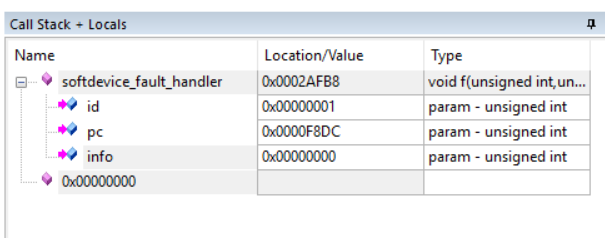
During development with the nrf52832 (SDK11.0.0-2.alpha), I occasionally get NRF_FAULT_ID_SD_ASSERT errors. I have a breakpoint set at the "softdevice_fault_handler" and the Call Stack shows the ID of 0x00000001, the Program Counter of 0x0000F8DC, and 0x00000000 for Info, which shows that it is NRF_FAULT_ID_SD_ASSERT error, but I don't appear to be able to figure out what address 0x0000F8DC is in the SoftDevice code.  Any help on what I can do to not get this assert based on this Program Counter would be greatly appreciated.
Parents
  • Hi,

    In order to figure out what might be the issue I must know what SoftDevice and version you are using.

    If you use the nRF52832, then I highly recommend to use the latest release of our SDK (currently v15.2.0). At least you should change to a production release of the SDK, and not use an alpha version.

    If you use the nRF51 series then the latest compatible SDK release is version 12.3.0.

    You can download nRF5 SDK releases here.

    Regards,
    Terje

  • Thanks for the reply. 

    We are using the S132 SoftDevice v2.0.0-7.alpha (not sure how I forgot to add that to the original description).  These versions were from when the project was originally started a few years ago.  We are adding BLE functionality now and, ideally, want to minimize any unnecessary changes.  I do see your point that using an alpha release of anything is not ideal when used in production products.

    Is there anyway for you to tell me what assert might be failing in this version of the SoftDevice?  I will attempt to update to the latest production version, but if we must still support the nRF52832 IC Revision Engineering B release due to units that are already in the field, I would like to try to address the issue as it stands in this version of SoftDevice.  We are using the BMD-300 module from Rigado and have been for years.  I have reached out to them to learn what versions of nRF52832 IC Revision are in their modules so I can see what the latest version of the SoftDevice we can upgrade to.

  • Hi,

    I refer to footnote 2 on that compatibility matrix:

    "If workaround for anomaly 73 is implemented, nRF5 SDK 11.0.0 can be used for development purposes together with SoftDevice S132 2.0.0/S212 0.9.x/S332 0.9.x on nRF52832 Engineering B. For more information, see nRF52 Engineering B Errata or nRF5 SDK 11.0.0 release notes."

    So yes, you will be able to use Engineering B for development, provided that you implement the workaround mentioned. Please note however that you should not use Engineering B ICs in production.

    Regards,
    Terje

  • Thanks for your quick responses concerning all my questions.  Now, all I can do is wait for Rigado customer support to get back to me about what IC Revision they are using and have used in the past to know what my upgrade options are. 

    As for figuring out what I am doing before the fault, the only thing I can say is that it is related to Bluetooth.  Before that was implemented, the fault never occurred.  Other than that, it is quite random.  We don't disable interrupts, we are not using any Timeslot API (that I am aware of), and all the interrupt levels are the defaults used in the examples.  Not sure what it could be that we are doing.

    In other threads on the forum, it looks like Nordic personnel were able look into the SoftDevice code and say what function the assert failed in.  I was hoping my situation would be that simple.

    If I am able to upgrade and if I still experience problems, I will respond on this thread.  Thanks again for all your help so far.

  • Hi,

    Yes, in some instances we can tell clearly where the fault happened, but this time it happened inside a function which is called from several locations.

    Regarding what IC revision they use for the module, do you see the nRF SoC on the module or is it encapsulated in shielding or otherwise out of view? If the SoC is visible you can have a look at its markings in order to determine what revision it is.

    E.g. I have a development board here, with the following markings on the nRF:

    N52832
    QFAABB
    1601AB

    The middle line is the Packet variant and two first symbols of the Build code, as described in the IC revision overview. That means the IC on my board is Engineering C.

    (The IC marking is described in section "52.1 IC marking" of the nRF52832 Product Specification, which you can find at https://www.nordicsemi.com/DocLib .)

    Regards,
    Terje

  • This is helpful to know.  The Rigado part does have a shield over the SoC so I can't read the chip itself.  I am able, however, to read the INFO.PART and INFO.VARIANT registers (sections 13.1.16 and 13.1.17 of the nRF52832 Product Spec).

    It turns out the reason why we were using the SDK 11.0.0-2.alpha / s132 v2.0.0-7.alpha was because that was the last supported version available as a Software Pack in Keil.  Only after starting this thread did I figure out that newer versions of the SDK need to be manually downloaded and un-zipped.

    Where is the recommended location to un-zip these files in Keil, or is it common to keep these files stand alone or even with the project files?

  • Hi,

    There is no standard or recommended location for the SDK, as they can be located anywhere on disk. You can go as simple as unzipping the SDK then develop your project by modifying an example within it, or you can have your project at another location. Please be aware of long paths, though, as too long paths may lead to strange compilation error messages.

    I do not know what is common out in the field, but there are some DevZone threads with good suggestions for what to do.

    In general I recommend to use revision control for your project files, and to not modify any SDK files.

    Regards,
    Terje

Reply
  • Hi,

    There is no standard or recommended location for the SDK, as they can be located anywhere on disk. You can go as simple as unzipping the SDK then develop your project by modifying an example within it, or you can have your project at another location. Please be aware of long paths, though, as too long paths may lead to strange compilation error messages.

    I do not know what is common out in the field, but there are some DevZone threads with good suggestions for what to do.

    In general I recommend to use revision control for your project files, and to not modify any SDK files.

    Regards,
    Terje

Children
No Data
Related