This post is older than 2 years and might not be relevant anymore
More Info: Consider searching for newer posts

SPI Configuration with CMSIS tool

Hello,

I am developing a project based on combining two example projects;

\nRF5_SDK_15.2.0_9412b96\examples\peripheral\spi 

and 

\nRF5_SDK_15.2.0_9412b96\examples\ble_peripheral\ble_app_uart

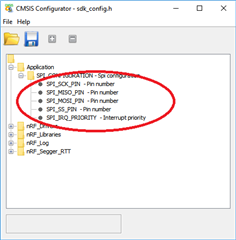
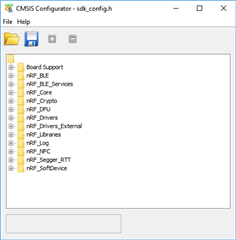
My question is regarding the configuration of sdk_config.h with the CMSIS tool. When I try to configure the ble_app_uart project to include the SPI driver (and subsequent pin configs), I cannot find the options, and the CMSIS tool seem to present me with different options.

I know I can manually correct this in sdk_config.h, but I'm not a fan of tinkering with auto-gen files.

Any help is greatly appreciated.

thanks
Parents
  • Hi.

    The reason you can't find the options is because CMSIS Configurator "reads" the text of the sdk_config.h for the project you have open, and presents a GUI version based on the text.

    For example, in the nRF5_SDK_15.2.0_9412b96\examples\peripheral\spi example's sdk_config.h file:

    // <h> Application 
    
    //==========================================================
    // <h> SPI_CONFIGURATION - Spi configuration
    
    //==========================================================
    // <o> SPI_SCK_PIN  - Pin number
    
    // <o> SPI_MISO_PIN  - Pin number
     
    // <o> SPI_MOSI_PIN  - Pin number
    
    // <o> SPI_SS_PIN  - Pin number
    
    // <o> SPI_IRQ_PRIORITY  - Interrupt priority
     
    // </h> 
    //==========================================================
    
    // </h> 
    //==========================================================
    
    // <h> nRF_Drivers 
    
    //==========================================================
    // <e> GPIOTE_ENABLED - nrf_drv_gpiote - GPIOTE peripheral driver - legacy layer
    //==========================================================
    

    You can see that <h> in represents a folder, and <o> represents an option in the sdk_config.h file

    So in order to find more options you have to either:

    1) Add the options you want to sdk_config.h

    2) Start with a sdk_config.h file which has all the options found in one of the subfolders of nRF5_SDK_15.2.0_9412b96\config.

    Best regards,

    Andreas

Reply
  • Hi.

    The reason you can't find the options is because CMSIS Configurator "reads" the text of the sdk_config.h for the project you have open, and presents a GUI version based on the text.

    For example, in the nRF5_SDK_15.2.0_9412b96\examples\peripheral\spi example's sdk_config.h file:

    // <h> Application 
    
    //==========================================================
    // <h> SPI_CONFIGURATION - Spi configuration
    
    //==========================================================
    // <o> SPI_SCK_PIN  - Pin number
    
    // <o> SPI_MISO_PIN  - Pin number
     
    // <o> SPI_MOSI_PIN  - Pin number
    
    // <o> SPI_SS_PIN  - Pin number
    
    // <o> SPI_IRQ_PRIORITY  - Interrupt priority
     
    // </h> 
    //==========================================================
    
    // </h> 
    //==========================================================
    
    // <h> nRF_Drivers 
    
    //==========================================================
    // <e> GPIOTE_ENABLED - nrf_drv_gpiote - GPIOTE peripheral driver - legacy layer
    //==========================================================
    

    You can see that <h> in represents a folder, and <o> represents an option in the sdk_config.h file

    So in order to find more options you have to either:

    1) Add the options you want to sdk_config.h

    2) Start with a sdk_config.h file which has all the options found in one of the subfolders of nRF5_SDK_15.2.0_9412b96\config.

    Best regards,

    Andreas

Children
No Data
Related