This post is older than 2 years and might not be relevant anymore
More Info: Consider searching for newer posts

nrf9160 DK asset_tracker loaded on board but not running

Hello

I am using Segger Embedded Studio with nrf9160. I can  'Build and Run' the 'asset_tracker' project but the LEDs are not blinking and my development kit is not connecting to Nordic cloud.

My board is printing 'NRF52840 board control statically configured. DK Uptime is 1780 seconds' in terminal.

My nrf9160DK was working fine out of the box but I erased firmware.

OUPUT:

Preparing target for download
Executing script TargetInterface.resetAndStop()
Reset: Halt core after reset via DEMCR.VC_CORERESET.
Reset: Reset device via AIRCR.SYSRESETREQ.
Downloading ‘zephyr.elf’ to J-Link
Programming 137.9 KB of addresses 00040000 — 000627b3
Programming 2.8 KB of addresses 000627b4 — 00063343
J-Link: Flash download: Bank 0 @ 0x00000000: 1 range affected (147456 bytes)
J-Link: Flash download: Total time needed: 1.240s (Prepare: 0.034s, Compare: 0.012s, Erase: 0.000s, Program: 1.181s, Verify: 0.004s, Restore: 0.007s)
Download successful
Stopped by vector catch
CPU could not be halted
Target connection has been lost
Connecting ‘J-Link’ using ‘USB’
Connecting to target using SWD
Loaded C:/arm_segger_embedded_studio_v414_win_x64_nordic/bin/JLink_x64.dll
Firmware Version: J-Link OB-K22-NordicSemi compiled Nov 20 2018 16:26:48
DLL Version: 6.40a
Hardware Version: V1.00
Target Voltage: 3.300
Device "NRF9160" selected.
Found SW-DP with ID 0x6BA02477
Scanning AP map to find all available APs
AP[2]: Stopped AP scan as end of AP map seems to be reached
AP[0]: AHB-AP (IDR: 0x84770001)
AP[1]: AHB-AP (IDR: 0x24770011)
Iterating through AP map to find AHB-AP to use
AP[0]: Core found
AP[0]: AHB-AP ROM base: 0xE00FF000
CPUID register: 0x410FD212. Implementer code: 0x41 (ARM)
Found Cortex-M33 r0p2, Little endian.
FPUnit: 8 code (BP) slots and 0 literal slots
Security extension: implemented
Secure debug: enabled
CoreSight components:
ROMTbl[0] @ E00FF000
ROMTbl[0][0]: E000E000, CID: B105900D, PID: 000BBD21 Cortex-M33
ROMTbl[0][1]: E0001000, CID: B105900D, PID: 000BBD21 DWT
ROMTbl[0][2]: E0002000, CID: B105900D, PID: 000BBD21 FPB
ROMTbl[0][3]: E0000000, CID: B105900D, PID: 000BBD21 ITM
ROMTbl[0][5]: E0041000, CID: B105900D, PID: 002BBD21 ETM
ROMTbl[0][6]: E0042000, CID: B105900D, PID: 000BBD21 CTI
Preparing target for download
Executing script TargetInterface.resetAndStop()
Reset: Halt core after reset via DEMCR.VC_CORERESET.
Reset: Reset device via AIRCR.SYSRESETREQ.
Downloading ‘zephyr.elf’ to J-Link
Programming 137.9 KB of addresses 00040000 — 000627b3
Programming 2.8 KB of addresses 000627b4 — 00063343
J-Link: Flash download: Bank 0 @ 0x00000000: Skipped. Contents already match
Download successful

  • Hi SuperAbe,

    First of I would highly recommend that you check out the "Getting started guide" on Devzone. 

    It could be that you find your answer in that tutorial. 


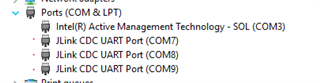
    Remember that when you connect the nRF91 to a computer it gives you access to three Virtual COM ports:

    • VCOM0 – Connected to nRF9160 (default)
    • VCOM1 – Connected to nRF52840 (nonconfigurable)
    • VCOM2 – Not connected to nRF9160 (default)

    So if you use a serial terminal you should make sure you are connected to the correct COM port so you are getting the correct data.

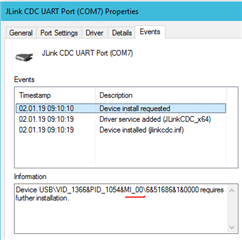
    It is usually the least incremented COM port that is for the nrf91, but you can confirm this also by checking in "Device manager",  right click the COM port and select "properties" and go to the "Events" tab and look in the "information" box to see that it includes: MI_00.


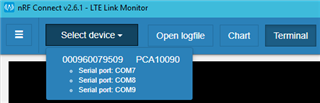
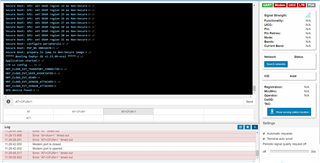
    This is something that you don't have to think about if you are using the Terminal in the "LTE Link Monitor" application in "nRF Connect for Desktop".

    That terminal selects the correct COM port for you:

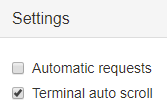
    If you want to use that Terminal as a regular terminal you need to deselect the "Automatic requests" in the down-right corner:

    Or else it will begin to send AT-commands automatically and update the information shown on the right tab.


    With regards to that the kit is not blinking, it sounds like you may be missing the secure_boot sample as well.

    This is all covered in the tutorial mentioned in the beginning of this post.

    Let me know if something is unclear and I will happily help.

    Best Regards,

    Martin L.

  • Thank you, Martin.

    My board is behaving blinking and connecting to NRF cloud.  Now I'm back to my first issue.

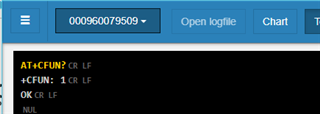
    AT commands always 'Error: 'AT+CFUN=1' timed out'

  • SuperAbe,

    If you are running the asset tracker tool there is no service listening to the serial port and forwarding the commands to the radio.  When you use the link monitor, you are seeing the output from any printf's in the code, but when you send an AT command something has to be listening (and nothing is).  The asset tracker code has all the AT commands baked into it and send those to the radio to connect.

    If you open the at_client software you can see how that is listening on the serial port and just passing data back and forth between the computer and the radio module.  You need to load the at_client software if you want to send AT commands and get a response.  Otherwise if you are running the asset tracker all you are seeing is output debug messages. 

    Steve

  • That worked. Thank you.

    I'm really loving nrf9160

Related