This post is older than 2 years and might not be relevant anymore
More Info: Consider searching for newer posts

facing issues in timer

hi..... i am using nrf52832 , merged the uart and  timer example program . while i am debugging , debugged successfully , but timer is not working

actually i set the timer for one minute after completing the one minute it should send the data .  i am getting the data very quickly in this case i couldn't  found any timer 

  • edits I made.

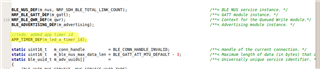
    Change the location of APP_TIMER_DEF(m_led_a_timer_id); // this has no effect on the results

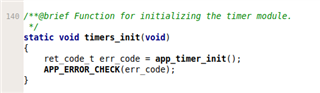
    I kept the timer_init function the same as the example. No need to change.

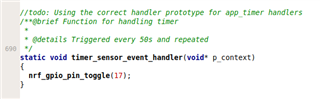
    Used the app_timer handler prototype instead of the nrf_drv_timer type. This is the change that provided working results.

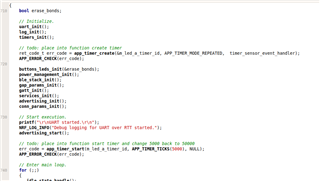
    I didn't place your create and start in function but you can keep those in your functions as you have shown above.

    Last time I would suggest is not to use pin 17 (LED1) as your toggle pin. Reason being the default ble_app_uart application might be using LED1 for visual feedback. If you need to use LED1 make sure the ble handler is not controlling the pin as well. This will be something like bsp_indicator_set 

  • thanks  alot its working. in this case how can put in sleep mode ,its like for one  minute it should sleep and another one minute it should send data ,how to do

  • Glad to hear it is working on your side!! Your sleep request is going to be a little tricky without knowing a little bit more about your use case. Here is why.

    Currently you above code by default goes into sleep mode by using the idle_state_handle function. Since your application is currently using BLE, you will only sleep between the advertisement intervals when not connected to a device and only sleep between the connection intervals when you are connected to a device. Since the softdevice will generate events in the background to be serviced. 

    If you only need to be connected to the device when it needs to send information then you could only advertise and connect to a central when data is needed to be sent.

    So instead of advertising continuously, you would advertise based on your timer, connect to central, send the information for your duration and then disconnect and restart or sleep timer and repeat.

    Or some scheme similar to the above. Basically you need to stop the softdevice from generating BLE events in order to get a longer sleep period or better CPU idle usage.

  • Is it possible to connect,when we need to send information . More over while during advertising and paring it will consume more power I guess . How to do that ,anyway we try this 

  • Yes it is possible and some of that is done of the central side to automatically send out the connection request once it appears the advertisement of your device. normally done by uuid filtering but there are other ways to do it as well.

    you can reduce the power consumption during advertising and connection by increasing the advertisement and connection intervals. You can also depending of the distance of the rx and tx reduce the radio power from 0 down to a low power. 

    Connecting only when you need to send information would be the best solution as you dont have to change any of the intervals. You only advertise when you want to connect and if you adjust your central to automatically connect to the device we it advertises then the peripheral can terminate the connect once it is done sending or maybe a better way it to have a end of transmission message and allow the central to perform the disconnect. Either way works. 

Related