This post is older than 2 years and might not be relevant anymore
More Info: Consider searching for newer posts

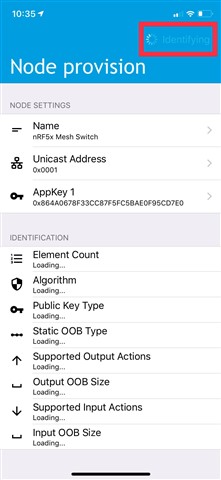
Mesh App on iOS couldn't identify a node

Hi,

I'm using the light switch client example to test the Mesh App on iOS.

The PCA10040 board can be identified through Mesh App, but not be identified on our test board.

Both programs on two boards are identical. Please tell me how to solve this problem.
Thanks.

  • Hello,

    So when you run the custom PCB board with the same application, you are able to discover the device, but it is stuck in "identifying" right? 

    Are you able to view the log output on this board? Can you also please try to forget the network on your phone (in the nRF Mesh app, go to settings -> forget network)

    Also, please try to erase the chip on the custom PCB, to make sure it starts with a clean flash. If you are not sure how to do this, please let me know. But you can use the "nrfjprog -e" command if you have nrfjprog (Nordic command line tools).

    If the clean flash and network reset doesn't work, what does your log output say?

    Best regards,

    Edvin

  • Hi Edvin,

    Our custom PCB can be found by Mesh App but stuck in "Identifying".

    I've used the nrfjprog to erase the chip and clear the network on App, it is still stuck.

    The following message are logs when it is identifying.

    <t: 0>, main.c, 322, ----- BLE Mesh Light Switch Client Demo -----
    <t: 545>, main.c, 293, Initializing and adding models
    <t: 5488>, mesh_app_utils.c, 65, Device UUID (raw): FE85BAB16813B743A8C4BC70CD1D3664
    <t: 5491>, mesh_app_utils.c, 70, Device UUID : B1BA85FE-1368-43B7-A8C4-BC70CD1D3664
    <t: 144379>, ble_softdevice_support.c, 104, Successfully updated connection parameters

  • What example and what SDK version do you use?

    And for good measure, what is the log output from the DK when it is successfully provisioned?

Related