This post is older than 2 years and might not be relevant anymore
More Info: Consider searching for newer posts

Problem: Not connecting to nRF cloud via LTE

I have a nrf9160dk I followed the steps in the movie www.nordicsemi.com/.../GetStarted
I have inserted my own sim that is working in my phone but I do not get LED3 and LED4 to blink. Question 1: what should I do to get it working?

I tried the 'getting started with development' with the nRF connect and launched the 'getting started assistent'

first step with installing Chocolatey: fail 

I get this in CMD powershell.exe
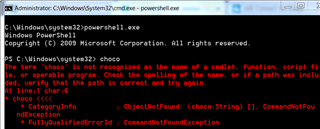
Question 2: what am I doing wrong and what should I do to make Chocolaty install properly?

Thanks for your help

  • Hi.

    You need to follow the installation steps found on Chocolatey's website.

    1. First, ensure that you are using an administrative shell - you can also install as a non-admin, check out Non-Administrative Installation.
    2. Copy the text specific to your command shell - cmd.exe or powershell.exe.
    3. Paste the copied text into your shell and press Enter.
    4. Wait a few seconds for the command to complete.
    5. If you don't see any errors, you are ready to use Chocolatey! Type choco or choco -? now, or see Getting Started for usage instructions.

    Install with cmd.exe:

    Run the following command:

    (copy command text)

    @"%SystemRoot%\System32\WindowsPowerShell\v1.0\powershell.exe" -NoProfile -InputFormat None -ExecutionPolicy Bypass -Command "iex ((New-Object System.Net.WebClient).DownloadString('">chocolatey.org/install.ps1'))" && SET "PATH=%PATH%;%ALLUSERSPROFILE%\chocolatey\bin"

    Install with PowerShell.exe:

    With PowerShell, there is an additional step. You must ensure Get-ExecutionPolicy is not Restricted. We suggest using Bypass to bypass the policy to get things installed or AllSigned for quite a bit more security.

    • Run Get-ExecutionPolicy. If it returns Restricted, then run Set-ExecutionPolicy AllSigned or Set-ExecutionPolicy Bypass -Scope Process.
    • Now run the following command:
    • (copy command text)
    Set-ExecutionPolicy Bypass -Scope Process -Force; iex ((New-Object System.Net.WebClient).DownloadString('chocolatey.org/install.ps1'))
    

    Additional considerations

    NOTE: Please inspect https://chocolatey.org/install.ps1 prior to running any of these scripts to ensure safety. We already know it's safe, but you should verify the security and contents of any script from the internet you are not familiar with. All of these scripts download a remote PowerShell script and execute it on your machine.

    Best regards,

    Andreas

Related