This post is older than 2 years and might not be relevant anymore
More Info: Consider searching for newer posts

52832 DK to 52840 Dongle migration help

I have some code that runs on the 52832 DK and I'd like to migrate it to the 52840 dongle, but I'm not sure what I need to do to accomplish that. I changed the memory locations a bit, changed some defines in the linker and everything compiled and seems to have flashed OK, but the dongle doesn't appear as a USB device when it's running my app. The dongle works when I flash the connectivity hex file.

My app is a combination of the multilink example from the SDK (15.0.0) and the Thingy to nRF example from here: https://github.com/crfosse/Thingy-52-to-nRF52xx It connects to multiple Thingy:52 devices, receives their environment data and writes it to the host PC over USB serial. It compiles and runs as expected on the DK.

I'm running SDK 15.0.0, with S132 6.0.0. I also changed to S140 6.0.0 when I flashed to the dongle, but it didn't seem to make a difference.

What do I need to do to get my app to work on the dongle?

Thanks!

Parents Reply Children
  • You said you're starting with an nRF52832 project.

    The nRF52832 doesn't have USB - so have you added that ... ?

  • No, the board is stock. It's a PCA10040, which I understand is a 52832 Development Kit, and it definitely has a USB port.

  • Hi.

    The nRF52832 does not have an USB peripheral, it does have an USB port for the Segger Chip. The Segger Chip is enumerating the USB port as a CDC serial COM Port, it also uses the same port as a USB when you're flashing and debugging. To make it more clear, the USB port you see talks with the Segger Chip, the Segger chip then talks with the nRF52832 chip, the USB port and the nRF52832 chip never talks directly with each other.

    The nRF52840 Dongle does not have a Segger Chip. It uses the DFU Trigger Library to flash new applications onto the chip. The DFU Trigger library is included in the shipped firmware which is an Open bootloader. When the trigger library is added to an application, it allows a connected USB host to remotely tell the app to reboot into the bootloader to allow it to be updated via DFU. You can click on the RESET button to jump into the bootloader.

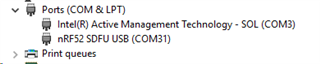
    Even though your Application compiled correctly it could still have some faults, and I think the reason that you cannot see the Dongle as a USB device is because you don't have the DFU Trigger Library.

    It should show up:

    Best regards,

    Andreas

Related