This post is older than 2 years and might not be relevant anymore
More Info: Consider searching for newer posts

Ping problem

Hello everyone!

I have followed the tutorial " Installing a 6LoWPAN enabled Linux kernel and required modules"
and i have compiled the UDP client IoT example in order to test the connectivity.
the led state shows that the ble connection was successful, 
the result of "ifconfig bt0" is as shown in the picture.
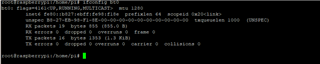

i think that confirms that the connection was successful.
but the problem is that i cannot ping on the device using the "ping6 -i bt0"
i get the following error message :

 PING fe80::21:12ff:fea7:af6a%bt0(fe80::21:12ff:fea7:af6a%bt0) 56 data bytes
From fe80::b827:ebff:fe98:f18e%bt0 icmp_seq=1 Destination unreachable: Address unreachable 


when i test with "tcpdump -i bt0" i can see that the nrf52 send some echo request as it should.

root@raspberrypi:/home/pi# tcpdump -i bt0
tcpdump: verbose output suppressed, use -v or -vv for full protocol decode
listening on bt0, link-type LINUX_SLL (Linux cooked), capture size 262144 bytes
11:52:47.976259 IP6 fe80::21:12ff:fea7:af6a > 2001:db8::1: ICMP6, echo request, seq 292, length 26
11:52:48.366236 IP6 fe80::21:12ff:fea7:af6a > 2001:db8::1: ICMP6, echo request, seq 293, length 26
11:52:48.756246 IP6 fe80::21:12ff:fea7:af6a > 2001:db8::1: ICMP6, echo request, seq 294, length 26
11:52:49.146269 IP6 fe80::21:12ff:fea7:af6a > 2001:db8::1: ICMP6, echo request, seq 295, length 26
11:52:49.536260 IP6 fe80::21:12ff:fea7:af6a > 2001:db8::1: ICMP6, echo request, seq 296, length 26
11:52:49.975022 IP6 fe80::21:12ff:fea7:af6a > 2001:db8::1: ICMP6, echo request, seq 297, length 26
11:52:50.365043 IP6 fe80::21:12ff:fea7:af6a > 2001:db8::1: ICMP6, echo request, seq 298, length 26

can anyone please explain to me why cant i ping on the nrf52840 device ? 

thank you


Parents
  • Make sure you have radvd installed and configured:

          sudo apt install radvd

    Save this config file to the /etc/ folder:

    radvd.conf

    Then execute these commands as root (write sudo -i to get root privileges)

          modprobe bluetooth-6lowpan
          echo 1 > /proc/sys/net/ipv6/conf/all/forwarding
          echo 1 > /sys/kernel/debug/bluetooth/6lowpan_enable
          echo "connect XX:XX:XX:XX:XX:XX 1" > /sys/kernel/debug/bluetooth/6lowpan_control
          ifconfig bt0 add 2001:db8::1/64
          /etc/init.d/radvd restart

    You should now see that the bt0 interface has a 2001:db8::1/64 ip using ifconfig.

    Translate the MAC address to ipv6 address this way

    AA:BB:CC:DD:EE:FF = 2BB:CCff:feDD:EEFF

    then to ping with global prefix:

          ping6 2001:db8::2BB:CCff:feDD:EEFF

    or to ping link local:

          ping6 fe80::2BB:CCff:feDD:EEFF

    Looking at the way you translated the MAC address into ipv6, fe80::21:12ff:fea7:af6a, I think maybe you should write 201 instead of 21? What is the MAC address?

Reply
  • Make sure you have radvd installed and configured:

          sudo apt install radvd

    Save this config file to the /etc/ folder:

    radvd.conf

    Then execute these commands as root (write sudo -i to get root privileges)

          modprobe bluetooth-6lowpan
          echo 1 > /proc/sys/net/ipv6/conf/all/forwarding
          echo 1 > /sys/kernel/debug/bluetooth/6lowpan_enable
          echo "connect XX:XX:XX:XX:XX:XX 1" > /sys/kernel/debug/bluetooth/6lowpan_control
          ifconfig bt0 add 2001:db8::1/64
          /etc/init.d/radvd restart

    You should now see that the bt0 interface has a 2001:db8::1/64 ip using ifconfig.

    Translate the MAC address to ipv6 address this way

    AA:BB:CC:DD:EE:FF = 2BB:CCff:feDD:EEFF

    then to ping with global prefix:

          ping6 2001:db8::2BB:CCff:feDD:EEFF

    or to ping link local:

          ping6 fe80::2BB:CCff:feDD:EEFF

    Looking at the way you translated the MAC address into ipv6, fe80::21:12ff:fea7:af6a, I think maybe you should write 201 instead of 21? What is the MAC address?

Children
  • Hello Sir, thank you for your reply.

    The mac adress is "00:21:12:A7:AF:6A"
    i tried pinging using "fe80::21:12ff:fea7:af6a and fe80::221:12ff:fea7:af6a"
    But the result remains the same.


    i guess the problem is that i was using the commands


       " ifconfig bt0 add 2001:db8::1/64" 
       " /etc/init.d/radvd restart"


    before connecting the device and not after.
    I will try it as soon as i get to my office.


    Thank you so much  for your help sir ! 

Related