hi...
i am using nrf52840 , segger.... mesh sdk 3.1 version in this case i want to send the simple message from client to server .how to do this ?
suggest me an idea ...
hi...
i am using nrf52840 , segger.... mesh sdk 3.1 version in this case i want to send the simple message from client to server .how to do this ?
suggest me an idea ...
Hi,
I suggest you have a look at the light switch example in the Mesh SDK. This example show you how you can send a message from client to server.
You need to have the same application key on both client and server, then set the publish address on the client to the server's unicast address.
Hi, Mttrinh
unicast address mean.... where can i find? i am using mesh app..how to set the address ..i am really confused please guide me
Hi,
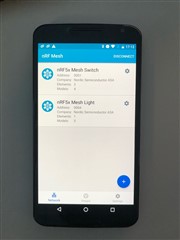
Have you been able to provision the clients and the server on the nRF Mesh app? After you have provisioned both devices, it should look like this:

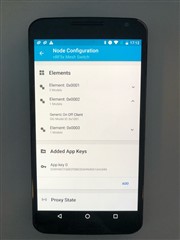
Then press on the gear icon next to "nRF5x Mesh Switch". You will then see this:
(If the second element aren't expanded do that first)
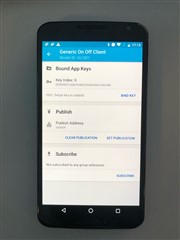
Next add a App Key by pressing "add"(In the picture you can see that I already added a key). Then press on Generic On Off Client. You will now see this:

Here you just have to bind the app key and set the publish address as the unicast address of the "nRF5x Mesh Light". In this case it is 0x0004, but this address depends on what order you have provisioned the devices. (You can see the address in the first picture).
You also have to bind the same app key for the Generic On Off Server model. nRF5x Mesh Light -> Element: 0x0004 -> Generic On Off Server -> Bind key
Try now and see if it works :) If you press button 1 on client, the LED on server should turn on and button 2 should turn it off.
Hi,
How can i send string "hello" from client to server? i don't know how to use, simple_on_off. I see function simple_on_off_set but argument on_off is bool value. Which function send string value message

So how to use this model?
Thanks you for your helps.

So how to use this model?
Thanks you for your helps.