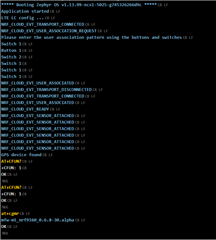
I have a nRF9160 DK that I am trying to get on a network. The iBasis sim does not appear to be in the coverage area, the SIM activated, but has not had both LEDs 3 & 4 blinking at any point. I have installed nRF connect 2.6.2 on Windows 10, followed by the LTE Link Monitor, in an attempt to see what the modem is doing and change sims as needed. However, when I try to run any AT command it gives me Error: 'command' timed out.
It has also started spewing the following after 10min:
***** Booting Zephyr OS kitprod_w49 *****
Application started
LTE LC config ...
[00:00:00.941,589]
[1;31m<err> net_if.net_if_init: There is no network interface to work with!
[0m
nrf_cloud_connect failed: 60
***** Booting Zephyr OS v1.13.99-ncs1-1823-g715d2df3dd *****
Secure Boot: configure flash
Secure Boot: SPU: set region 0 as Secure
Secure Boot: SPU: set region 1 as Secure
Secure Boot: SPU: set region 2 as Secure
Secure Boot: SPU: set region 3 as Secure
Secure Boot: SPU: set region 4 as Secure
Secure Boot: SPU: set region 5 as Secure
Secure Boot: SPU: set region 6 as Secure
Secure Boot: SPU: set region 7 as Secure
Secure Boot: SPU: set Flash region 8 as Non-Secure
Secure Boot: SPU: set Flash region 9 as Non-Secure
Secure Boot: SPU: set Flash region 10 as Non-Secure
Secure Boot: SPU: set Flash region 11 as Non-Secure
Secure Boot: SPU: set Flash region 12 as Non-Secure
Secure Boot: SPU: set Flash region 13 as Non-Secure
Secure Boot: SPU: set Flash region 14 as Non-Secure
Secure Boot: SPU: set Flash region 15 as Non-Secure
Secure Boot: SPU: set Flash region 16 as Non-Secure
Secure Boot: SPU: set Flash region 17 as Non-Secure
Secure Boot: SPU: set Flash region 18 as Non-Secure
Secure Boot: SPU: set Flash region 19 as Non-Secure
Secure Boot: SPU: set Flash region 20 as Non-Secure
Secure Boot: SPU: set Flash region 21 as Non-Secure
Secure Boot: SPU: set Flash region 22 as Non-Secure
Secure Boot: SPU: set Flash region 23 as Non-Secure
Secure Boot: SPU: set Flash region 24 as Non-Secure
Secure Boot: SPU: set Flash region 25 as Non-Secure
Secure Boot: SPU: set Flash region 26 as Non-Secure
Secure Boot: SPU: set Flash region 27 as Non-Secure
Secure Boot: SPU: set Flash region 28 as Non-Secure
Secure Boot: SPU: set Flash region 29 as Non-Secure
Secure Boot: SPU: set Flash region 30 as Non-Secure
Secure Boot: SPU: set Flash region 31 as Non-Secure
Secure Boot: configure SRAM
Secure Boot: SPU: set SRAM region 0 as Secure
Secure Boot: SPU: set SRAM region 1 as Secure
Secure Boot: SPU: set SRAM region 2 as Secure
Secure Boot: SPU: set SRAM region 3 as Secure
Secure Boot: SPU: set SRAM region 4 as Secure
Secure Boot: SPU: set SRAM region 5 as Secure
Secure Boot: SPU: set SRAM region 6 as Secure
Secure Boot: SPU: set SRAM region 7 as Secure
Secure Boot: SPU: set SRAM region 8 as Non-Secure
Secure Boot: SPU: set SRAM region 9 as Non-Secure
Secure Boot: SPU: set SRAM region 10 as Non-Secure
Secure Boot: SPU: set SRAM region 11 as Non-Secure
Secure Boot: SPU: set SRAM region 12 as Non-Secure
Secure Boot: SPU: set SRAM region 13 as Non-Secure
Secure Boot: SPU: set SRAM region 14 as Non-Secure
Secure Boot: SPU: set SRAM region 15 as Non-Secure
Secure Boot: SPU: set SRAM region 16 as Non-Secure
Secure Boot: SPU: set SRAM region 17 as Non-Secure
Secure Boot: SPU: set SRAM region 18 as Non-Secure
Secure Boot: SPU: set SRAM region 19 as Non-Secure
Secure Boot: SPU: set SRAM region 20 as Non-Secure
Secure Boot: SPU: set SRAM region 21 as Non-Secure
Secure Boot: SPU: set SRAM region 22 as Non-Secure
Secure Boot: SPU: set SRAM region 23 as Non-Secure
Secure Boot: SPU: set SRAM region 24 as Non-Secure
Secure Boot: SPU: set SRAM region 25 as Non-Secure
Secure Boot: SPU: set SRAM region 26 as Non-Secure
Secure Boot: SPU: set SRAM region 27 as Non-Secure
Secure Boot: SPU: set SRAM region 28 as Non-Secure
Secure Boot: SPU: set SRAM region 29 as Non-Secure
Secure Boot: SPU: set SRAM region 30 as Non-Secure
Secure Boot: SPU: set SRAM region 31 as Non-Secure
Secure Boot: configure peripherals
Secure Boot: MSP_NS 2002c790
Secure Boot: prepare to jump to Non-Secure image
***** Booting Zephyr OS kitprod_w49 *****
Application started
LTE LC config ...
[00:00:00.940,063]
[1;31m<err> net_if.net_if_init: There is no network interface to work with