hi...
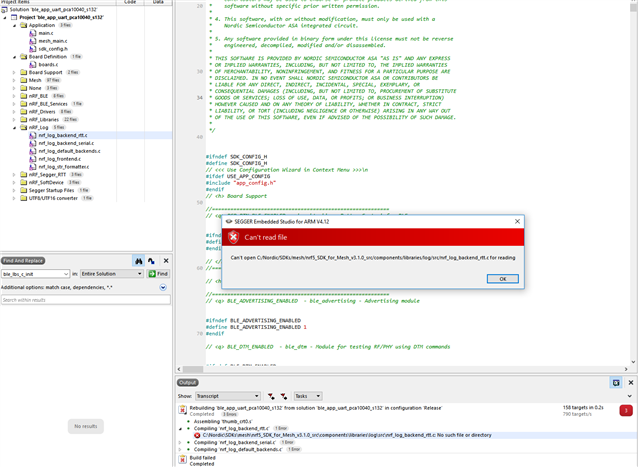
i am using latest sdk 3.1 mesh ,nRF52832 development kit while i am building it showing error "boards.h no such directory found ", even tools are set .how to solve this issue
hi...
i am using latest sdk 3.1 mesh ,nRF52832 development kit while i am building it showing error "boards.h no such directory found ", even tools are set .how to solve this issue
Have you updated the corrected path in SES? Go to Tools -> Options -> Building -> Global Macros & make sure that the SDK_ROOT & the MESH_ROOT paths are set correctly. For example, my path is:
SDK_ROOT=C:\Nordic\SDKs\mesh\nRF5_SDK_15.2.0_9412b96
MESH_ROOT=C:\Nordic\SDKs\mesh\nrf5_SDK_for_Mesh_v3.1.0_src
yes i have set properly
It seems what the developer has done is include all of the relevant folders & files from nRF5 SDK & copy them into the nrf5_SDK_for_Mesh_v3.1.0_src folder.
Either, you can keep the files separate & make sure that the header & c files point to the correct paths in each relevant SDK or you can copy the relevant files from the nRF5 SDK into the mesh SDK like the developer has done.
If you already have the nRF5 SDK & the mesh SDK, I would keep the files separate & make sure that the paths to the .c & .h files point to the correct SDK.
If you take a look at the Set User Include Directories (i.e. Right Click on Edit Options -> Common Configuration -> Preprocessor tab -> User Include Directories -> you can change all of the lines with:
../../../../../../components
& other header paths which refer to the nRF5 SDK locations to the correct location, e.g.
$(SDK_ROOT)/components
If you receive another compiler error later due to a missing .c file in Segger Embedded Studio, you can find the path of this file by clicking on the file location here.
Example below:

This documentation may also be helpful.
It seems what the developer has done is include all of the relevant folders & files from nRF5 SDK & copy them into the nrf5_SDK_for_Mesh_v3.1.0_src folder.
Either, you can keep the files separate & make sure that the header & c files point to the correct paths in each relevant SDK or you can copy the relevant files from the nRF5 SDK into the mesh SDK like the developer has done.
If you already have the nRF5 SDK & the mesh SDK, I would keep the files separate & make sure that the paths to the .c & .h files point to the correct SDK.
If you take a look at the Set User Include Directories (i.e. Right Click on Edit Options -> Common Configuration -> Preprocessor tab -> User Include Directories -> you can change all of the lines with:
../../../../../../components
& other header paths which refer to the nRF5 SDK locations to the correct location, e.g.
$(SDK_ROOT)/components
If you receive another compiler error later due to a missing .c file in Segger Embedded Studio, you can find the path of this file by clicking on the file location here.
Example below:

This documentation may also be helpful.