This post is older than 2 years and might not be relevant anymore
More Info: Consider searching for newer posts

DFU OTA error via nRF Connect over Samsung S9.

Hello,

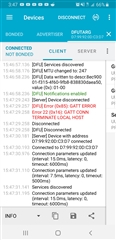
I am trying to connect my nRF52 DK to my phone (apologies not desktop) and perform a DFU OTA via the nRF Connect app. I'm using SD132 6.1.1, and uploaded the secure bootloader from SDK 15.2 to the DK (built and compiled via segger) after uploading the Hex file of SD132 6.1.1, I followed the getting started guide from 2017 and built the boot-loader successfully, I built a zip file out of the peripheral blinky example hex file provided via SDK 15.2. Key generation went smoothly, and wasn't tampered with once generated. The zip was transferred to my google drive. The DK registers as DfuTarg and connects successfully to my Samsung galaxy S9 running nRF Connect, but when I tried to upload my zip from either my google drive or phone, it stalls after stating "Starting DFU..." . The screenshot below shows what happened after I began the DFU upload of the zip via the logger records. I am unsure if the issue is my zip, the bootloader application, or my phone/nRF Connect's connectivity settings. The two errors received after starting the upload were as follows from the logger:

[DFU] Error(0x85): GATT ERROR

Error 22 (0x16): GATT CONN TERMINATE LOCAL HOST
Parents
  • Hi Ryan,

    Sorry for the late reply. Do you still have problems with this? I recommend you take one step at the time to debug. Have you tried to see if you can run a successful DFU transfer with a precompile bootloader and on of the provided pre-generated test packages in the SDK? Try for instance to upload hrs_application_s132.zip.

    And also, which peripheral blinky app did you built your DFU package from? Was it ble_app_blinky or blinky? Does the package includes a Softdevice?

    Best Regards,

    Marjeris

  • Hello, I am still having the issue, I did not try using a pre-compiled bootloader as I was confused on key access in my bootloader and application. Are you referring to the initial public key in SDK 15.2? I created a new private and public key and included that into my secure_bootloader project that was uploaded to my nRF52 DK. As for which blinky, the exact hex file is ble_app_blinky_pca10040_s132.hex . The exact nrfutil command was: nrfutil pkg generate --hw-version 52 --application-version 1 --application ble_app_blinky_pca100
    40_s132.hex --sd-req 0xB7 --key-file private.key app_dfu_package.zip 

    The nRF52 DK had Softdevice s132 nRF52 6.1.1 uploaded before secure bootloader project was uploaded.

    I followed this guide explicitly, only changing zip generation line to above blinky hex and sofdevice hex code: Getting Started with Nordic's Secure DFU bootloader, a step by step guide

  • Hi Ryan,

    The provided packages have been generated using a private key that corresponds to the default public key in the project, but which should not be use in production. See here for how to test the secure bootloader with the provided test images. You don't need to generate any keys for that.

    But the problem here I think is that you are probably using the ble_app_blinky_pca10040_s132.hex from the precompiled hex folder ble_peripheral\ble_app_blinky\hex which also includes a softdevice, as your application hex file. The tutorial specifies that the nrfutil commands above are for performing application image update only.

    "The .zip file contains the image hex file(s) we want to update, the init data and the signature of the packet. In the main part of this tutorial, we only do application image update. For bootloader and softdevice update, please see the Appendix."

    Open your ble_app_blinky_pca10040_s132 example in Segger Embedded, build the example, then go to the Output\Release\Exe folder and use the file ble_app_blinky_pca10040_s132.hex from there.

    Tips! You can check the contents of a hex file using the nRF Connect app for Desktop and the Programmer tool.

    You can also read appendix 1.3 in the tutorial (or even better the documentation on nrfutil on github directly) to see the nrfutil commands you need for generating a softdevice + application combination for your DFU zip file.

    Best Regards,

    Marjeris

  • So if I take one of those example hex files found in the secure_dfu test folder and use nrfutil to genrate a zip file using my own key it should upload properly?

Reply Children
Related