This post is older than 2 years and might not be relevant anymore
More Info: Consider searching for newer posts

SEGGER Embedded Studio (NRF9160) Project load failed

as title,

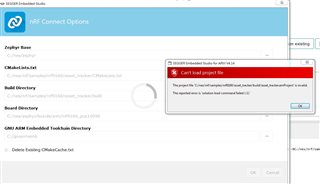
I can't load the project to SEGGER Embedded Studio.
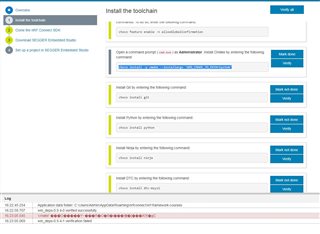
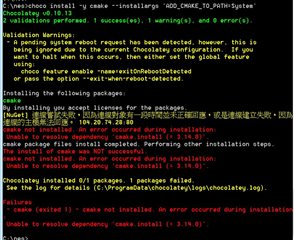
I  can't  install CMake by entering the those command (choco install -y cmake --installargs 'ADD_CMAKE_TO_PATH=System')

So I download CMake from their website
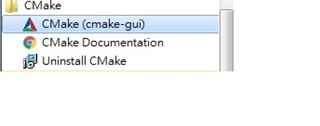
After  install  CMake , nRF connect SDK verify still not pass!


By the way,I can't find correct GNU Arm Embedded Toolchain version for my system os (windows 7 64-bit)

  • Hi,


    In order for SES (Nordic Edition) to find cmake, it needs to be in your PATH.

    You can check if cmake is in your path by opening a cmd.exe prompt and write "cmake". If it does not find it, you need to edit your environmental variables and add cmake to the path (you may have to reboot in order to apply the settings).

    Could you try this and see if SES starts working?


    Kind regards,

    Håkon

  • Hi ,

    I success to install CMake,


    But project load still failed, and I got following error message.

    Did you have any suggested?

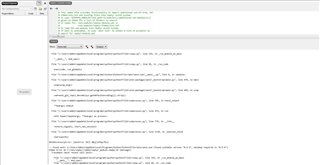
    Loading solution asset_tracker.emProject
    Executing load commands
    cmake -GNinja -DBOARD=nrf9160_pca10090 -DBOARD_DIR=C:/nes/zephyr/boards/arm/nrf9160_pca10090 -DZEPHYR_TOOLCHAIN_VARIANT=gnuarmemb -DGNUARMEMB_TOOLCHAIN_PATH=C:/gnuarmemb -BC:/nes/nrf/samples/nrf9160/asset_tracker/build -HC:/nes/nrf/samples/nrf9160/asset_tracker
    Failed to create ConsoleBuf!
    setActiveInputCodepage failed!
    Failed to create ConsoleBuf!
    setActiveInputCodepage failed!
    Zephyr version: 1.14.0
    -- Found PythonInterp: C:/Users/Admin/AppData/Local/Programs/Python/Python37/python.exe (found suitable version "3.7.2", minimum required is "3.4") 
    -- Selected BOARD nrf9160_pca10090
    Traceback (most recent call last):
      File "c:\users\admin\appdata\local\programs\python\python37\lib\runpy.py", line 193, in _run_module_as_main
        "__main__", mod_spec)
      File "c:\users\admin\appdata\local\programs\python\python37\lib\runpy.py", line 85, in _run_code
        exec(code, run_globals)
      File "C:\Users\Admin\AppData\Local\Programs\Python\Python37\Scripts\west.exe\__main__.py", line 9, in <module>
      File "c:\users\admin\appdata\local\programs\python\python37\lib\site-packages\west\_bootstrap\main.py", line 479, in main
        wrap(wrap_argv)
      File "c:\users\admin\appdata\local\programs\python\python37\lib\site-packages\west\_bootstrap\main.py", line 445, in wrap
        cwd=west_git_repo).decode(sys.getdefaultencoding()).strip()
      File "c:\users\admin\appdata\local\programs\python\python37\lib\subprocess.py", line 395, in check_output
        **kwargs).stdout
      File "c:\users\admin\appdata\local\programs\python\python37\lib\subprocess.py", line 472, in run
        with Popen(*popenargs, **kwargs) as process:
      File "c:\users\admin\appdata\local\programs\python\python37\lib\subprocess.py", line 775, in __init__
        restore_signals, start_new_session)
      File "c:\users\admin\appdata\local\programs\python\python37\lib\subprocess.py", line 1178, in _execute_child
        startupinfo)
    NotADirectoryError: [WinError 267] ¥Ø¿ý¦WºÙµL®Ä¡C
    -- Found west: C:/Users/Admin/AppData/Local/Programs/Python/Python37/Scripts/west.exe (found suitable version "0.5.5", minimum required is "0.5.4")
    CMake Error at C:/nes/zephyr/cmake/zephyr_module.cmake:29 (message):
      Traceback (most recent call last):
        File "c:\users\admin\appdata\local\programs\python\python37\lib\runpy.py", line 193, in _run_module_as_main
          "__main__", mod_spec)
        File "c:\users\admin\appdata\local\programs\python\python37\lib\runpy.py", line 85, in _run_code
          exec(code, run_globals)
        File "C:\Users\Admin\AppData\Local\Programs\Python\Python37\Scripts\west.exe\__main__.py", line 9, in <module>
        File "c:\users\admin\appdata\local\programs\python\python37\lib\site-packages\west\_bootstrap\main.py", line 479, in main
          wrap(wrap_argv)
        File "c:\users\admin\appdata\local\programs\python\python37\lib\site-packages\west\_bootstrap\main.py", line 464, in wrap
          import west.main
      ModuleNotFoundError: No module named 'west.main'
    Call Stack (most recent call first):
      C:/nes/zephyr/cmake/app/boilerplate.cmake:394 (include)
      CMakeLists.txt:9 (include)
    -- Configuring incomplete, errors occurred!
    Project load failed
    Reported error: solution load command failed (1)
  • Hi,


    I have not seen these types of errors before. Could you ensure that you start with a clean build directory when trying to import the project?

    If you have had issues prior (with the configuration) and you re-configure in the same build folder, it may give you issues, so removing the build folder manually between each import is highly recommended.


    Kind regards,

    Håkon

  • Hi

    After I re-pull all file from git

    I can build project on SES.

    Thanks for your help!

Related