This post is older than 2 years and might not be relevant anymore
More Info: Consider searching for newer posts

How use to 0.96" 160x80 st7735s on NRF52840DK in SDK project nRF5_SDK_15.2.0_9412b96\examples\peripheral\gfx\pca10056\blank\ses

Hi,

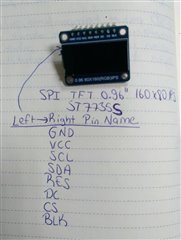
0.96"  160x80 st7735 

Pin definitions in gfx project in sdk

#define ST7735_SCK_PIN 47

#define ST7735_MISO_PIN 46

#define ST7735_MOSI_PIN 45

#define ST7735_SS_PIN 44

#define ST7735_DC_PIN 42

#define ST7735_IRQ_PRIORITY 3

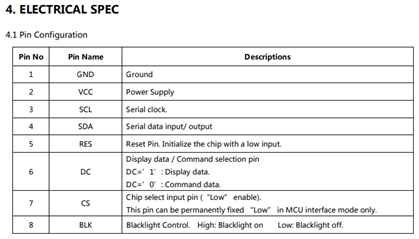
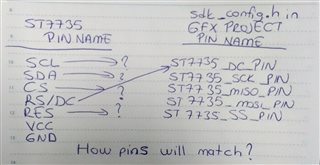
(SCL , SDA,RES,CS,BLK)The pins in the module are matched with which pins in the project.

Parents Reply Children
  • I do not have this board, so I have not tested myself. However, you can see that the pin numbers in this post (which you pasted in your previous post), matches the defines in <SDK12.3>\examples\peripheral\gfx\pca10040\blank\config\sdk_config.h. However, you are using the nRF52840 DK, so you need to match this with the <SDK12.3>\examples\peripheral\gfx\pca10056\blank\config\sdk_config.h, but that should not be a problem since you have both the sdk_config.h files from the SDK.

    For example, you can see this relevant information for the SCK pin in what we already have:

    • pca10056 sdk_config.h: #define ST7735_SCK_PIN 47
    • pca10040 sdk_config.h: #define ST7735_SCK_PIN 25
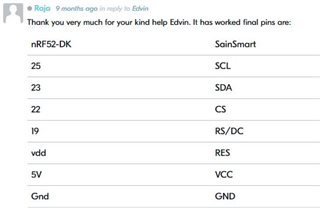
    • Table from this post: SCL is pin 25 on nRF52-DK using GFX example

    From this we know that the SCL pin on the ST7735 is the SCK signal seen by the nRF ST7735 driver, and you should connect it accordingly. If you do not modify the pin configuration of the GFX example for the nRF52840 DK, this means that you should connect it to GPIO 47, which is P1.15.

    You can use the same approach with the other pins.

Related