This post is older than 2 years and might not be relevant anymore
More Info: Consider searching for newer posts

USB DFU help

My application will update over USB from a connected host.

For testing, I used two projects:

  • Bootloader: secure_bootloader_usb_mbr_pca10056
  • Application: led_softblink_pca10056

This is running on the nRF52840 DK, with development on Segger Embedded Studio.

I generated a package with nrfutil, using custom security keys.

nrfutil pkg generatge --hw-version 0 -sd-req 0x00 --application-version 4 --key-file private.key --application softblink.hex --output dfu_test.zip

I can program the application and it runs.

I can program the bootloader and it runs. It creates a new USB serial port. can load the application into the USB port.

nrfutil dfu usb-serial -pkg dfu_test.zip -p COMxx

But the application does not run.

I'm not sure where the problem is.

Do I need to create a nrfutil settings file?

Do I need to change the link map settings for the application?

  • Hi.

    You should generate a bootloader settings page also, and merge that with your bootloader.

    Best regards,

    Andreas

  • Step by step, on NRF52840 DK board


    Build bootloader

    Verify that it runs when downloaded from Segger Embedded Studio.


    Create settings file

    nrfutil settings generate --family NRF52840 --application led_softblink_pca10056.hex --application-version 1 --bootloader-version 1 --bl-settings-version 1 settings.hex


    Merge files

    mergehex -m secure_bootloader_usb_mbr_pca10056.hex settings.hex -o bl_and_settings.hex


    Program

    nrfjprog -F NRF52 --program bl_and_settings.hex --chiperase


    The board comes up with the LED status patterns, showing that the bootloader is running


    Create a DFU package


    nrfutil pkg generate --hw-version 0 --sd-req 0x00 --application-version 1 --key-file private.key --application led_softblink_pca10056.hex dfu_test.zip


    Download the update


    nrfutil dfu usb-serial -pkg dfu_test.zip -p COM68

    Device programmed

    Nothing happens

    All steps were executed without errors.


    Is the example DFU bootloader incomplete?

  • Hi again ken-a

    Can you try to add the following to your procedure:

    1. Build bootloader

    2. In the Application, change the Section Placement Macros, as step 4 in this guide demonstrates, to the following:

    FLASH_PH_START=0x0
    FLASH_PH_SIZE=0x100000
    RAM_PH_START=0x20000000
    RAM_PH_SIZE=0x40000
    FLASH_START=0x1000
    FLASH_SIZE=0xFF000
    RAM_START=0x20000008
    RAM_SIZE=0x3FFF8

    Save and build the Application.

    3. Generate settings file.

    4. Merge settings file

    5. Program bl_and_settings.hex and program the MBR, you find the MBR in the folder: components\softdevice\mbr\nrf52840\hex

    6.Generate the DFU packet

    7. Do the DFU.

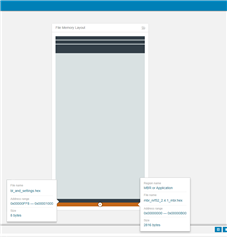
    I think the issue you had was that the Application was placed in an area where the MBR or Bootloader had occupied memory:

    The Application started on my board after the DFU.

    Best regards,

    Andreas

Related