This post is older than 2 years and might not be relevant anymore
More Info: Consider searching for newer posts

JLINK directory not created (USB connection)

I am following the instructions at infocenter.nordicsemi.com/.../nRF52840_PDK_User_Guide_v1.2.pdf
to program a pre-compiled example (blinky).

I have two nRF52840-PDK (PC10056) preview development kits.
When I use the first board, everything works perfectly.

However, when I use the second board, the standard USB driver (JLINK directory) does not appear on my host computer (linux machine).

Here is what I do:
- connect the USB port to my linux machine
     /dev/ttyACM0 shows up
- erase the flash on the board:
    nrfjprog --eraseall
- disconnect the USB port
- re-connect the USB port 
      /dev/ttyACM0 shows up
.     .. but JLINK directory does not show up.

Since all of this works well when I use the first board (the JLINK directory shows up), it appears that the issue is with the second board.

Is there something on my second board that prevents it from allowing the JLINK directory to be created?
What can I do to fix the issue?

  • Hi.

    Can you try the following:

    1. Find a new USB cable or check that your cable is OK.

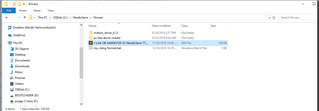
    2. Download this file: J-Link OB-SAM3U128-V2-NordicSemi 170724.bin

    3. Put the device in BOOTLOADER mode by holding button IF BOOT/RESET down, and turning power OFF, then turning power ON.

    4. Have the file ready to be dragged into the BOOTLOADER folder like this:

    5. Turn the power OFF, then turn the power ON.

    Does this fix the problem?

    If not, please try/confirm the following:

    1. Does the device show up in Device Manager on your computer? Please try to connect and disconnect the kit a few times. It might show up with unexpected names.
    2. Have you tried a different USB cable? Faulty cables are surprisingly often the problem.
    3. Have you tried using a different computer? If it works on a different computer we know that the kit is not broken and that it is probably a driver issue.
    4. Have you measured the supply voltage on the kit? It should be somewhere between 2.8V-3.3V. If it isn't, then the hardware is probably broken.
    5. Have you made sure that you are using the latest J-Link driver version?
    6. Have you tried this guide?
    7. Are the switches on your board in the correct place? SW9 set to VDD, SW6 set to DEFAULT. Have you cut any solder bridges?

    Best regards,

    Andreas

Related