

Hi,
Since the last update of the 'Getting Started Assistant' (0.9.0) from 'nRF Connect' 2.6.2 on Windows, I can´t set up or compile any sample of the SDK for the evaluation board nRF9160-DK.
I followed all the steps of the Assistant in a clean Windows environment without success.
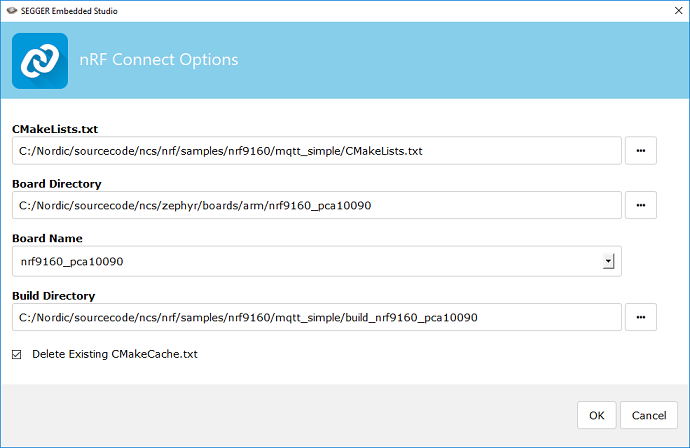
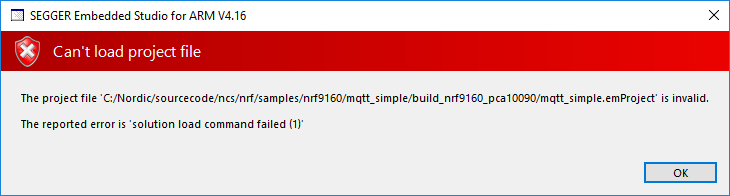
In the created folder <sourcecode_root>/ncs/nrf/samples/nrf9160 the samples 'asset_tracker' and 'secure_boot' no longer exist. But, if I try to open any other existing sample with SEGGER Studio with file->Open nRF Connect SDK Project, I always get an error.
This is the output:
Loading solution mqtt_simple.emProject
Executing load commands
cmake -GNinja -DBOARD=nrf9160_pca10090 -DBOARD_DIR=C:/Nordic/sourcecode/ncs/zephyr/boards/arm/nrf9160_pca10090 -DZEPHYR_TOOLCHAIN_VARIANT=gnuarmemb -DGNUARMEMB_TOOLCHAIN_PATH=C:/7_2018-q2-update -BC:/Nordic/sourcecode/ncs/nrf/samples/nrf9160/mqtt_simple/build_nrf9160_pca10090 -HC:/Nordic/sourcecode/ncs/nrf/samples/nrf9160/mqtt_simple -DEXTRA_KCONFIG_TARGETS=menuconfig_ses -DEXTRA_KCONFIG_TARGET_COMMAND_FOR_menuconfig_ses=C:/Users/Alejandro/Desktop/arm_segger_embedded_studio_v416_win_x64_nordic/html/configure_nordic_project_menuconfig.py
-- Using application from 'C:/Nordic/sourcecode/ncs/nrf/samples/nrf9160/mqtt_simple'
Zephyr version: 1.14.0
-- Found PythonInterp: C:/Python37/python.exe (found suitable version "3.7.3", minimum required is "3.4")
-- Selected BOARD nrf9160_pca10090
-- Found west: C:/Python37/Scripts/west.exe (found suitable version "0.5.8", minimum required is "0.5.6")
-- Cache files will be written to: C:\Users\Alejandro\AppData\Local/.cache/zephyr
-- Loading C:/Nordic/sourcecode/ncs/zephyr/boards/arm/nrf9160_pca10090/nrf9160_pca10090.dts as base
-- Overlaying C:/Nordic/sourcecode/ncs/zephyr/dts/common/common.dts

C:/Nordic/sourcecode/ncs/nrf/samples/nrf9160/mqtt_simple/prj.conf:11: warning: attempt to assign the value 'y' to the undefined symbol LTE_LINK_CONTROL

C:/Nordic/sourcecode/ncs/nrf/samples/nrf9160/mqtt_simple/prj.conf:12: warning: attempt to assign the value 'n' to the undefined symbol LTE_AUTO_INIT_AND_CONNECT

C:/Nordic/sourcecode/ncs/nrf/samples/nrf9160/mqtt_simple/prj.conf:15: warning: attempt to assign the value 'y' to the undefined symbol BSD_LIBRARY

C:/Nordic/sourcecode/ncs/nrf/samples/nrf9160/mqtt_simple/prj.conf:19: warning: attempt to assign the value 'y' to the undefined symbol AT_HOST_LIBRARY

Error: Aborting due to non-whitelisted Kconfig warning
'C:/Nordic/sourcecode/ncs/nrf/samples/nrf9160/mqtt_simple/prj.conf:11: warning: attempt to assign
Parsing Kconfig tree in C:/Nordic/sourcecode/ncs/nrf/samples/nrf9160/mqtt_simple/Kconfig
Loading C:/Nordic/sourcecode/ncs/zephyr/boards/arm/nrf9160_pca10090/nrf9160_pca10090_defconfig as base
Merging C:/Nordic/sourcecode/ncs/nrf/samples/nrf9160/mqtt_simple/prj.conf
the value 'y' to the undefined symbol LTE_LINK_CONTROL'. Note: If this warning doesn't point to an
actual problem, you can add it to the whitelist at the top of
C:/Nordic/sourcecode/ncs/zephyr/scripts/kconfig/kconfig.py.

CMake Error at C:/Nordic/sourcecode/ncs/zephyr/cmake/kconfig.cmake:191 (message):
  command failed with return code: 1
Call Stack (most recent call first):
  C:/Nordic/sourcecode/ncs/zephyr/cmake/app/boilerplate.cmake:487 (include)
  CMakeLists.txt:10 (include)


-- Configuring incomplete, errors occurred!
Project load failed
Reported error: solution load command failed (1)
Thank you in advance for any help

