This post is older than 2 years and might not be relevant anymore
More Info: Consider searching for newer posts

nRF52832 uart init (APP_UART_FIFO_INIT) stop ble from working

Hi Team,

Can some one help me out? I really a newbie and I try to use example to modify for my need and something work okay now (bluetooth) but when I try to use the uart take from those example too.

and ble stop working it seem stuck somewhere or I missing something on configure file but I don't know. I search through internet and try few solutions but none work.

and in uart init when I remove below code ble working again :( 

I stuck with it 2 days and this is my last resource to ask your help on this. I attached my project to this stuff too.ble_app_Bike_pca10040_s132.zip

APP_UART_FIFO_INIT(&comm_params,
UART_RX_BUF_SIZE,
UART_TX_BUF_SIZE,
uart_event_handle,
APP_IRQ_PRIORITY_LOWEST,
err_code);
APP_ERROR_CHECK(err_code);

Parents
  • Hi,

    You write "it seem stuck somewhere". Have you attempted to debug to see exactly what is happening? Which state is the system in? Was an error detected by an APP_ERROR_CHECK? If so, where and what was the return code? You can typically find out much about these issues by enabling logging and building with "DEBUG" defined for the project (simply by selecting the Debug build configuration from the Drop-down if you are using SES). You might find An introduction to error handling in nRF5 projects interesting.

    Also, which SDK version are you using, and are you testing on a DK or custom HW?

  • Hi Einar,

    This is more profound to me since I just quick learn about the chip and code few days through one of your guiding with example then I succeed with ble. but I have no luck on Uart, when I check with keil debug I don't see it jump out for other init. I aware my lacking knowledge on this that why I try my hard to copy from example code.

    on the HW I'm not sure if this belong too any of your development kit, cause I quick take from customer a pcba for this quick project. but I do know it is GEM2 which seem you are supply this to wahoo

  • Hi,

    I see. The only sensible way going forward is to debug the application to see what state it is in. It will not just stop working without any trace. For instance: what is the value of the err_code after you call APP_UART_FIFO_INIT()?

  • Hi Einar,

    the compile is okay, and I don't see any error happen at the compiling. is error_code will record somewhere on working folder then I go can check with it?

  • Hi,

    Anh Le said:
    the compile is okay, and I don't see any error happen at the compiling.

     I understand that it compiles. But you need to debug the application while it is running.

    Anh Le said:
    is error_code will record somewhere on working folder then I go can check with it?

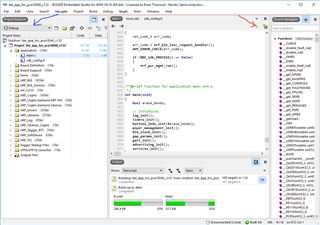
    No, you should use a debugger (the same device you use to flash the nRF), and this will allow you to set breakpoints and inspect memory of the running application. For instance if you are using SES, you can start debugging by clicking the button pointed to by the red arrow to the right here (also note the blue arrow on the left side, selecting the debug configuration):

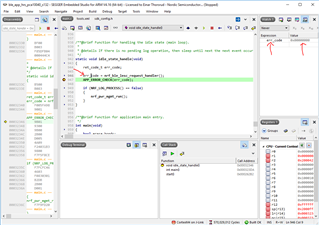
    Now I set a breakpoint on the line after the error code I am interested in, and run the application until it hits the breakpoint. Then I can hover over the variable with the mouse to see it's value, or right click and add it to watch as shown here:

    In this case you can see that the err_code value is 0, which is NRF_SUCCESS (meaning all OK).

    Using such and other debugging techniques is necessary to understand what is going on when you have something not working with your application.

  • Hi Einar,

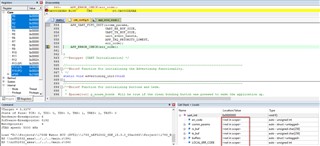
    I was busy this week and just have my time to testing your suggestion, but the variables always show me not in scope :( can you please give me some advises?


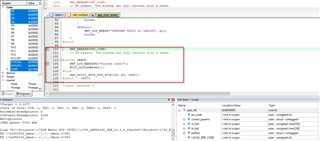
    Also I can see it always jump to request the system due to error happen somewhere

Reply Children
No Data
Related