This post is older than 2 years and might not be relevant anymore
More Info: Consider searching for newer posts

Zigbee debugging

Hi,

I'm using the NRF52840 with the "nRF5_SDK_for_Thread_and_Zigbee_2.0.0".

I tested the zigbee light_bulb example and zigbee light_bulb + ble. It works fine so my next step was to do combination with my own ble service in a existing project.
In my new project the ble part works fine. The zigbee (still the light bulb example) part does not work at the moment. When i sniff, i don't see the Beacon request frames.

When i look at the uart logging i still see "Production config is not present or invalid" and "Failed to join network. Status: -1".

extra info:
i used sd_softdevice_vector_table_base_set((uint32_t) vector_table) to change the vector table to RAM. For the Zigbee part i registered the following interrupts: 

SysInt_RegisterIsr(TIMER3_IRQn, (ISR_CALLBACK) TIMER3_IRQHandler);
SysInt_RegisterIsr(SWI3_EGU3_IRQn, (ISR_CALLBACK) SWI3_IRQHandler);
SysInt_RegisterIsr(RTC2_IRQn, (ISR_CALLBACK) RTC2_IRQHandler);

this is needed if i look at the documentation. 

My goal is to let the zigbee and the BLE part to work together in my code. Any tips how to debug the Zigbee part so i can figure out the problem?

Best regards,

Mathias

  • Hello Mathias,

    I suggest that you port to the nRF5_SDK_for_Thread_and_Zigbee_3.0.0, which was recently released. In addition to bugfixes, there are more examples, and more documentation in this SDK.

    If you want to look at how to set up the Zigbee + BLE project, I suggest that you look at one of the examples from the SDK\examples\multiprotocol\ble_zigbee folder. Perharps the ble_zigbee_light_bulb_eddystone or the ble_zigbee_light_switch_nus is a good starting point from your application?

    Best regards,

    Edvin

  • Hello,

    Ok, we will start to update the SDK.

    We looked at the multiprotocol examples with SKD 2.0.0 and they worked.
    But when i port the code to my my project only the BLE part works.

    mmmm strange, if i init the clock before i init S140 stack in don't get zigbee messages. 
    If i don't init the clock i get my beacon request. Are there other thing i need to be aware of?

    I want to connect to my echo plus (amazon alexa). But i don't get "Joined network successfully"
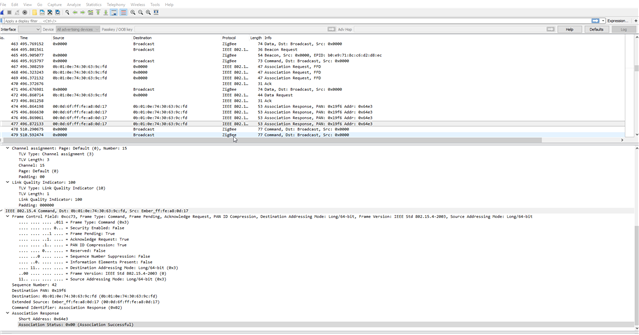
    Any ideas on this. I see communication with my sniffer. See image below.

    Thx

  • Hello.

    Can you send the sniffer trace? The .pcapng file that the screenshot is from?

  • Hello

    We are still unable to connect with zigbee using "nRF5_SDK_for_Thread_and_Zigbee_3.0.0".  However, with the "eddystone" example (multiprotocol / zigbee / ble), we see that the NRF52840 DK almost immediately a zigbee-connection can be made with our Amazon Alexa. 

    When we use the SDK for our own project, also BLE+zigbee, the BLE stack is up and running and advertising.  The zigbee stack also is up and running, but we always get the message "Failed to join network. Status: -1".  Our own project is derived from the "eddystone" example.

    This is wat we have tried:

     - We stripped the eddystone example from cryptography, pwm and the eddystone functionality itself.  What remains is the BLE stack init, scheduler init and zigbee init.  Zigbee connection still works.

     - Our project uses exact the same sdk_config.h file

     - Our project uses exact the same "system_nrf52840.c" file.  We also use the "multiprotocol_802451_config.h" file.

     - Our Zigbee initialisation is exact the same as in the eddystone example.  The stack runs because the "zboss_signal_handler" is periodically called.

     - Beacon requests are send too.  The "zb_set_network_router_role" is set to ZB_TRANSCEIVER_ALL_CHANNELS_MASK.

     - I have enable the Zboss logging.  This is what we get out from it.  I hope you can help us in some way.  If you need some other info / code fragments,... , please ask.

    <info> app: Stack init done

    <info> app: StartAdvPublic

    <info> zboss:  DE AD 0E 02 00 00 00 00|........

    <info> zboss:  7A 00 00 0F 00 F8 FF 07|z.......

    <info> zboss:  DE AD 0A 02 00 00 01 00|........

    <info> zboss:  47 01 6F 00 DE AD 0A 02|G.o.....

    <info> zboss:  00 00 02 00 47 01 99 00|....G...

    <info> zboss:  DE AD 0A 02 00 00 03 00|........

    <info> zboss:  47 01 F1 00 DE AD 0A 02|G.......

    <info> zboss:  00 00 04 00 48 01 36 00|....H.6.

    <info> zboss:  DE AD 0A 02 00 00 05 00|........

    <info> zboss:  B9 08 83 00 DE AD 0A 02|........

    <info> zboss:  00 00 06 00 B9 08 86 00|........

    <info> zboss:  DE AD 0A 02 00 00 07 00|........

    <info> zboss:  B9 08 8A 00 DE AD 0A 02|........

    <info> zboss:  00 00 08 00 B9 08 8D 00|........

    <info> zboss:  DE AD 0A 02 00 00 09 00|........

    <info> zboss:  47 01 94 00 DE AD 0A 02|G.......

    <info> zboss:  00 00 0A 00 69 00 5C 00|....i.\.

    <info> zboss:  DE AD 16 02 00 00 0B 00|........

    <info> zboss:  69 00 77 00 0C 00 00 00|i.w.....

    <info> zboss:  8A 02 00 00 C3 00 00 00|........

    <info> zboss:  DE AD 0A 02 00 00 0C 00|........

    <info> zboss:  69 00 79 00 DE AD 0E 02|i.y.....

    <info> zboss:  00 00 0D 00 2B 08 96 00|....+...

    <info> zboss:  01 00 00 00 DE AD 0A 02|........

    <info> zboss:  00 00 0E 00 90 0C DD 00|........

    <info> zboss:  DE AD 16 02 00 00 0F 00|........

    <info> zboss:  90 0C A8 00 00 80 00 00|........

    <info> zboss:  00 00 00 00 08 00 00 00|........

    <info> zboss:  DE AD 16 02 00 00 10 00|........

    <info> zboss:  90 0C A8 00 01 80 00 00|........

    <info> zboss:  01 00 00 00 08 00 00 00|........

    <info> zboss:  DE AD 16 02 00 00 11 00|........

    <info> zboss:  90 0C A8 00 02 80 00 00|........

    <info> zboss:  02 00 00 00 08 00 00 00|........

    <info> zboss:  DE AD 16 02 00 00 12 00|........

    <info> zboss:  90 0C A8 00 03 80 00 00|........

    <info> zboss:  03 00 00 00 08 00 00 00|........

    <info> zboss:  DE AD 16 02 00 00 13 00|........

    <info> zboss:  90 0C A8 00 04 80 00 00|........

    <info> zboss:  04 00 00 00 08 00 00 00|........

    <info> zboss:  DE AD 16 02 00 00 14 00|........

    <info> zboss:  90 0C A8 00 05 80 00 00|........

    <info> zboss:  05 00 00 00 08 00 00 00|........

    <info> zboss:  DE AD 16 02 00 00 15 00|........

    <info> zboss:  90 0C A8 00 06 80 00 00|........

    <info> zboss:  06 00 00 00 08 00 00 00|........

    <info> zboss:  DE AD 16 02 00 00 16 00|........

    <info> zboss:  90 0C A8 00 1F 80 00 00|........

    <info> zboss:  07 00 00 00 08 00 00 00|........

    <info> zboss:  DE AD 16 02 00 00 17 00|........

    <info> zboss:  90 0C B6 00 00 00 00 00|........

    <info> zboss:  00 00 00 00 09 00 00 00|........

    <info> zboss:  DE AD 16 02 00 00 18 00|........

    <info> zboss:  90 0C B6 00 01 00 00 00|........

    <info> zboss:  01 00 00 00 09 00 00 00|........

    <info> zboss:  DE AD 16 02 00 00 19 00|........

    <info> zboss:  90 0C B6 00 02 00 00 00|........

    <info> zboss:  02 00 00 00 09 00 00 00|........

    <info> zboss:  DE AD 16 02 00 00 1A 00|........

    <info> zboss:  90 0C B6 00 03 00 00 00|........

    <info> zboss:  03 00 00 00 09 00 00 00|........

    <info> zboss:  DE AD 16 02 00 00 1B 00|........

    White small square[1;31mLogs dropped (162)White small square[0m

    <info> zboss:  BC 08 22 01 DE AD 0A 02|..".....

    <info> zboss:  41 00 66 00 B9 08 23 04|A.f...#.

    <info> zboss:  DE AD 0A 02 41 00 67 00|....A.g.

Related