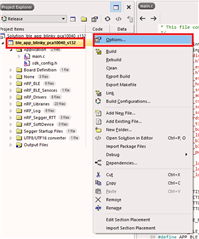
2. Right click the Project folder and click Options...
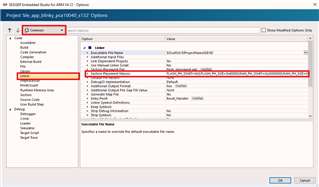
3. Select Common configuration and click Linker, then double-click Section Placement Macros.
4. Now the Section Placement Macros window will open, and you can edit FLASH_START, FLASH_SIZE, RAM_START and RAM_SIZE to the exact values the SoftDevice suggests.
5. Click OK and confirm that the values have changed in theSection Placement Macrosbefore pressing OK to confirm the changes in your options.
2. Right click the Project folder and click Options...
3. Select Common configuration and click Linker, then double-click Section Placement Macros.
4. Now the Section Placement Macros window will open, and you can edit FLASH_START, FLASH_SIZE, RAM_START and RAM_SIZE to the exact values the SoftDevice suggests.
5. Click OK and confirm that the values have changed in theSection Placement Macrosbefore pressing OK to confirm the changes in your options.