This post is older than 2 years and might not be relevant anymore
More Info: Consider searching for newer posts

nRF52 - Irregular delay between data packets

Hi there,

In my application I use a hardware timer to capture and transmit sensor data with a sample time of 10ms (after corresponding notification is enabled). The connection interval is set up to 7.5ms. 

As the TX queue is filled with slower rate than the data is (or should) be transmitted, I would expect that there are "empty" (or no) packets between the sensor data packets, but not that multiple data packets are transmitted during one connection interval. However, that seems to be the case: I use a nRF DK52 board in combination with nRF Connect using a PC to enable notification of the bluetooth characteristic which should send packets with sensor data every 7.5ms. However, examining the timestamps of the incoming packets,

1) the delay times between the packets seem to vary and are never 7.5ms (s. Screenshot)
2) it seems as if during some connection intervals multiple packets are received


The data packets contain an index which is incremented by the sensor application with every new data set. Apparently, no packets seem to miss. Only the time in between the incoming packets is what troubles me (as for the real application the sensor data is transmitted to a second device which performs real time processing of the data, where the time difference of the packets is of importance). 

I am using an nRF52832 with SD s132 5.0.0 and have activated DLE.

The log file gained by nRF Connect is attached.

Thanks in advance for any help!


  • Hi,

    There could be some log buffering and deferred logging happening in the nRF Connect BLE app, so the timestamps might not be perfectly accurate. In order to get accurate timestamps, and see what’s really happening on-air, you would need to do a sniffer trace. If you have a extra DK, you could use nRF Sniffer for that. (I recommend to use the nRFSniffer v2 variant)

  • Hi,

    thanks for the reply.

    I went through the various steps to get the sniffer running under wireshark.. Although I followed all the steps in the troubleshooting area (checking the jlink version on the firmware, running the "sethwfc force" option and so on) the tool chain does not work properly. I need several starting retries to finally receive packets after activating the COM port.
    However, even then there seems to be a problem remaining, because all advertising packets show "length is incorrect" under header->length of payload (s. screenshot below).
    I'm using Wireshark Version 2.4.2 and Sniffer v2_001. The sniffer firmware runs on a NRF52 DK (PCA10040).
    Do you have any ideas what causes this behaviour?

    (The marked packet in the screenshot does not relate to my device, it is just examplatory... All received advertising messages are shown in that way).


  • I'm using Wireshark Version 2.4.2 and Sniffer v2_001

    You are using version 2.0.0-beta-1 ?
    If that is the case, please use the 2.0.0-beta-3 version, as there was some bug-fixes for DLE in that version.

  • I already had found the information regarding the bug of the prior version when using DLE, so I already have used 2.0.0.-beta 3 (the profile folder seems to be the same as v2_001, that's why this version appears in the lower-right corner).

    However, an update of Wireshark (to v3.01) apparently did the job and I now see normal behavior when sniffing data (maybe a reinstalling of the old version would have done the trick as well, but I cannot say for the certain).

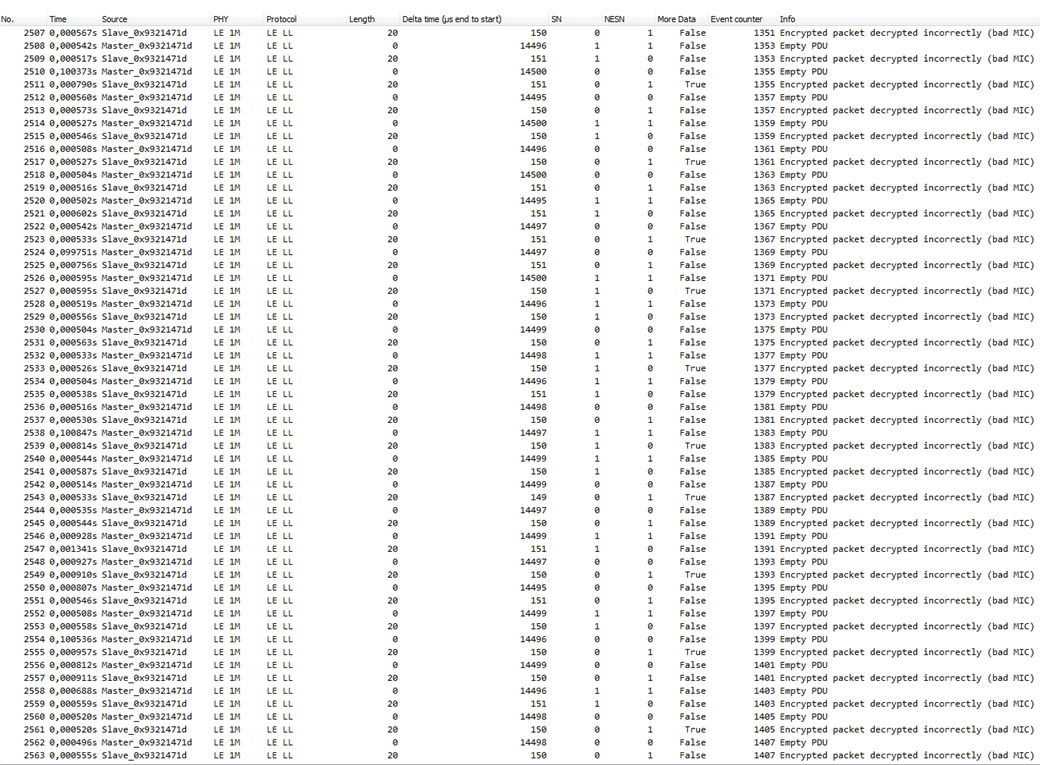
    Nevertheless: the problem of varying delay times between the packets can also be observed when looking at the time stamps of packet (s. screenshot).

    For your information: our application is based on three devices which communicate via bluetooth. Two of the devices are self-developed battery driven devices each using an NRF52, and the third device is usually a smartphone. However for simplicity I use an NRF52-DK board connected to the PC via USB instead of the smartphone most of the times. One of the self-developed boards (“slave”) collects sensor data and sends it to the other board (“master”) every 7.5ms. The master uses its’ own data and the data of the slave for processing and sends the preprocessed data to the central (in this case the NRF52 DK). The DK transmits the data via RTT to the PC. The bluetooth code of the master is originally based on the relay example found in the SDK, and the bluetooth code of the slave is originally based on the heart rate example. However, many changes containing own services and characteristics (with own UUIDs) have been implemented since beginning of the project.  

    For sniffing of the attached log file I first turned on the slave device, and filtered the displayed data based on the advertising data. Then I turned on the master. The master automatically connects to the slave. The master does not activate notification of the slave characteristic before connecting to the central. That’s why there seem to be a lot of empty packet exchanges in between the connection events (s. log file). After connecting to the central, the central activates notification of the master (to central), and the master activates notification of the slave (to master). After the master establishes connection to the central, the packets start to appear with the info “bad MIC”. Is the tool confused by the messages the master exchanges with the central to establish connection? The data format of the slave generally does not change, it only starts containing real data (no empty packets anymore).

    Anyway, as I’m currently interested in the packet timing, the time stamps are relevant and should still be valid.

    Do you have any idea for the variation of delay times regarding the data sent from the slave to the master? As mentioned, usually no packets get lost (this is verified by the incremented packet indexes).

    Do you have any suggestion to deal with the “bad MIC” problem?

    Thanks in advance!


     WiresharkLog.pcapng

  • Hi,

    Do you have any suggestion to deal with the “bad MIC” problem?

    The link gets encrypted, and the sniffer is therefore unable to see the packet content. See chapter 5.4 and 5.5 in the Sniffer User guide.

    he problem of varying delay times between the packets can also be observed when looking at the time stamps of packet

    I don't see any issues in the log. The connection interval is 15 ms (Delta time (µs start to start) for master + slave). For each connection event, the master sends a packet, and the slave responds. Then after 15 ms the next connection event starts. The slave is always just sending 1 packet per connection event.

    Note that the "Time" field in the sniffer is not accurate(that is just the time stamp on UART on PC), the accurate timestamp is the "delta time" fields.

Related