This post is older than 2 years and might not be relevant anymore
More Info: Consider searching for newer posts

NUS handler for ADC

I'm trying to use the NUS to send data over from NRF52 dev kit to the NRF Connect app. Using Putty for UART works fine. Now I adapted to read out ADC values from 2 ADC ports, but data is unreadable on phone application.

Found lots of other code on the internet and adapted the best, but now stuck at this problem.

 See below part code:


        ret_code_t err_code;
        uint16_t adc_value;
        uint8_t value[SAADC_SAMPLES_IN_BUFFER*2];
        uint8_t bytes_to_send;
     
        // set buffers
        err_code = nrf_drv_saadc_buffer_convert(p_event->data.done.p_buffer, SAADC_SAMPLES_IN_BUFFER);
        APP_ERROR_CHECK(err_code);
						
        // print samples on hardware UART and parse data for BLE transmission
        printf("ADC event number: %d\r\n",(int)m_adc_evt_counter);
        for (int i = 0; i  data.done.p_buffer[i]);

            adc_value = p_event->data.done.p_buffer[i];
            value[i*2] = adc_value;
            value[(i*2)+1] = adc_value >> 8;
        }
				
        // Send data over BLE via NUS service. Makes sure not to send more than 20 bytes.
        if((SAADC_SAMPLES_IN_BUFFER*2) <= 20) 
        {
            bytes_to_send = (SAADC_SAMPLES_IN_BUFFER*2);
        }
        else 
        {
            bytes_to_send = 20;
        }
        err_code = ble_nus_string_send(&m_nus, value, bytes_to_send);
        if (err_code != NRF_ERROR_INVALID_STATE) 
        {
            APP_ERROR_CHECK(err_code);
        }
						
        m_adc_evt_counter++;
    }

Parents Reply Children
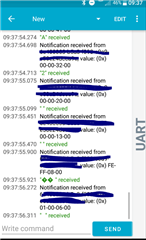
  • I do receive data. And if I use Putty I can send text messages which are received correctly ("hello" and things).

    But when I use this NUS with above code to send ADC values, I do not get reliable data as when I print the values on the terminal.

    See screenshot below. Where to adept the code to get for instance: "value_adc0, valueadc1"

  • Hi,

    I do not see any way the data could be corrupted in the NUS/BLE transfer. Have you verified (with logging or inspection with a debugger) that you actually get the sample values you expect from the SAADC? If not, I am inclined to believe that the problem here is that you fail to interpret the sample values correctly to whatever format you want/expect, as suggested.

    If you don't have any progres on this, can you describe the following:

    • How have your configured the SAADC (resolution, gain, reference, ..)?
    • The state of the two pins when you test (for instance you could connect one to GND and one to VDD to have fixed references)?
    • What is the value of the SAADC samples when you check with a debugger before they are transmitted over NUS?
    • What ar the values of the same samples when they are received on the phone?
    • Do you do any processing of the samples or do you transmit raw samples?
    • If the samples are not as expected: what exactly do you expect?
  • Yes, you're right. The data is not corrupt, but not in the format as I want to have.

    When sending data (even numbers) via putty, it will show as:"received: 123". That is also what I'd like to achieve.

    Binary format it is all okay. The hex data as showed above is in my screenshot is okay. I just want to achieve that it will be readable by user. Maybe even with a prefix as:

    "temperature: 39". instead of: "39".

  • Thank you for clarifying. Then you simply need to either pretend "temperature: " to the string you send or add the text in your custom app. Note that it will not show up as a string in nRF Connect app that you have used here, as it displays hex (so you will only see the ACSII codes of your pretended text).

Related