This post is older than 2 years and might not be relevant anymore
More Info: Consider searching for newer posts

nRF Thingy 52_ Mesh Demo

Hi,

 i am working under the mesh concept in nRF52. I saw the mesh demo in nRF thingy the link is here.

and i also have 4 nRF Thingy boards in my hand. i want to do the demonstrate that example code to understand how it working. nut unfortunately

i got some errors

can you please help to solve the errors

i have the nRF52_SDK15.3.0

and i downloaded

1. nrf5SDKforMeshv101src

2. Nordic-Thingy52-mesh-demo-master

3. Nordic-Thingy52-FW-master

I run the code as per the instruction

but i got the error

nrf_mesh_defines.h: No such file or directory
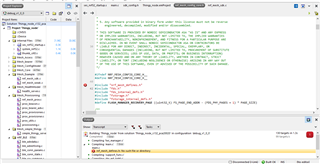
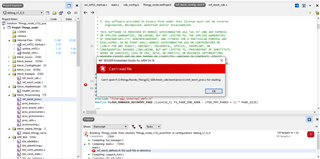
and some of the files

in the project are showing not found or error
Parents
  • Hi Sunil

    You have to download the prerequisites stated here before you can run the setup_sdk.bat

    Prerequisites

    Before running the scripts below, make sure you have the following software installed:

    1. Git v2.xx.xx, Available from https://git-scm.com/. Use default configurations.
    2. Install GNU ARM embedded toolchain v4.9-2015q3. Available from https://launchpad.net/gcc-arm-embedded/4.9/4.9-2015-q3-update. Use default configurations.
    3. Make must be installed and be in system path. For example http://gnuwin32.sourceforge.net/packages/make.htm.
    4. Create a user at https://www.invensense.com/. Under "Downloads" download "Embedded MotionDriver 6.12". Unzip the downloaded motion_driver_6.12 folder and navigate to motion_driver_6.12/mpl libraries/arm/Keil. Unzip the folder libmpllib_Keil_M4FP.zip. Copy the extracted library libmpllib.lib into <your Thingy folder>/libs/libmpllib_Keil_M4FP/. Finally, unzip /motion_driver_6.12/mpl libraries/arm/gcc4.9.3/liblibmplmpu_m4_hardfp.zip and copy the extracted library liblibmplmpu.a into the folder <your Thingy folder>/libs/liblibmplmpu_m4_hardfp/.

    Bluetooth SoftDevice

    Thingy FW version 2.0.0 is compatible with softdevice s132 v4.0.2

    Best regards,

    Simon

Reply
  • Hi Sunil

    You have to download the prerequisites stated here before you can run the setup_sdk.bat

    Prerequisites

    Before running the scripts below, make sure you have the following software installed:

    1. Git v2.xx.xx, Available from https://git-scm.com/. Use default configurations.
    2. Install GNU ARM embedded toolchain v4.9-2015q3. Available from https://launchpad.net/gcc-arm-embedded/4.9/4.9-2015-q3-update. Use default configurations.
    3. Make must be installed and be in system path. For example http://gnuwin32.sourceforge.net/packages/make.htm.
    4. Create a user at https://www.invensense.com/. Under "Downloads" download "Embedded MotionDriver 6.12". Unzip the downloaded motion_driver_6.12 folder and navigate to motion_driver_6.12/mpl libraries/arm/Keil. Unzip the folder libmpllib_Keil_M4FP.zip. Copy the extracted library libmpllib.lib into <your Thingy folder>/libs/libmpllib_Keil_M4FP/. Finally, unzip /motion_driver_6.12/mpl libraries/arm/gcc4.9.3/liblibmplmpu_m4_hardfp.zip and copy the extracted library liblibmplmpu.a into the folder <your Thingy folder>/libs/liblibmplmpu_m4_hardfp/.

    Bluetooth SoftDevice

    Thingy FW version 2.0.0 is compatible with softdevice s132 v4.0.2

    Best regards,

    Simon

Children
Related