This post is older than 2 years and might not be relevant anymore
More Info: Consider searching for newer posts

Problem during Serialization of nRF52840

Hello,

I have 2 PCA10056 DK (with nRF52840), my purpose is to check the serialization between App. chip to connectivity chip

I have 2 problems on in each chip:

1. App chip: - I'd like to compile the project \nRF5_SDK_15.3.0_59ac345\examples\ble_peripheral\ble_app_hrs\pca10056\ser_s140_uart\iar\  (i'm using IAR 8.20.2) however I got linker error see below
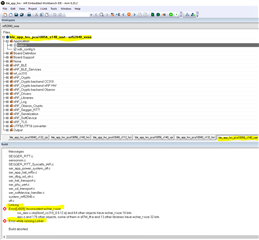
ser_phy_uart.c
ser_sd_transport.c
ser_softdevice_handler.c
system_nrf52840.c
utf.c
Linking
Error[Lt009]: Inconsistent wchar_t size
ssi_aes.c.obj(libnrf_cc310_0.9.12.a) and 64 other objects have wchar_t size 16 bits
aes.o and 178 other objects, some of them in dl7M_tlf.a and 13 other libraries have wchar_t size 32 bits
Error while running Linker

Build aborted.

2. connectivity chip - seems something happens to the BL and Led5 is always off, and no D: drive is open - Please advise
i successfully compiled the connectivity chip project  

Please advise

Best Regards

Micha Valach

[email protected]

Parents
  • Hi,

    The nRF5 SDK v15.3.0 release notes contains the following note for IAR 8 users:

    *****
    Note for IAR 8 users:
    (Libraries for IAR 8 require wchar_t to be of size 32 bits while IAR 7 requires 16 bits).
     
    To run a project using IAR 8, follow these intructions:
     - Open the IAR project in IAR 8. The IAR workbench will automatically generate an IAR 8 compatible project file.
     - If the project contains one of the precompiled libraries listed below, replace it with the IAR 8 compatible alternative
       (there are no projects targeting nRF51 in this SDK).
     - Save the project.
     - When building the project, you might get the warning: "The header file 'cmsis_iar.h' is obsolete and should not be used. [...]".
        - The problem is described in DevZone post: devzone.nordicsemi.com/.../iar-ewarm-8-22-1-complains-about-cmsis_iar-h
          The solution is to remove all occurrences of #include <cmsis_iar.h>.
        
    The affected libraries are:
     - micro-ecc crypto:
        - IAR7: Includes library located in the folder named “…_iar\…”.
        - IAR8: Switch to using the library from the folder named “…_armgcc\…”.
     - nrf_cc310, nrf_cc310_bl, and nrf_oberon:
        - IAR7: Link to a library where “short_wchar” is part of the folder name.
        - IAR8: Link to a library without “short_wchar” in part of the folder name.
     - Gazell, NFC Tag, and 802.15.4:
        - IAR7: Includes the library where the file name ends with “_iar”.
        - IAR8: Switch to using the library with similar file name that ends with “_gcc”.
    *****

    Similar notes apply for other nRF5 SDK v15.x.x versions. Older versions of the SDK is only supported in IAR 8.10 and earlier (which was when wchar_t was changed in IAR.)

    Regards,
    Terje

Reply
  • Hi,

    The nRF5 SDK v15.3.0 release notes contains the following note for IAR 8 users:

    *****
    Note for IAR 8 users:
    (Libraries for IAR 8 require wchar_t to be of size 32 bits while IAR 7 requires 16 bits).
     
    To run a project using IAR 8, follow these intructions:
     - Open the IAR project in IAR 8. The IAR workbench will automatically generate an IAR 8 compatible project file.
     - If the project contains one of the precompiled libraries listed below, replace it with the IAR 8 compatible alternative
       (there are no projects targeting nRF51 in this SDK).
     - Save the project.
     - When building the project, you might get the warning: "The header file 'cmsis_iar.h' is obsolete and should not be used. [...]".
        - The problem is described in DevZone post: devzone.nordicsemi.com/.../iar-ewarm-8-22-1-complains-about-cmsis_iar-h
          The solution is to remove all occurrences of #include <cmsis_iar.h>.
        
    The affected libraries are:
     - micro-ecc crypto:
        - IAR7: Includes library located in the folder named “…_iar\…”.
        - IAR8: Switch to using the library from the folder named “…_armgcc\…”.
     - nrf_cc310, nrf_cc310_bl, and nrf_oberon:
        - IAR7: Link to a library where “short_wchar” is part of the folder name.
        - IAR8: Link to a library without “short_wchar” in part of the folder name.
     - Gazell, NFC Tag, and 802.15.4:
        - IAR7: Includes the library where the file name ends with “_iar”.
        - IAR8: Switch to using the library with similar file name that ends with “_gcc”.
    *****

    Similar notes apply for other nRF5 SDK v15.x.x versions. Older versions of the SDK is only supported in IAR 8.10 and earlier (which was when wchar_t was changed in IAR.)

    Regards,
    Terje

Children
No Data
Related