I used the example pin_change_int from peripheral examples and commented the OUT pins. In addition I added the sleep commands to the main while loop. This is the code:
#include <stdbool.h>
#include "nrf.h"
#include "nrf_drv_gpiote.h"
#include "app_error.h"
#include "boards.h"

#ifdef BSP_BUTTON_0
    #define PIN_IN BSP_BUTTON_0
#endif
#ifndef PIN_IN
    #error "Please indicate input pin"
#endif

#ifdef BSP_LED_0
    #define PIN_OUT BSP_LED_0
#endif
#ifndef PIN_OUT
    #error "Please indicate output pin"
#endif

void in_pin_handler(nrf_drv_gpiote_pin_t pin, nrf_gpiote_polarity_t action)
{
    //nrf_drv_gpiote_out_toggle(PIN_OUT);
}
/**
 * @brief Function for configuring: PIN_IN pin for input, PIN_OUT pin for output,
 * and configures GPIOTE to give an interrupt on pin change.
 */
static void gpio_init(void)
{
    ret_code_t err_code;

    err_code = nrf_drv_gpiote_init();
    APP_ERROR_CHECK(err_code);

    //nrf_drv_gpiote_out_config_t out_config = GPIOTE_CONFIG_OUT_SIMPLE(false);

    //err_code = nrf_drv_gpiote_out_init(PIN_OUT, &out_config);
    //APP_ERROR_CHECK(err_code);

    nrf_drv_gpiote_in_config_t in_config = GPIOTE_CONFIG_IN_SENSE_TOGGLE(true);
    in_config.pull = NRF_GPIO_PIN_PULLUP;

    err_code = nrf_drv_gpiote_in_init(PIN_IN, &in_config, in_pin_handler);
    APP_ERROR_CHECK(err_code);

    nrf_drv_gpiote_in_event_enable(PIN_IN, true);


}

/**
 * @brief Function for application main entry.
 */
int main(void)
{
    gpio_init();

    while (true)
    {
       __SEV();
       __WFE();
       __WFE();
    }
}
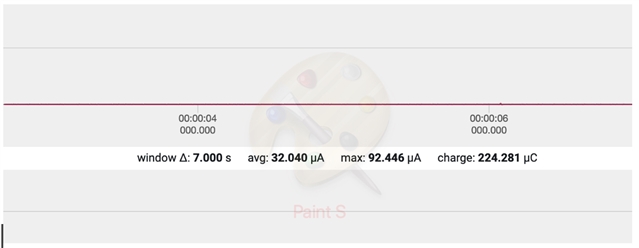
When I power profile it right after turning the device on, I get a nice expected current consumption of 32uA as seen below
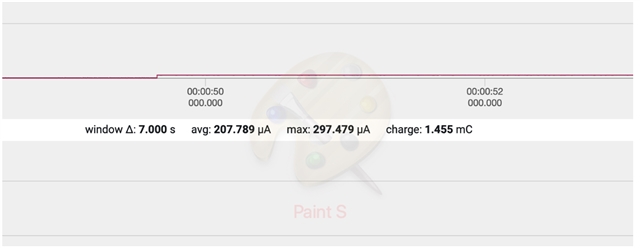
However, as soon as I press the button per code, the consumption goes high and stays high. I was expecting it to spike up but then go back to normal. Why is this occurring? I am using the DK board and using the regular board button 0 for this. Why is it using so much current consistently?