

OS: Mac
I installed nrf v1.2.0 and Segger Embedded Studio v4.42a. I can't open project and it causes error.
Loading solution at_client.emProject
Executing load commands
/usr/local/bin/cmake -GNinja -DBOARD=nrf9160_pca10090ns -DBOARD_DIR=/Users/fukuharayuusuke/nRF9160/ncs/zephyr/boards/arm/nrf9160_pca10090 -DZEPHYR_TOOLCHAIN_VARIANT=gnuarmemb -DGNUARMEMB_TOOLCHAIN_PATH=/opt/gnuarmemb -B/Users/fukuharayuusuke/nRF9160/ncs/nrf/samples/nrf9160/at_client/build_nrf9160_pca10090ns -H/Users/fukuharayuusuke/nRF9160/ncs/nrf/samples/nrf9160/at_client -DPYTHON_EXECUTABLE=/Users/fukuharayuusuke/.pyenv/shims/python -DCMAKE_MAKE_PROGRAM=/usr/local/bin/ninja -DDTC=/usr/local/bin/dtc -D WEST=/Users/fukuharayuusuke/.pyenv/shims/west -DEXTRA_KCONFIG_TARGETS=menuconfig_ses -DEXTRA_KCONFIG_TARGET_COMMAND_FOR_menuconfig_ses=/Applications/arm_segger_embedded_studio_v442a_macos_x64_nordic/html/configure_nordic_project_menuconfig.py
-- Zephyr version: 2.1.99
-- Selected BOARD nrf9160_pca10090ns
-- Found west: /Users/fukuharayuusuke/.pyenv/shims/west (found suitable version "0.6.3", minimum required is "0.6.0")
-- Loading /Users/fukuharayuusuke/nRF9160/ncs/zephyr/boards/arm/nrf9160_pca10090/nrf9160_pca10090ns.dts as base
nrf9160_pca10090ns.dts.pre.tmp:89.42-101.3: Warning (unique_unit_address_if_enabled): /soc/peripheral@40000000/flash-controller@39000: duplicate unit-address (also used in node /soc/peripheral@40000000/kmu@39000)
nrf9160_pca10090ns.dts.pre.tmp:338.19-344.3: Warning (unique_unit_address_if_enabled): /soc/peripheral@40000000/clock@5000: duplicate unit-address (also used in node /soc/peripheral@40000000/power@5000)
Devicetree configuration written to /Users/fukuharayuusuke/nRF9160/ncs/nrf/samples/nrf9160/at_client/build_nrf9160_pca10090ns/zephyr/include/generated/devicetree.conf
Parsing /Users/fukuharayuusuke/nRF9160/ncs/zephyr/Kconfig
/Users/fukuharayuusuke/nRF9160/ncs/nrf/lib/fprotect/Kconfig:20: WARNING: dt_int_val is deprecated.
/Users/fukuharayuusuke/nRF9160/ncs/bootloader/mcuboot/zephyr/Kconfig:37: WARNING: dt_int_val is deprecated.
Loaded configuration '/Users/fukuharayuusuke/nRF9160/ncs/zephyr/boards/arm/nrf9160_pca10090/nrf9160_pca10090ns_defconfig'
Merged configuration '/Users/fukuharayuusuke/nRF9160/ncs/nrf/samples/nrf9160/at_client/prj.conf'
Configuration saved to '/Users/fukuharayuusuke/nRF9160/ncs/nrf/samples/nrf9160/at_client/build_nrf9160_pca10090ns/zephyr/.config'
-- The C compiler identification is GNU 8.3.1
-- The CXX compiler identification is GNU 8.3.1
-- The ASM compiler identification is GNU
-- Found assembler: /opt/gnuarmemb/bin/arm-none-eabi-gcc
-- Cache files will be written to: /Users/fukuharayuusuke/Library/Caches/zephyr

=== child image spm begin ===
Changed board to secure nrf9160_pca10090 (NOT NS)
-- Zephyr version: 2.1.99
CMake Error at /usr/local/Cellar/cmake/3.15.5/share/cmake/Modules/FindPackageHandleStandardArgs.cmake:137 (message):
  Could NOT find PythonInterp: Found unsuitable version "2.7.16", but
  required is at least "3.6" (found /usr/bin/python)
Call Stack (most recent call first):
  /usr/local/Cellar/cmake/3.15.5/share/cmake/Modules/FindPackageHandleStandardArgs.cmake:376 (_FPHSA_FAILURE_MESSAGE)
  /Users/fukuharayuusuke/nRF9160/ncs/zephyr/cmake/backports/FindPythonInterp.cmake:174 (FIND_PACKAGE_HANDLE_STANDARD_ARGS)
  /Users/fukuharayuusuke/nRF9160/ncs/zephyr/cmake/python.cmake:22 (include)
  /Users/fukuharayuusuke/nRF9160/ncs/zephyr/cmake/app/boilerplate.cmake:101 (include)
  CMakeLists.txt:9 (include)


-- Configuring incomplete, errors occurred!
CMake Error at ../../../cmake/multi_image.cmake:176 (message):
  CMake generation for spm failed, aborting.  Command: 1
Call Stack (most recent call first):
  ../../../cmake/multi_image.cmake:76 (add_child_image_from_source)
  ../../CMakeLists.txt:8 (add_child_image)


-- Configuring incomplete, errors occurred!
See also "/Users/fukuharayuusuke/nRF9160/ncs/nrf/samples/nrf9160/at_client/build_nrf9160_pca10090ns/CMakeFiles/CMakeOutput.log".
See also "/Users/fukuharayuusuke/nRF9160/ncs/nrf/samples/nrf9160/at_client/build_nrf9160_pca10090ns/CMakeFiles/CMakeError.log".
Project load failed
Reported error: solution load command failed (1)
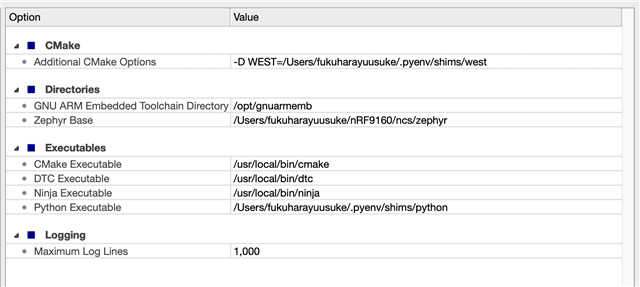
I can open projects with this config on SES v4.42a and nrf v1.1.0.
Any help?

