This post is older than 2 years and might not be relevant anymore
More Info: Consider searching for newer posts

Tools and software versions that are required for developing BLE products with nrf51822 modules.

Hi,

I have purchased an nRf52DK set for developing BLE applications. I am using the Segger Embedded Studio (SES) with GCC and SDK version 16 for development.

I have two questions:
1. I have a few nrf51822 modules that I bought a while ago.  Can I develop code for these modules in the setup that i have ? If not, could you please let me know the setup - Soft device version, SDK version and programmer that I will need to use these modules.

2. How can i check if these modules have a boot loader inside ? If that exists, can i program them over serial port and how to it?

Thanks and Regards

Parents
  • Hello Karl,

    For my project with the 51822, i need touse the BLE UART service. So I began with testing the ble_app_uart example of the nrf52832, since that is directly available on the nrf52DK. As i mentioned earlier, i am using the SDK16 and i chose the app_ble_uart for the PCA10040 with soft device 132.

    But I am not able to get it to run. It is not advertising at all. To make sure the board does not have a problem I ran the LED Blinky app and that is running fine, i am able to discover it on the nRF Blinky app on my iPad and see the button and LED status.

    So i switched back to the UART example and looked at debugging the code. I find that it is getting stuck in the uart initialization. I am running the default example code, no modifications. During uart_init() in main(), it is landing at  atapp_error_weak.c, line 100 ,

    in function __WEAK void app_error_fault_handler(uint32_t id, uint32_t pc, uint32_t info):

        NRF_BREAKPOINT_COND;

    The call stack shows  it arrived here from the function

    static void buttons_leds_init(bool * p_erase_bonds)
    {
        bsp_event_t startup_event;

        uint32_t err_code = bsp_init(BSP_INIT_LEDS | BSP_INIT_BUTTONS, bsp_event_handler);
        APP_ERROR_CHECK(err_code);   /// <<<<<<THIS IS THE PLACE IT IS FAILING

    .........

    When i checked inside button init, but couldn't catch the problem.... Disappointed

    Any tips on checking the source for the problem or known issues information would help....

    Thanks and Regards

    Sreenivasa Chary

  • Hello Sreenivasa Chary,

    That is strange - I have not heard about this trouble when using the unmodified ble_peripheral_uart example before.

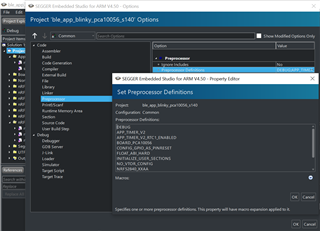
    Could you make sure DEBUG is defined in the preprocessor defines, as shown in the picture below, and run this again?
    This will let you know which error the bsp_init is being called with, so that we may see why the bsp_init failed.


    For future reference, this question is diverging from the original "Tools required for developing on the nRF51822" question, and I would recommend that you open a separate ticket regarding debugging of the ble_uart application, to keep the forum tidy.

    Best regards,
    Karl

  • Hi Karl,

    Thanks for the inputs. Yes , i  will create a separate ticket for this issue.

    So i will close it here now and start a new post.

    But just for continuity, I have checked the settings and i see only DEBUG and DEBUG_NRF are specified in the Preprocessor settings. I will enable the other modules and see if i can get a log.

    Regards

    Chary BS

  • Hello Chary BS,

    SChary said:
    Thanks for the inputs. Yes , i  will create a separate ticket for this issue.

    Great, thank you for keeping the forum tidy.
    You will receive support for your issue in your new ticket.

    Best regards,
    Karl

  • Hi Karl,

    Regarding the nRF51822 build, i followed the instructions in the link that you shared and also referred to the getting started guide. I was able to import the nrf51822 SDK12.3 SD130 version of ble_app_uart example, into my SES ver 4.30c (64-bit version) .

    I made the settings for the linker too, defining the section placements.

    However when i compiled the project, i get the following log from the Linker phase:

    1> Generating linker script ‘ble_app_uart_pca10028_s130.ld’
    1> Linking ble_app_uart_pca10028_s130.elf
    1> C:/Program Files/SEGGER/SEGGER Embedded Studio for ARM 4.30c/gcc/arm-none-eabi/bin/ld: Output/nrf51422_xxac/Exe/ble_app_uart_pca10028_s130.elf section `.init' will not fit in region `UNPLACED_SECTIONS'
    1> C:/Program Files/SEGGER/SEGGER Embedded Studio for ARM 4.30c/gcc/arm-none-eabi/bin/ld: region `UNPLACED_SECTIONS' overflowed by 32784 bytes
    1> C:/Program Files/SEGGER/SEGGER Embedded Studio for ARM 4.30c/gcc/arm-none-eabi/bin/ld: Output/ble_app_uart_pca10028_s130 nrf51422_xxac/Obj/SEGGER_THUMB_Startup.o: in function `exit':
    1> (.init+0x48): undefined reference to `__stack_end__'
    1> C:/Program Files/SEGGER/SEGGER Embedded Studio for ARM 4.30c/gcc/arm-none-eabi/bin/ld: (.init+0x4c): undefined reference to `__SEGGER_init_table__'
    1> C:/Program Files/SEGGER/SEGGER Embedded Studio for ARM 4.30c/gcc/arm-none-eabi/bin/ld: (.init+0x50): undefined reference to `__heap_start__'
    1> C:/Program Files/SEGGER/SEGGER Embedded Studio for ARM 4.30c/gcc/arm-none-eabi/bin/ld: (.init+0x54): undefined reference to `__heap_end__'
    1> C:/Program Files/SEGGER/SEGGER Embedded Studio for ARM 4.30c/gcc/arm-none-eabi/bin/ld: (.init+0x58): undefined reference to `__ctors_start__'
    1> C:/Program Files/SEGGER/SEGGER Embedded Studio for ARM 4.30c/gcc/arm-none-eabi/bin/ld: (.init+0x5c): undefined reference to `__ctors_end__'
    1> C:/Program Files/SEGGER/SEGGER Embedded Studio for ARM 4.30c/gcc/arm-none-eabi/bin/ld: Output/ble_app_uart_pca10028_s130 nrf51422_xxac/Obj/ses_nrf51_startup.o: in function `_vectors':
    1> (.vectors+0x0): undefined reference to `__stack_end__'
    1> C:/Program Files/SEGGER/SEGGER Embedded Studio for ARM 4.30c/gcc/arm-none-eabi/bin/ld: Output/ble_app_uart_pca10028_s130 nrf51422_xxac/Obj/ses_nrf51_startup.o: in function `SystemInit':
    1> (.init+0x64): undefined reference to `__SRAM_segment_end__'
    1> C:/Program Files/SEGGER/SEGGER Embedded Studio for ARM 4.30c/gcc/arm-none-eabi/bin/ld: Output/ble_app_uart_pca10028_s130 nrf51422_xxac/Obj/softdevice_handler.o: in function `softdevice_enable':
    1> softdevice_handler.c:(.text.softdevice_enable+0x28): undefined reference to `__data_start__'
    Build failed

    Any help possible ??

    Regards

    Sreenivasa Chary

  • There was one instruction int the getting started guide which said "Import Section Placement" but I coiuld not find that option in the menu. I did download the flash placement XML file and placed it in the project folder.

    I hope it is in the right place - i saved it  in the example folder for ble_app_uart.

    Regards

    Chary BS

  • Hello Chary BS;

    The errors you are getting indicates that the flash placement is indeed missing and / or wrong.

    SChary said:
    I hope it is in the right place - i saved it  in the example folder for ble_app_uart.

     The flash_placement file needs to be located next to the Segger Embedde Studios project file - ie in the directory SDK\examples\ble_peripheral\ble_app_uart\pca10028\s130\ses\
    Please relocate the file to this location.

    With the file in this location, please right click your project file in SES, click options and go to the linker settings. There should be an alternative for "Section Placement File" that should point to your flash_placement.xml file.

    What changes did you make in the linker settings?

    Best regards,
    Karl 

Reply
  • Hello Chary BS;

    The errors you are getting indicates that the flash placement is indeed missing and / or wrong.

    SChary said:
    I hope it is in the right place - i saved it  in the example folder for ble_app_uart.

     The flash_placement file needs to be located next to the Segger Embedde Studios project file - ie in the directory SDK\examples\ble_peripheral\ble_app_uart\pca10028\s130\ses\
    Please relocate the file to this location.

    With the file in this location, please right click your project file in SES, click options and go to the linker settings. There should be an alternative for "Section Placement File" that should point to your flash_placement.xml file.

    What changes did you make in the linker settings?

    Best regards,
    Karl 

Children
Related