This post is older than 2 years and might not be relevant anymore
More Info: Consider searching for newer posts

Combining Mesh and Blinky examples

Hello everyone.

I would like to set-up a mesh network of Thingy:52 devices and an nRF52840, which would help me communicate from the an external stimulus to the phone, via this mesh network.

The steps that I have done are: I tried the the Light switch demo Ok & thingy52-mesh-provisioning-demo Ok and the BLE Blinky Application Ok. So, my goal is to send a notification on the phone, when a button on the other end is pressed. Something like that:

[external button -> on, to start communication] -------> [client starts Bluetooth communication (nRF52840)] ------> [server (Thingy:52), relay] ------> [phone running 'Blinky App', receives notification].

Do you have an idea/suggestion of how I should combine the two examples? From what I understand, the phone cannot participate in the Mesh, so the tricky part should be a code on the nRF52840, which helps the board (1) join the mesh and subscribe to notifications, while (2) also writing into a characteristic something, to send a notification on the phone.

Thank you in advance!

  • Hi .

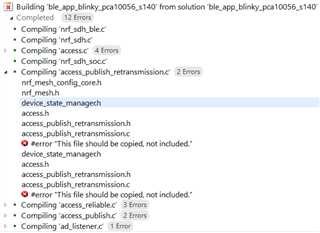
    A short update: I decided to copy that file from the internet and now that error is gone. However. I get the following:

    #error "This file should be copied, not included."

    What does this refer to? I do not understand what "copy" and "include" mean in this context. Should I just copy the content? If yes, where?

    Thanks in advance.

  • Hi,

    From the documentation Integrating Mesh into nRF5 SDK examples

    • If you are adding you own mesh functionality rather than working from an existing mesh example, you also need to add the file nrf_mesh_config_app.h. Copy it from the examples/templates folder in mesh stack repository into your project folder, and remove #error message at the top of the file. Make other appropriate changes to the file content, like adjusting ACCESS_ELEMENT_COUNT and ACCESS_MODEL_COUNT to the required number of elements and models.

    Can you try copy from the template instead and remove #error message at the top of the fil? Does it make any difference? Also, go through the "Optional changes" in the document.

    A comment on combining the two examples though. I think it might be easier doing it the other way around, use a mesh example(for example light switch) and then add the nRF5 functionality to it instead.

  • Hi 

    Copy it from the examples/templates folder in mesh stack repository into your project folder,

    I did that. But I would like to point out that nrf_mesh_config_app.h does not go in the project folder, i.e. C:\SESProj\nRF5_SDK_1530\examples\ble_peripheral\ble_app_blinky\pca10056\s140\ses, like you are proposing. 

    Instead, it goes to C:\SESProj\nrf5_SDK_for_Mesh_v320\mesh\core\api, where all .h files for the project are. Otherwise it will throw errors. 

    Can you try copy from the template instead and remove #error message at the top of the fil? Does it make any difference?

    I did erase those 3 lines and I do not get that specific error anymore. Instead, other errors arise, from the file mesh_opt_gatt.h not being found. (and I neither find this in any folder nor on the internet).

    think it might be easier doing it the other way around, use a mesh example

    Thanks for your suggestion, but it's completely unclear to me how to follow the original tutorial. If I switch to the other way round, I don't know which files from the SDK I should move to the Mesh folder. So, I will try to follow the original post, with the hope that it will work some day.. Disappointed

  • Have you taken a look at the SDK UART coexistence example? It is an example where mesh is merged into the nRF5 UART example. This example can be used as a reference as to how you can merge mesh into the Blinky example.

  • Hi! Sorry for the delay, I have been trying this example which you advised me.

    It builds successfully. However, I cannot test it. My steps are the following:

    1. Follow the 4 steps from the SDK UART coexistence example.

    2. Try to connect via nRF Mesh App - not sucessfull No entry sign The board is not found in the app. 

    3. Try to connect via nRF Connect - not sucessfull No entry sign  I can connect to the board. But whenever I try to write something in the field Mesh Proxy Data In, I get disconnected to the board (and I can reconnect back, but still the message is not received).

    Do you have any ideas how to make this example work? Thanks a lot for your ideas and help!

Related