Hello,
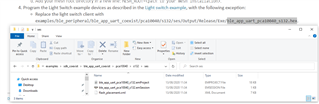
I am trying to follow the tutorial SDK UART coexistence example, but it seems like the last step cannot be completed. As you can see, that .hex file does not exist in the folder. Do you have any suggestion?
Thanks.
Hello,
I am trying to follow the tutorial SDK UART coexistence example, but it seems like the last step cannot be completed. As you can see, that .hex file does not exist in the folder. Do you have any suggestion?
Thanks.
Hi,
The Output folder in .../pca10040/s132/ses/ and all the files in it are generated when you build your project. Try building the ble_app_uart_coexist example in SES. The folder, and then also the .hex file, should be then generated, and you should be able to find the file.
Best regards,
Marte
Ok, I get it, thank you.
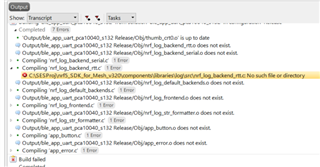
Hi. Trying to build the example (did not do any modification), these errors occur:
The problem is that the components folder does not even exist in the Mesh folder, but rather in the other one (SDK folder). And the global macros in SES are defined as:
SDK_ROOT=C:\SESProj\nRF5_SDK_1530
MESH_ROOT=C:\SESProj\nrf5_SDK_for_Mesh_v320
Do you have any clue why this happens? Thanks.
Problem solved.
Solution: the project needs to be run from ...\nRF5_SDK_1530\examples\ble_peripheral\ble_app_uart_coexist\pca10040\s132\ses (not from the Mesh folder).
Hi,
Great to hear that you managed to solve the problem yourself!
Yes, with the coexistence examples you have to copy the example folders to the nRF5 SDK folder and build it from there, as you did.
There's also a guide about integrating mesh into nRF5 SDK examples here, which can be useful if you experience any new problems. However, with the coexistence examples, I don't think you should have to do everything under "Including nRF5 SDK for Mesh functionality in an nRF5 SDK example", as the files and folders should already be included. At least they were when I tested the example earlier.
Hope you're able to run the example without any problems now.
Best regards,
Marte