This post is older than 2 years and might not be relevant anymore
More Info: Consider searching for newer posts
This discussion has been locked.
You can no longer post new replies to this discussion. If you have a question you can start a new discussion

Sending SAADC data via ble_nus_data_send

Hello,

I am trying to send data obtained from a SAADC port via BLE using the ble_nus_data_send function. This must happen periodically at frequencies within the Gigahertz range, ideally.

I started with the ble_app_uart example, from SDK16. Then, I initialized a timer using PPI to trigger an SAADC sampling event, such as in the saadc example.

Inside the saadc_callback function, I process the data and call the ble_nus_data_send function, as seen bellow:

void saadc_callback(nrf_drv_saadc_evt_t const * p_event)
{
    if (p_event->type == NRF_DRV_SAADC_EVT_DONE)
    {
        ret_code_t err_code;

        err_code = nrf_drv_saadc_buffer_convert(p_event->data.done.p_buffer, SAMPLES_IN_BUFFER);
        APP_ERROR_CHECK(err_code);

        saadc2ble_convert();   
        uint16_t length = (uint16_t)UART_TX_BUF_SIZE;
        err_code = ble_nus_data_send(&m_nus, adc_output, &length, m_conn_handle);                  
        APP_ERROR_CHECK(err_code);         
    }
}

the saadc2ble_convert function simply converts the data from uint16_t to uint8_t and the length of the data transmitted via ble_nus_data_send function has not been modified from the initial example:

#define UART_TX_BUF_SIZE                256                                         /**< UART TX buffer size. */
#define SAMPLES_IN_BUFFER  UART_TX_BUF_SIZE/2
static nrf_saadc_value_t adc_buf[SAMPLES_IN_BUFFER];                   //!< Buffer used for storing ADC value.
static uint8_t          adc_output[UART_TX_BUF_SIZE]; //!< Current battery level.


void saadc2ble_convert(){

   int i;

   for(i=0; i<SAMPLES_IN_BUFFER; i++){
       adc_output[i*2] = adc_buf[i] & 0xff;
       adc_output[i*2 + 1] = (adc_buf[i] >> 8) & 0xff;
   }

}

I initialize all in the main function as seen in the next code block:

int main(void)
{
    bool erase_bonds;
    ret_code_t err_code;

    // Initialize.
    uart_init();
    log_init();
    timers_init();    
    buttons_leds_init(&erase_bonds);
    power_management_init();
    ble_stack_init();
    gap_params_init();
    gatt_init();
    services_init();

    saadc_init();
    saadc_sampling_event_init();
    

    advertising_init();
    conn_params_init();

    // Start execution.
    printf("\r\nUART started.\r\n");
    NRF_LOG_INFO("Debug logging for UART over RTT started.");


    advertising_start();

    saadc_sampling_event_enable();


    // Enter main loop.
    for (;;)
    {
        idle_state_handle();
    }
}

Debugging, I see that the SAADC is reading data well, however, I couldn't get any data at the smartphone.

I am getting the error shown on the image:
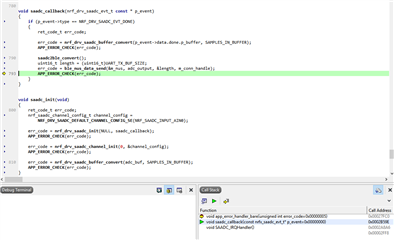
Could anyone help me to find a way to solve this problem?

  • Hello, Karl.

    About your questions:

    Are you saying that you are no longer able to see the messages you are sending to your device through UART, on your connected device?

    Right.

    If I may ask, why are you modifying your "adc_output" buffer with the contents of your buffer pool? I suspect that the naming here is just a bit ambiguous, but I am asking just in case.

    The ADC conversion is configured to 12-bits but, as I understand, we only can send 8-bits at a time via BLE, so I get every 12-bits from the adc_buf array (receiving data sampled from SAADC) and organize it in two bytes in the adc_output. So, let's say my adc_buf array has 50 samples, the adc_out array will have 100 elements. I agree that I may have been a bit unfortunate with the choice of the variable name. I may change it for something less ambiguous, as you suggest.

    After I found the error, I tried another search here in the forum and I found this ticket:

    send packets continuously in ble_app_uart example

    Following the instructions in there, I modified the my code a bit. I removed the ble_nus_data_send function call from the saadc_callback and put it in the infinite loop in the main function as bellow:

    // Enter main loop.
        for (;;)
        {
            //idle_state_handle();
            if(m_conn_handle != BLE_CONN_HANDLE_INVALID && notification_err_code == BLE_GATTS_EVT_HVN_TX_COMPLETE|| notification_err_code == NRF_SUCCESS){
    
                saadc2ble_convert();   
                uint16_t length = (uint16_t)UART_TX_BUF_SIZE;            
                SEGGER_RTT_WriteString(0, "Trying to send data.\n");  
                do{
                    notification_err_code = ble_nus_data_send(&m_nus, adc_output, &length, m_conn_handle);   
                    sprintf(error_string, "Error number: %#x\n", notification_err_code);
                    //SEGGER_RTT_WriteString(0, error_string);  
                    if ((notification_err_code != NRF_ERROR_INVALID_STATE) &&
                                (notification_err_code != NRF_ERROR_RESOURCES) &&
                                (notification_err_code != NRF_ERROR_NOT_FOUND))
                    {
                        APP_ERROR_CHECK(notification_err_code);                    
                    }
                }while(notification_err_code != NRF_SUCCESS);          
                
            }
        }

    Fortunately, I am now receiving data in the nrf_connect application.

    I also followed your, first suggestion in the response above, redefining the code bellow to 1:

    #ifndef NRF_FPRINTF_FLAG_AUTOMATIC_CR_ON_LF_ENABLED
    #define NRF_FPRINTF_FLAG_AUTOMATIC_CR_ON_LF_ENABLED 0
    #endif

    And it seems that now I see some messages in the J-Link RTT viewer. Now, I am getting the following error:

    00> <error> app: ERROR 4 [NRF_ERROR_NO_MEM] at C:\Users\MBIS\Documents\Thiago\Projects\BCC Project\BLE Projects\nRF5_SDK_16.0.0_98a08e2\examples\ble_peripheral\ble_app_uart - Copy (2)\main.c:589
    00> PC at: 0x00031529
    00> <error> app: End of error report

    I appreciate any further suggestions you could give me.

  • Hello again,

    Thiago said:
    The ADC conversion is configured to 12-bits but, as I understand, we only can send 8-bits at a time via BLE, so I get every 12-bits from the adc_buf array (receiving data sampled from SAADC) and organize it in two bytes in the adc_output. So, let's say my adc_buf array has 50 samples, the adc_out array will have 100 elements. I agree that I may have been a bit unfortunate with the choice of the variable name. I may change it for something less ambiguous, as you suggest.

    Yes, I suspected that it was just some ambiguity with the variable names. My recommendation to change them is just to ensure that the code is easier to understand for others, and your future-self.

    Thiago said:
    Following the instructions in there, I modified the my code a bit. I removed the ble_nus_data_send function call from the saadc_callback and put it in the infinite loop in the main function as bellow:

    I am glad to hear that you are achieving your intended functionality with the code you have shared - but please be advised that this code is not power optimized at all.
    With the code you have shared above, you CPU will be running in an endless while loop - wasting all cycles - between the sending of the notifications.
    I can not recommend this approach for any low-power application, but you are of course free to keep it like this.
    Instead, I would suggest your original approach of queueing a notification every time a buffer is filled with samples - and having the CPU in a lower power SYSTEM ON state while CPU intervention is not needed.

    Thiago said:
    I also followed your, first suggestion in the response above, redefining the code bellow to 1:
    Thiago said:
    And it seems that now I see some messages in the J-Link RTT viewer.

    I am happy to hear that you are now able to see the logger output in your RTT viewer, great!

    Thiago said:
    And it seems that now I see some messages in the J-Link RTT viewer. Now, I am getting the following error:

    Since I do not have your complete code, I do not know exactly which function is returning the function ( line 589 of main.c ) - could you tell me which function this points to?

    Looking forward to resolving this issue together!

    Best regards,
    Karl

  • Hi.

    This is the code around line 589 in the main.c:

    /**@brief   Function for handling app_uart events.
     *
     * @details This function will receive a single character from the app_uart module and append it to
     *          a string. The string will be be sent over BLE when the last character received was a
     *          'new line' '\n' (hex 0x0A) or if the string has reached the maximum data length.
     */
    /**@snippet [Handling the data received over UART] */
    void uart_event_handle(app_uart_evt_t * p_event)
    {
        static uint8_t data_array[BLE_NUS_MAX_DATA_LEN];
        static uint8_t index = 0;
        uint32_t       err_code;
    
        switch (p_event->evt_type)
        {
            case APP_UART_DATA_READY:
                UNUSED_VARIABLE(app_uart_get(&data_array[index]));
                index++;
    
                if ((data_array[index - 1] == '\n') ||
                    (data_array[index - 1] == '\r') ||
                    (index >= m_ble_nus_max_data_len))
                {
                    if (index > 1)
                    {
                        NRF_LOG_DEBUG("Ready to send data over BLE NUS");
                        NRF_LOG_HEXDUMP_DEBUG(data_array, index);
    
                        do
                        {
                            uint16_t length = (uint16_t)index;
                            err_code = ble_nus_data_send(&m_nus, data_array, &length, m_conn_handle);
                            if ((err_code != NRF_ERROR_INVALID_STATE) &&
                                (err_code != NRF_ERROR_RESOURCES) &&
                                (err_code != NRF_ERROR_NOT_FOUND))
                            {
                                APP_ERROR_CHECK(err_code);
                            }
                        } while (err_code == NRF_ERROR_RESOURCES);
                    }
    
                    index = 0;
                }
                break;
    
            case APP_UART_COMMUNICATION_ERROR:
                APP_ERROR_HANDLER(p_event->data.error_communication); <========== (LINE 589)
                break;
    
            case APP_UART_FIFO_ERROR:
                APP_ERROR_HANDLER(p_event->data.error_code);
                break;
    
            default:
                break;
        }
    }

    But now I'm confused! As I understand, the error is ERROR 12 [NRF_ERROR_DATA_SIZE]. I thought I was not using the UART functionality. Since no data comes from the UART port, how can a problem related to data size appear in the uart_event_handle function?

  • Hello,

    Thiago said:
    This is the code around line 589 in the main.c:

    No, you need to tell me which function is generating the error, which is line 589 of main.c.
    When you copy parts of your code into the forum, the enumeration changes, and as such I have no way of knowing which line is actually line 589 in your code.

    Thiago said:
    As I understand, the error is ERROR 12 [NRF_ERROR_DATA_SIZE].

    No, this is not the error you posted in your previous comment - ERROR 4 NRF_ERROR_NO_MEM. Are you now seeing NRF_ERROR_DATA_SIZE? If so, which function generates this error, and what did you do to resolve the NRF_ERROR_NO_MEM error?

    Thiago said:
    I thought I was not using the UART functionality. Since no data comes from the UART port, how can a problem related to data size appear in the uart_event_handle function?

    If you are receiving UART events, then you have initialized and enabled the UART peripheral.
    Please check your sdk_config, to see if UART is enabled, and please check your main function, to see if you are initializing / starting UART there.

    Best regards,
    Karl

  • Hello, Karl.

    I was getting a very slow data transfer so I made a small change to the code. I removed the ble_nus_data_send() function from the main loop and placed it in the saadc_callback(). After I did that, I left the device working to check for stability and it seems that I am not getting errors anymore. This is how my saadc_callback() function looks like now:

    void saadc_callback(nrf_drv_saadc_evt_t const * p_event)
    {
        if (p_event->type == NRF_DRV_SAADC_EVT_DONE)
        {
            ret_code_t err_code;
    
            err_code = nrf_drv_saadc_buffer_convert(p_event->data.done.p_buffer, SAMPLES_IN_BUFFER);
            APP_ERROR_CHECK(err_code);
            SEGGER_RTT_WriteString(0, "saadc_callback function\n");
    
            saadc2ble_convert();   
            uint16_t length = (uint16_t)UART_TX_BUF_SIZE;            
            SEGGER_RTT_WriteString(0, "Trying to send data.\n");  
            
            notification_err_code = ble_nus_data_send(&m_nus, adc_output, &length, m_conn_handle);   
            sprintf(error_string, "Error number: %#x\n", notification_err_code);
            SEGGER_RTT_WriteString(0, error_string);  
            if ((notification_err_code != NRF_ERROR_INVALID_STATE) &&
                        (notification_err_code != NRF_ERROR_RESOURCES) &&
                        (notification_err_code != NRF_ERROR_NOT_FOUND))
            {
                APP_ERROR_CHECK(notification_err_code);                    
            }
        }
    }

    The callback is called by a timer event, every 1us. I am getting the data, but I need to speed up the transmission. I can see that not every time the ble_nus_data_transfer() function is called the data is successfully transmitted. Very often, it returns the error 0x13 (NRF_ERROR_RESOURCES).

    What could I do to increase the success rate of the ble_nus_data_transfer() function, thus increasing the amount of transmitted data?

Related