This post is older than 2 years and might not be relevant anymore
More Info: Consider searching for newer posts
This discussion has been locked.
You can no longer post new replies to this discussion. If you have a question you can start a new discussion

Sending SAADC data via ble_nus_data_send

Hello,

I am trying to send data obtained from a SAADC port via BLE using the ble_nus_data_send function. This must happen periodically at frequencies within the Gigahertz range, ideally.

I started with the ble_app_uart example, from SDK16. Then, I initialized a timer using PPI to trigger an SAADC sampling event, such as in the saadc example.

Inside the saadc_callback function, I process the data and call the ble_nus_data_send function, as seen bellow:

void saadc_callback(nrf_drv_saadc_evt_t const * p_event)
{
    if (p_event->type == NRF_DRV_SAADC_EVT_DONE)
    {
        ret_code_t err_code;

        err_code = nrf_drv_saadc_buffer_convert(p_event->data.done.p_buffer, SAMPLES_IN_BUFFER);
        APP_ERROR_CHECK(err_code);

        saadc2ble_convert();   
        uint16_t length = (uint16_t)UART_TX_BUF_SIZE;
        err_code = ble_nus_data_send(&m_nus, adc_output, &length, m_conn_handle);                  
        APP_ERROR_CHECK(err_code);         
    }
}

the saadc2ble_convert function simply converts the data from uint16_t to uint8_t and the length of the data transmitted via ble_nus_data_send function has not been modified from the initial example:

#define UART_TX_BUF_SIZE                256                                         /**< UART TX buffer size. */
#define SAMPLES_IN_BUFFER  UART_TX_BUF_SIZE/2
static nrf_saadc_value_t adc_buf[SAMPLES_IN_BUFFER];                   //!< Buffer used for storing ADC value.
static uint8_t          adc_output[UART_TX_BUF_SIZE]; //!< Current battery level.


void saadc2ble_convert(){

   int i;

   for(i=0; i<SAMPLES_IN_BUFFER; i++){
       adc_output[i*2] = adc_buf[i] & 0xff;
       adc_output[i*2 + 1] = (adc_buf[i] >> 8) & 0xff;
   }

}

I initialize all in the main function as seen in the next code block:

int main(void)
{
    bool erase_bonds;
    ret_code_t err_code;

    // Initialize.
    uart_init();
    log_init();
    timers_init();    
    buttons_leds_init(&erase_bonds);
    power_management_init();
    ble_stack_init();
    gap_params_init();
    gatt_init();
    services_init();

    saadc_init();
    saadc_sampling_event_init();
    

    advertising_init();
    conn_params_init();

    // Start execution.
    printf("\r\nUART started.\r\n");
    NRF_LOG_INFO("Debug logging for UART over RTT started.");


    advertising_start();

    saadc_sampling_event_enable();


    // Enter main loop.
    for (;;)
    {
        idle_state_handle();
    }
}

Debugging, I see that the SAADC is reading data well, however, I couldn't get any data at the smartphone.

I am getting the error shown on the image:
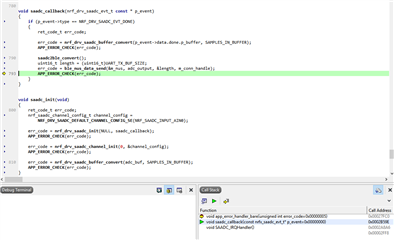
Could anyone help me to find a way to solve this problem?

  • Hello,

    Thiago said:
    I also changed the timer configuration to 5us, since transmitting data faster than the saadc can sample in pointless. 

    You might already know this, but I will mention it here just in case:
    The shortest possible connection interval is 7.5 ms. This is the fastest you may send notification, or any other BLE packet, in your connection.
    So, while you may queue a notification for sending whenever you would like - such as every 5 us - it will not be sent until the next connection event occurs, which in the worst timing case might be as long as 7.5 ms.

    Thiago said:
    Actually, I changed a bit the saadc example to fill a buffer with 64 samples. 

    With a 64 sample buffer and sampling time of 5 us total ( assuming non-scanning mode ) the DONE event will be generated once every 320 us. So, if you are using the shortest connection interval of 7.5 ms ( you will have to configure this ), you will receive 23 DONE events per connection interval.

    Thiago said:
    I want to sample signals with frequencies higher than 10kHz and faithfully reproduce the signal after BLE transmission. Power consumption is important, but the first requirement is the fidelity of the signal received in the central device.

    What do you mean when you say "higher than 10 kHz", exactly? As stated by the Shannon-Nyquist theorem, you will need to sample with a sampling frequency equal to or greater than 2 times the highest frequency you will be sampling, in order to avoid aliasing.

    Thiago said:
    At the moment, I only can transmit and receive signals with frequencies up to 1Hz.

    Please be more specific - are you talking about the SAADC Sampling or the BLE Transmissions through NUS?
    From your earlier comments I think you mean that you are only able to sample the SAADC 1 time per second - is this correct?
    If so, could you share your current SAADC configuration and sampling code, and tell me what you have done to change the sampling frequency?
    If you are talking about the NUS service, please elaborate.

    Looking forward to resolving these issues together!

    Best regards,
    Karl

  • Hello, Karl.

    What do you mean when you say "higher than 10 kHz", exactly?

    With that statement, I mean that I would like to sample signals with frequencies of, at least, 10kHz at the peripheral BLE device, and transmit these signals without loss of information to the central device.

    Please be more specific - are you talking about the SAADC Sampling or the BLE Transmissions through NUS?

    Here I mean that after sampling of the input analog signal by SAADC and transmission via BLE to the master, only signals of a maximum 1Hz frequency are faithfully reproduced in the master device.

    This is how I configure, sample, and transmit the data via SAADC and NUS:

    void saadc_init(void)
    {
        ret_code_t err_code;
        nrf_saadc_channel_config_t channel_config =
            NRF_DRV_SAADC_DEFAULT_CHANNEL_CONFIG_SE(NRF_SAADC_INPUT_AIN0);
    
        err_code = nrf_drv_saadc_init(NULL, saadc_callback);
        APP_ERROR_CHECK(err_code);
    
        CH0_CONFIG_R &= ~0x70000; 
    
        err_code = nrf_drv_saadc_channel_init(0, &channel_config);
        APP_ERROR_CHECK(err_code);
    
        err_code = nrf_drv_saadc_buffer_convert(adc_buf, SAMPLES_IN_BUFFER);
        APP_ERROR_CHECK(err_code);    
    }
    

    In line 10 of the code above is how I change acquisition time. CH0_CONFIG_R is defined as:

    #define CH0_CONFIG_R   (*((volatile unsigned long*) 0x40007518))

    Bellow, you can see the functions saadc_sampling_event_initsaadc_sampling_event_enable, and , timer_handler:

    void timer_handler(nrf_timer_event_t event_type, void * p_context)
    {
    
    }


    void saadc_sampling_event_init(void)
    {
        ret_code_t err_code;
    
        err_code = nrf_drv_ppi_init();
        APP_ERROR_CHECK(err_code);
    
        nrf_drv_timer_config_t timer_cfg = NRF_DRV_TIMER_DEFAULT_CONFIG;
        timer_cfg.bit_width = NRF_TIMER_BIT_WIDTH_32;
        err_code = nrf_drv_timer_init(&TIMER_LED, &timer_cfg, timer_handler);
        APP_ERROR_CHECK(err_code);
    
        /* setup m_timer for compare event every 400ms */
        uint32_t ticks = nrf_drv_timer_us_to_ticks(&TIMER_LED, 5);
        nrf_drv_timer_extended_compare(&TIMER_LED,
                                       NRF_TIMER_CC_CHANNEL0,
                                       ticks,
                                       NRF_TIMER_SHORT_COMPARE0_CLEAR_MASK,
                                       false);
        nrf_drv_timer_enable(&TIMER_LED);
    
        uint32_t timer_compare_event_addr = nrf_drv_timer_compare_event_address_get(&TIMER_LED,
                                                                                    NRF_TIMER_CC_CHANNEL0);
        uint32_t saadc_sample_task_addr   = nrf_drv_saadc_sample_task_get();
    
        /* setup ppi channel so that timer compare event is triggering sample task in SAADC */
        err_code = nrf_drv_ppi_channel_alloc(&m_ppi_channel);
        APP_ERROR_CHECK(err_code);
    
        err_code = nrf_drv_ppi_channel_assign(m_ppi_channel,
                                              timer_compare_event_addr,
                                              saadc_sample_task_addr);
        APP_ERROR_CHECK(err_code);
    }
    
    
    void saadc_sampling_event_enable(void)
    {
        ret_code_t err_code = nrf_drv_ppi_channel_enable(m_ppi_channel);
    
        APP_ERROR_CHECK(err_code);
    }

    And finally, the next function is the saadc_callback, which samples the data and transmits using the ble_nus_data_send function 

    void saadc_callback(nrf_drv_saadc_evt_t const * p_event)
    {
        if (p_event->type == NRF_DRV_SAADC_EVT_DONE)
        {
            ret_code_t err_code;
    
            err_code = nrf_drv_saadc_buffer_convert(p_event->data.done.p_buffer, SAMPLES_IN_BUFFER);
            APP_ERROR_CHECK(err_code);
            SEGGER_RTT_WriteString(0, "saadc_callback function\n");
    
            saadc2ble_convert();   
            uint16_t length = (uint16_t)UART_TX_BUF_SIZE;            
            SEGGER_RTT_WriteString(0, "Trying to send data.\n");  
            
            notification_err_code = ble_nus_data_send(&m_nus, adc_output, &length, m_conn_handle);   
            sprintf(error_string, "Error number: %#x\n", notification_err_code);
            SEGGER_RTT_WriteString(0, error_string);  
            if ((notification_err_code != NRF_ERROR_INVALID_STATE) &&
                        (notification_err_code != NRF_ERROR_RESOURCES) &&
                        (notification_err_code != NRF_ERROR_NOT_FOUND))
            {
                APP_ERROR_CHECK(notification_err_code);                    
            }
        }
    }

    The main is structured like this:

    /**@brief Application main function.
     */
    int main(void)
    {
        bool erase_bonds;   
    
        // Initialize.
        uart_init();
        log_init();
        timers_init();    
        buttons_leds_init(&erase_bonds);
        power_management_init();
        ble_stack_init();
        gap_params_init();
        gatt_init();
        services_init();
    
        saadc_init();
        saadc_sampling_event_init();
        
    
        advertising_init();
        conn_params_init();
    
        // Start execution.
        printf("\r\nUART started.\r\n");
        NRF_LOG_INFO("Debug logging for UART over RTT started.");
        SEGGER_RTT_WriteString(0, "Debug logging for UART over RTT started.\n");
    
    
        advertising_start();
    
        saadc_sampling_event_enable();


        // Enter main loop.
        for (;;)
        {
           
        }
    }
    

  • Hello,

    Thiago said:
    With that statement, I mean that I would like to sample signals with frequencies of, at least, 10kHz at the peripheral BLE device, and transmit these signals without loss of information to the central device.

    Sorry, I should have been more explicit here; what is the highest frequency of the signal that you will be sampling?
    Please be specific - The only way to ensure that you are in fact sampling without loss is to know the signal you will be sampling, so that you can ensure that you are sampling with the required frequency.

    Thiago said:
    Here I mean that after sampling of the input analog signal by SAADC and transmission via BLE to the master, only signals of a maximum 1Hz frequency are faithfully reproduced in the master device.

    Ok, so by this you are saying that if you sample with a maximum of 1 Hz the signal is transferred without loss to the master device, is this correct?
    Tell me then, what happens when you increase the sampling frequency? Is the central then receiving an incorrectly sampled signal from the peripheral?

    Thiago said:
    Bellow, you can see the functions saadc_sampling_event_initsaadc_sampling_event_enable, and , timer_handler:

    Why is your sampling timer named TIMER_LED

    Thiago said:
    The main is structured like this:

    I would recommend using the idle_state_handler() function from the example in your for (;;) loop, to drastically reduce power consumption.

    Best regards,
    Karl

  • Hello, Karl.

    Sorry I didn't get this before. I wrote "at least 10kHz" because I was not sure about the maximum frequency of the signal. But let's say that the maximum frequency will be 10kHz.

    Ok, so by this you are saying that if you sample with a maximum of 1 Hz the signal is transferred without loss to the master device, is this correct?
    Tell me then, what happens when you increase the sampling frequency? Is the central then receiving an incorrectly sampled signal from the peripheral?

    I mean, I input to the SAADC a 1Hz sinusoidal wave and I got the same wave on the central device. If I increase the frequency of the input wave, I get a signal that is no more a sine wave. It is still an oscillation but doesn't look like a sine anymore.

    Why is your sampling timer named TIMER_LED

    I didn't change the variable names from the examples yet. Hehehehe.

    I would recommend using the idle_state_handler() function from the example in your for (;;) loop, to drastically reduce power consumption.

    Thank you. I already started following this recommendation.

  • Hello, Karl

    You might already know this, but I will mention it here just in case:
    The shortest possible connection interval is 7.5 ms. This is the fastest you may send notification, or any other BLE packet, in your connection.
    So, while you may queue a notification for sending whenever you would like - such as every 5 us - it will not be sent until the next connection event occurs, which in the worst timing case might be as long as 7.5 ms.

    I reduced the minimum connection time to 8ms and increased the timer frequency to 10ms. Now the output from ble_nus_data_send is always 0x00, which means success, right? I will now test with a signal generator at the input of the SAADC.

Related