This post is older than 2 years and might not be relevant anymore
More Info: Consider searching for newer posts
This discussion has been locked.
You can no longer post new replies to this discussion. If you have a question you can start a new discussion

Sending SAADC data via ble_nus_data_send

Hello,

I am trying to send data obtained from a SAADC port via BLE using the ble_nus_data_send function. This must happen periodically at frequencies within the Gigahertz range, ideally.

I started with the ble_app_uart example, from SDK16. Then, I initialized a timer using PPI to trigger an SAADC sampling event, such as in the saadc example.

Inside the saadc_callback function, I process the data and call the ble_nus_data_send function, as seen bellow:

void saadc_callback(nrf_drv_saadc_evt_t const * p_event)
{
    if (p_event->type == NRF_DRV_SAADC_EVT_DONE)
    {
        ret_code_t err_code;

        err_code = nrf_drv_saadc_buffer_convert(p_event->data.done.p_buffer, SAMPLES_IN_BUFFER);
        APP_ERROR_CHECK(err_code);

        saadc2ble_convert();   
        uint16_t length = (uint16_t)UART_TX_BUF_SIZE;
        err_code = ble_nus_data_send(&m_nus, adc_output, &length, m_conn_handle);                  
        APP_ERROR_CHECK(err_code);         
    }
}

the saadc2ble_convert function simply converts the data from uint16_t to uint8_t and the length of the data transmitted via ble_nus_data_send function has not been modified from the initial example:

#define UART_TX_BUF_SIZE                256                                         /**< UART TX buffer size. */
#define SAMPLES_IN_BUFFER  UART_TX_BUF_SIZE/2
static nrf_saadc_value_t adc_buf[SAMPLES_IN_BUFFER];                   //!< Buffer used for storing ADC value.
static uint8_t          adc_output[UART_TX_BUF_SIZE]; //!< Current battery level.


void saadc2ble_convert(){

   int i;

   for(i=0; i<SAMPLES_IN_BUFFER; i++){
       adc_output[i*2] = adc_buf[i] & 0xff;
       adc_output[i*2 + 1] = (adc_buf[i] >> 8) & 0xff;
   }

}

I initialize all in the main function as seen in the next code block:

int main(void)
{
    bool erase_bonds;
    ret_code_t err_code;

    // Initialize.
    uart_init();
    log_init();
    timers_init();    
    buttons_leds_init(&erase_bonds);
    power_management_init();
    ble_stack_init();
    gap_params_init();
    gatt_init();
    services_init();

    saadc_init();
    saadc_sampling_event_init();
    

    advertising_init();
    conn_params_init();

    // Start execution.
    printf("\r\nUART started.\r\n");
    NRF_LOG_INFO("Debug logging for UART over RTT started.");


    advertising_start();

    saadc_sampling_event_enable();


    // Enter main loop.
    for (;;)
    {
        idle_state_handle();
    }
}

Debugging, I see that the SAADC is reading data well, however, I couldn't get any data at the smartphone.

I am getting the error shown on the image:
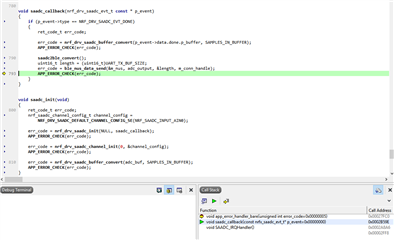
Could anyone help me to find a way to solve this problem?

  • But now, once again, I am getting the NRF_ERROR_NO_MEM after a while.

    <error> app: ERROR 4 [NRF_ERROR_NO_MEM] at C:\Users\MBIS\Documents\Thiago\Projects\BCC Project\BLE Projects\nRF5_SDK_16.0.0_98a08e2\examples\ble_peripheral\ble_app_uart - Copy (2)\main.c:596
    PC at: 0x00031661
    <error> app: End of error report

  • Hello again,

    Thiago said:
    Sorry I didn't get this before. I wrote "at least 10kHz" because I was not sure about the maximum frequency of the signal. But let's say that the maximum frequency will be 10kHz.

    No problem at all, thank you for being specific about the frequency.

    Thiago said:
    I mean, I input to the SAADC a 1Hz sinusoidal wave and I got the same wave on the central device. If I increase the frequency of the input wave, I get a signal that is no more a sine wave. It is still an oscillation but doesn't look like a sine anymore.

    What is the frequency of the sine wave you are sampling? I suspect that this might be the result of aliasing. When you increased the frequency, how high did you increase it, compared to the frequency of the sine wave?

    Thiago said:
    I didn't change the variable names from the examples yet. Hehehehe.

    I understand, thank you for clarifying this. I highly recommend changing variable and function names immediately, upon altering their function. Having updated and apt names drastically increases readability, and shortens the time it takes to debug an application.
    I also see that you have left some comments from the example, which may not be relevant anymore - I would recommend removing any derelict comments immediately, to avoid any confusion.

    Thiago said:
    Thank you. I already started following this recommendation.

    Great, I am happy to hear that! You should see a drastic reduction in your power consumption.

    Thiago said:
    I reduced the minimum connection time to 8ms and increased the timer frequency to 10ms. Now the output from ble_nus_data_send is always 0x00, which means success, right? I will now test with a signal generator at the input of the SAADC.

    You may not set it to 8 ms, as it is given as a multiple of the 1.25 ms unit. I.e, you may set it to either 7.5 ms or 8.75 ms or 10 ms, but not 8 ms.
    0x00 is NRF_SUCCESS, correct.

    Thiago said:
    But now, once again, I am getting the NRF_ERROR_NO_MEM after a while.

    When you have debug defined, and receive an explicit error message like NRF_ERROR_NO_MEM returned from a function, it is easy to check in the documentation to see what the cause ( and solution ) to the error then might be.
    In this case, you will need to see which function is causing this, on line 596 of main.c - as is written in the error message.

    A small side-note on my part: I see that your project path includes spaces ( blank characters ) - this is not advisable, since it may not be compatible with all OS versions and / or programs you might be working with in the future. I highly recommend removing all spaces from your path.

    Best regards,
    Karl

  • Hello, Karl.

    Thank you for your suggestions. 

    I fixed the NRF_ERROR_NO_MEM and modified a few parameters as described in this link. I was able to get an increase in the bandwidth and now I get transfer rates of ~51kBps.

    There are a few strange things happening with the SAADC though:

    1. Signals are only well reproduced if the input voltage is higher than 0.25V and lower than 1V. I expected that any voltage from 0 to 3.3V would be ok, but the signal is distorted if not in the 0.25V to 1V range. I can live with it, but I would like to know why this is happening.
    2. Now I can successfully transmit signals with frequencies up to approximately 20kHz, but signals with frequencies in the hundreds of Hertz are appearing distorted. This is not good since this frequency range contains important information for my application. Would you happen to know what could be causing this?
  • Hello, Karl.

    From the link of the ATT_MTU Throughput Example, there are two values that I couldn't find. They are the Data Length, which is defined as 27 bytes in the example, and the Connect Event Extension. Could you let me know in what file I can find them to modify their value according to the ATT MTU Throughput Example?

  • Hello Thiago,

    Thiago said:
    Thank you for your suggestions. 

    It is no problem at all, I am happy to help!

    Thiago said:
    I fixed the NRF_ERROR_NO_MEM and modified a few parameters as described in this link. I was able to get an increase in the bandwidth and now I get transfer rates of ~51kBps.

    I am glad to hear that you were able to resolve your NO_MEM issue, and increase your throughput.

    Thiago said:
    Signals are only well reproduced if the input voltage is higher than 0.25V and lower than 1V. I expected that any voltage from 0 to 3.3V would be ok, but the signal is distorted if not in the 0.25V to 1V range. I can live with it, but I would like to know why this is happening.

    This definitely sounds strange, since the SAADC's input range is determined as specified in the documentation, which in your case should yield and input range of 0.6 V / (1/6) = 3.6V -> range: 0 - 3.6 V. When you say that the signal is distorted outside this range, what do you then mean? That the signal is not properly captured, or that the SAADC only captures values in the 0.25 - 1.0 V range? The more specific you are, the easier it will be to determine the cause of this behavior.
    Could you also tell me how you are generating this signal? Are you also monitoring it with an oscilloscope, to rule out the possibility that the signal source could be sending unexpected values? 

    Thiago said:
    Now I can successfully transmit signals with frequencies up to approximately 20kHz, but signals with frequencies in the hundreds of Hertz are appearing distorted. This is not good since this frequency range contains important information for my application. Would you happen to know what could be causing this?

    Could you confirm for me that you read my previous comment regarding Aliasing, and that you are fulfilling the Shannon-Nyquist sampling requirement? This is an elementary requirement we will have to know is fulfilled, before we can proceed with the debugging.
    Could you also confirm for me that you did in fact mean Hundreds of Hertz, and not Hundreds of Kilo Hertz?
    From your wording and previous comment, I suspect you might have been meant Hundreds of Kilo Hertz.

    Thiago said:
    This is not good since this frequency range contains important information for my application.

    It would be beneficial if you could tell me exactly which frequency range you intend to sample.

    Thiago said:
    Would you happen to know what could be causing this?

    There are many possible reasons for the sampled signal appearing distorted, but we will have to rule out the common pitfalls before we may delve deeper into this.
    Please answer my questions above, so we may proceed with the debugging.

    Looking forward to resolve this issue together!

    Thiago said:
    From the link of the ATT_MTU Throughput Example, there are two values that I couldn't find. They are the Data Length, which is defined as 27 bytes in the example, and the Connect Event Extension. Could you let me know in what file I can find them to modify their value according to the ATT MTU Throughput Example?

    Please take a look at the m_test_params structure used in the ATT_MTU throughput example.

    You might also want to take a look at this page, regarding possible throughput - this is specifically for the S132 SoftDevice, but a similar document is available for other the other SoftDevices also, please make sure you check the for the SoftDevice you are using.

    Best regards,
    Karl

Related